




Fifth lesson in the Year 6 website design series. Students evaluate and improve their websites using a clear rubric covering safety, layout, and more.
This is the fifth lesson in a complete six-part series for Year 6 Computing, focusing on the evaluation and improvement of websites. The lesson provides an activity where students will explore and evaluate a partner’s website. This resource includes a detailed evaluation criteria grid for students to use.
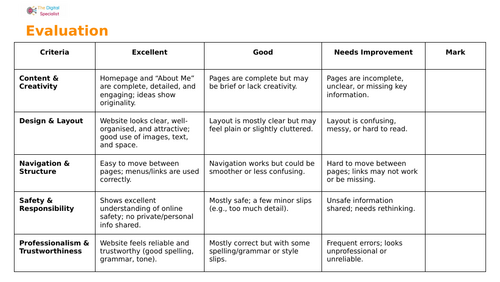
The lesson starts with a recap of key web design terms like responsive, accessibility, and navigation. It then guides students on how to give constructive feedback to their peers, focusing on what they like and suggesting improvements. The core of the lesson involves students using a clear rubric to evaluate their partner’s website based on:
- Content & Creativity: Is the website complete and engaging?
- Design & Layout: Does the website look clear and well-organised?
- Navigation & Structure: Is it easy to move between pages?
- Safety & Responsibility: Is the information shared safe and responsible?
- Professionalism & Trustworthiness: Are there spelling and grammar errors?
After the evaluation, students will use the feedback to make improvements to their own websites. The lesson concludes with a reflection on what they learned about web design and what they would change about their own site.
What’s included
- Full editable Google Slides/ PowerPoint lesson (step-by-step activities)
- Evaluation rubric for websites
- Plenary activities for reflection on learning
Something went wrong, please try again later.
This resource hasn't been reviewed yet
To ensure quality for our reviews, only customers who have purchased this resource can review it
Report this resourceto let us know if it violates our terms and conditions.
Our customer service team will review your report and will be in touch.
£1.00