


Engaging lesson for Year 6 computing. Students explore website features, design their own site on Google Sites, and create an ‘About Me’ page.
This resource is a complete lesson on website design for Year 6 computing, focusing on creative and practical skills. This is the second lesson in a series of six for making a website. The lesson teaches students about key features of a website, such as site logos, menus, and page headers. Students will learn to identify these features by exploring existing websites. The main activity involves students starting to design their own website using Google Sites.
The presentation guides students through the design process, including:
- Considering what content to include on their website.
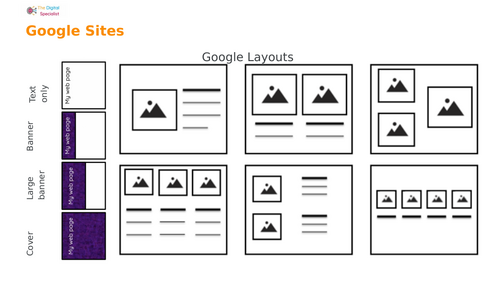
- Sketching their website layout using a key of design symbols for pictures, text, and buttons.
- Creating a page header, choosing a menu location, and adding content blocks.
This resource is designed to be highly interactive and engaging, with prompts for class discussion and individual design work. It includes “challenges” to extend students. The lesson concludes with a reflection activity, where students can share what they learned about web design and Google Sites.
What’s included
- Full editable Google Slides/ PowerPoint lesson (step-by-step activities)
- Resource sheets showing how add content, add subpages, change menu types, and add logos on Google Sites
- Plenary activities for reflection on web design
This versatile resource serves perfectly as an introduction to a web design unit or as a standalone creative computing lesson.
Something went wrong, please try again later.
This resource hasn't been reviewed yet
To ensure quality for our reviews, only customers who have purchased this resource can review it
Report this resourceto let us know if it violates our terms and conditions.
Our customer service team will review your report and will be in touch.
£1.00