 Quick View
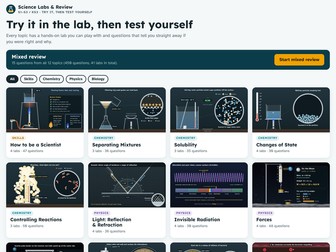
12-Topic Science Labs & Review: 41 Interactive Labs + 450 Self-Marking Questions (S1–S3 / KS3)
Let pupils try it in the lab, then test themselves.
TRY BEFORE YOU BUY: download the free sample (the complete Light topic: 4 labs and 36 questions) from my shop.
This is a single web page that opens in any up-to-date browser (Chrome, Edge, Firefox, Safari, Chromebooks). No installs, no accounts, no internet needed, and no pupil data collected. It works brilliantly on a classroom board or on pupils’ own devices.
WHAT’S INSIDE
• 12 topics (this is not a full KS3 course): How to be a Scientist, Separating Mixtures, Solubility, Changes of State, Controlling Reactions, Light, Invisible Radiation, Forces, Gravity, Cells, Microbes and Body Defence
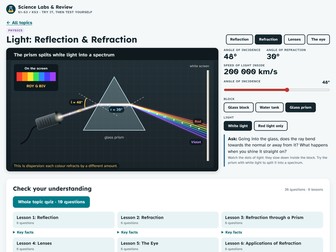
• 41 interactive labs, including a Bunsen burner licence, distillation, chromatography “who wrote the note?”, rates of reaction with a gas syringe, a thermal camera, X-rays, refraction through a prism, a working microscope, phagocytes engulfing bacteria and vaccine tag
• Zoom lenses show what the particles and cells are doing next to the apparatus
• Live tables and graphs that fill in as pupils investigate, with repeats and averages
• 450 self-marking questions across 78 short lessons: multiple choice, true/false and type-the-word
• Every wrong answer explains why it is wrong, not just what the right answer is
• Results screen with a lesson-by-lesson breakdown, key facts to revisit and “retry the ones I got wrong”
• 10-question topic quizzes and a 15-question mixed review across all topics
• Teacher guide (PDF) with contents, lesson ideas and set-up help
GREAT FOR
Starters and plenaries · Rehearsing a practical before you do it · Covering practicals you can’t run (X-rays, UV, distillation) · Homework and revision · Cover lessons
ACCESSIBILITY
High-readability font (Atkinson Hyperlegible), large text that scales on boards, light and dark mode, keyboard controls and reduced motion support.
HOW TO USE
Download, unzip and double-click “Science Labs and Review.html”.
Works best on laptops, Chromebooks and classroom boards. To share with pupils, put the file in your class area for them to download and open. It is a file, not a web link, so Google Drive and Teams will not run it as a preview. Scores are saved on each device; there is no teacher dashboard.