 Quick View
Drag & Rope: Make Your Own Rope Drag & Drop Activities (SCORM & HTML)
Live Link: https://ulasseker78-star.github.io/rope/
Youtube: https://youtube.com/shorts/8qvg9eeNv70
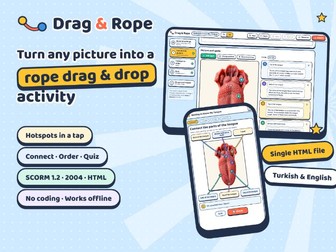
Turn any picture into an interactive drag & drop activity, without any coding.
Drag & Rope is a simple tool that runs in your browser from a single file. Pupils drag colourful ropes from cards to the right spots on a picture, put steps in order and answer a short quiz. When they press “Check”, correct answers get a green tick and wrong ones swing back, so they can try again.
What you can make:
Labelling activities on any image (body parts, maps, diagrams, plants, machines…)
Sequencing activities with 2–8 steps
True/false and multiple-choice quizzes with a question pool
Why teachers like it:
Quick to build: upload a picture, tap to add hotspots, type the labels
Use one, two or all three parts in the same activity
Hints after repeated mistakes, stars and sound effects keep pupils engaged
Works on computers, tablets, phones and interactive whiteboards (full-screen mode)
English and Turkish interface, 5 colour themes
Export to SCORM 1.2 / 2004 for your LMS, or a single HTML file to use without an LMS
No installation, no account, works offline
Included:
Drag & Rope editor (one HTML file)
Sample activity: “Getting to Know My Tongue” (science, ages 8–9), in English and Turkish
User guide
Recommended browser: Chrome or Edge.
[License terms]