DT Practical Guide - Bird House and FeederQuick View
nestor_benavides94

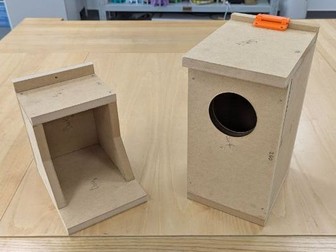
DT Practical Guide - Bird House and Feeder

(0)
This resource includes everything you need to create an engaging practical activity for your Design & Technology lessons. You can use 1,2cm - 2cm wood thick for both projects. REQUIREMENTS FOR STUDENTS: A copy of the plan. 1,2cm-thick wooden boards (measurements in the file). Ruler, try square, pencil, rubber, wood glue. Hand saw. Hammer and nails (2,5cm length) INSTRUCTIONS: Print a copy of the file for each student. Follow the plan to mark the measurements on the wood. Cut the parts. Assemble as indicated in the plan. Finish the product. FINAL NOTES: Students take 4-5 hours to finish the feeder. Students take 5-6 hours to finish the house.
DT Practical Guide - Small box with finger joints [Planter]Quick View
nestor_benavides94

DT Practical Guide - Small box with finger joints [Planter]

(0)
This resource includes everything you need to create an engaging practical activity for your Design & Technology lessons. You can use Inkscape to scan the PDF File and laser cut your own model. REQUIREMENTS FOR STUDENTS: A copy of the plan. 6mm-thick wooden boards (measurements in the file) Scissors, masking tape, glue stick. **** Students can complete this practice using hand tools only OR machinery**** HAND TOOLS: Coping saw, hand saw MACHINERY: Scroll saw. INSTRUCTIONS: Print a copy of the file for each student. +When printing, ensure to print on “Actual size” for the parts to fit properly. Make the students fully cover one face of the wood with masking tape. Stick the parts on the wood as indicated in the file. Cut all the parts. Remove the paper and the masking tape. Assemble and finish. FINAL NOTES: Students take 2-3 hours to finish this practice. The plan was designed for students to use the minimum number of cuts.
DT Practical Guide - Big box with finger joints [Planter]Quick View
nestor_benavides94

DT Practical Guide - Big box with finger joints [Planter]

(0)
This resource includes everything you need to create an engaging practical activity for your Design & Technology lessons. You can use Inkscape to scan the PDF File and laser cut your own model. REQUIREMENTS FOR STUDENTS: A copy of the plan. 9mm-thick wooden boards (measurements in the file) Scissors, masking tape, glue stick. **** Students can complete this practice using hand tools only OR machinery**** HAND TOOLS: Coping saw, hand saw MACHINERY: Scroll saw. INSTRUCTIONS: Print a copy of the file for each student. +When printing, ensure to print on “Actual size” for the parts to fit properly. Make the students fully cover one face of the wood with masking tape. Stick the parts on the wood as indicated in the file. Cut all the parts. Remove the paper and the masking tape. Assemble and finish. FINAL NOTES: Students take 4-5 hours to finish this practice. The plan was designed for students to use the minimum number of cuts.
DT Practical Guide - Cat phone standQuick View
nestor_benavides94

DT Practical Guide - Cat phone stand

(0)
This resource includes everything you need to create an engaging practical activity for your Design & Technology lessons. You can use Inkscape to scan the PDF File and laser cut your own model. REQUIREMENTS FOR STUDENTS: A copy of the plan. 3mm-thick wooden board (measurements in the file) Scissors, masking tape, glue stick. **** Students can complete this practice using hand tools only OR machinery**** HAND TOOLS: Hand drill, coping saw, hand saw MACHINERY: Pillar drill, scroll saw. INSTRUCTIONS: Print a copy of the file for each student. +When printing, ensure to print on “Actual size” for the parts to fit properly. Make the students fully cover one face of the wood with masking tape. Stick the parts on the wood as indicated on the file. Cut all the parts. Remove the paper and the masking tape. Assemble and finish. FINAL NOTES: Usually, students take 2-3 Hours to finish this practice. Red circles on the document indicate drilling holes. Internal parts in the design are small, encourage students to treat the material carefully to not break the design (particularly the eyes and ears)
DT Practical Guide - Box with dividers [Planter]Quick View
nestor_benavides94

DT Practical Guide - Box with dividers [Planter]

(0)
This resource includes everything you need to create an engaging practical activity for your Design & Technology lessons. You can use Inkscape to scan the PDF File and laser cut your own model. REQUIREMENTS FOR STUDENTS: A copy of the plan. 9mm-thick wooden boards (measurements in the file) Scissors, masking tape, glue stick. **** Students can complete this practice using hand tools only OR machinery**** HAND TOOLS: Coping saw, hand saw MACHINERY: Scroll saw. INSTRUCTIONS: Print a copy of the file for each student. +When printing, ensure to print on “Actual size” for the parts to fit properly. Make the students fully cover one face of the wood with masking tape. Stick the parts on the wood as indicated on the file. Cut all the parts. Remove the paper and the masking tape. Assemble and finish. FINAL NOTES: Usually, students take 4-5 Hours to finish this practice.
DT Practical Guide - Wooden BookendQuick View
nestor_benavides94

DT Practical Guide - Wooden Bookend

(0)
This resource includes everything you need to create an engaging practical activity for your Design & Technology lessons. You can use Inkscape to scan the PDF File and laser cut your own model. REQUIREMENTS FOR STUDENTS: A copy of the plan. 9mm-thick wooden board (measurements in the file) Scissors, masking tape, glue stick. **** Students can complete this practice using hand tools only OR machinery**** HAND TOOLS: Hand drill, coping saw, hand saw MACHINERY: Pillar drill, scroll saw. INSTRUCTIONS: Print a copy of the file for each student. When printing, ensure to print on “Actual size” for the parts to fit properly. Make the students fully cover one face of the wood with masking tape. Stick the parts on the wood as indicated on the file. Cut all the parts. Remove the paper and the masking tape. Assemble and finish. FINAL NOTES: Usually, students take 2-3 Hours to finish this practice. Red circles on the document indicate drilling holes.
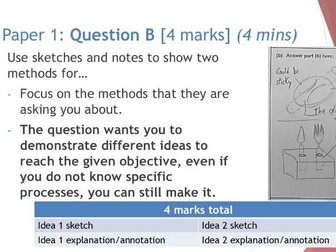
Cambridge IGCSE D&T Paper 1 Cheat SheetQuick View
nestor_benavides94

Cambridge IGCSE D&T Paper 1 Cheat Sheet

(0)
This Presentation explains how to complete the Cambridge Design & Technology IGCSE Paper 1 Examination to have successful results. The resource contains suggested timings, mark schemes, examples, dos and don’ts, and tips to answer each question in the best possible way. Teachers can use the presentation to train students on the expected answers for this paper and give them clear instructions on how to complete the examination, ensuring that they adhere to the timings and requirements of the exam board. Students can use the resource to train themselves with past papers (link in the PowerPoint document) and get used to the requirements of each question in the examination until they automate the timings and expected outcomes of each task.
D&T Materials and processesQuick View
nestor_benavides94

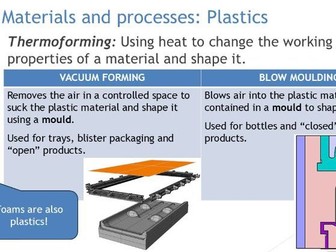
D&T Materials and processes

(0)
This presentation contains a summary of the materials and processes that students need to recognize for IGCSE and A Levels in Design & Technology. The resource is particularly useful in international contexts due to the number students that have little to no background in D&T. Nevertheless, it is a great revision material for every D&T student aiming to pass standardized examinations. The presentation contains technical vocabulary, images, animations of processes and suggested tools and machinery to work with different materials.