Word App Skills Workbook & Lesson PackQuick View
laurabbarton

Word App Skills Workbook & Lesson Pack

(0)
About this Resource This comprehensive training package has been designed for Further Education learners and apprentices working from entry level to intermediate level. It provides a complete set of materials to support classroom delivery, blended learning or self‑paced digital skills development using the Word App. Developed around real‑world tasks such as preparing CVs, formatting business documents, creating tables, arranging images and completing mail merge activities, this resource offers clear, structured guidance suitable for learners who need a confidence‑building approach. What’s Included Word App Skills Workbook (fully editable) A clean, professionally formatted workbook covering: First steps with documents Enhancing text and layout Paragraph spacing, page setup and document structure Working with images and graphical objects Creating and formatting tables Prepare for printing Mail merge Word App shortcut keys What You Will Learn page Student‑friendly PowerPoint presentation A modern slide deck summarising layout, images, tables, page setup and mail merge in clear, accessible steps. Shortcut Keys reference sheet A printable page covering formatting, editing, navigation and document shortcuts. All files fully editable! Everything can be adapted to suit your course, awarding body or students’ needs. How to Use This Resource This pack works well for: Classroom teaching Workshops and revision sessions Individual learning plans Portfolio building for employability Apprenticeship digital skills sessions ESOL and adult community learning with digital elements The workbook tasks guide learners through practical, hands‑on activities that build confidence and independence. The accompanying slides help structure lessons and reinforce key skills. Who This Resource Is For FE colleges Adult community learning Apprenticeships Functional Skills Digital Skills / Essential Digital Skills Employability programmes Foundation level learners needing supportive explanations Primary Keyword List Word App Word Processing Digital Skills Further Education FE Adult Learning Apprenticeships Functional Skills ICT Essential Digital Skills EDSQ CV writing Business documents Formatting Page layout Paragraph spacing Images and text wrapping Tables Mail Merge Printing and output Step‑by‑step tasks Office Skills ICT Skills Beginner ICT Editable workbook
Excel App Skills Workbook Basic to Intermediate in 3 PartsQuick View
laurabbarton

Excel App Skills Workbook Basic to Intermediate in 3 Parts

(0)
About this resource This three‑part Excel App training package supports Further Education learners and apprentices working from entry level to intermediate level. It includes modernised, editable booklets with clear tasks, plus separate practice files and completed examples (you’ll upload these alongside the booklets). It’s ideal for classroom delivery, blended lessons, or self‑paced digital skills. What’s included Three modernised Excel App booklets (fully editable .docx): Part 1 — Data Entry, Formatting, Sorting, Filtering, Importing Delimited Data. Part 2 — Number Formatting, Relative Referencing, Basic Calculations, Sorting and Filters, Worksheet Design, Invoices. Part 3 — Functions and Charts (SUM, AVERAGE, COUNT, COUNTA, MAX, MIN, IF), Chart creation and formatting, Relative vs Absolute referencing, Non‑adjacent selection. Front‑matter in each booklet: What You Will Learn page Consistent Style 1 formatting: clear headings, spacing and a page‑numbered footer “Excel App Skills Workbook”. Editable practice files and completed examples: to be uploaded in a separate folder (your files are fully adaptable for different cohorts). How to use Teach directly from the booklets with live demo in Excel App. Set individual or paired tasks for independent practice. Use completed examples to model solutions and discuss approaches. Ideal for workshops, revision sessions, and employability programmes. ** Who this is for** FE colleges and adult community learning Apprenticeships and Functional Skills/EDS Foundation‑level learners who benefit from supportive, step‑by‑step activities Learning outcomes Learners will be able to: Enter, edit and format data in Excel App; apply sorting and filtering confidently. Choose appropriate number/date/percentage formatting and build basic calculations with correct referencing. Use functions (SUM, AVERAGE, COUNT, COUNTA, MAX, MIN, IF) and create clean charts, moving them to dedicated sheets and formatting titles What teachers receive Three consistent workbooks ready to adapt Tasks that build from entry-level skills to intermediate Space for reflection and extension activities Clear structure suitable for pacing and assessment **Keywords ** Excel App, Spreadsheets, Digital Skills, FE, Further Education, Apprenticeships, Functional Skills ICT, EDSQ, Data Entry, Sorting, Filtering, Number Formatting, Formulas, Functions, Charts, Invoices, Teaching Resources, Adult Learning.
GCSE Maths Gradient PresentationQuick View
laurabbarton

GCSE Maths Gradient Presentation

(0)
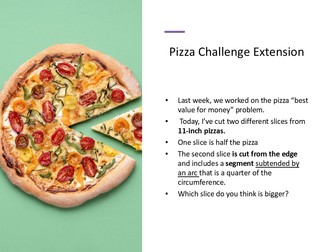
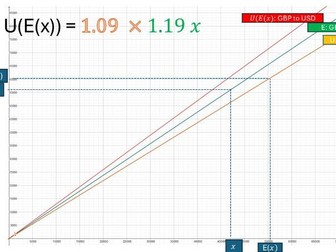
This GCSE Maths Gradient Presentation is a full lesson resource that introduces gradient through clear visuals, worked examples and step by step explanations. It supports learners in understanding steepness, calculating gradient from two points and interpreting gradients in real contexts such as distance–time graphs. The resource begins with an engaging investigation using A series paper to explore aspect ratios and ratio reasoning. This leads into warm up activities linking steepness to gradient before introducing the formal definition of gradient as change in y over change in x. Students then practise calculating gradients through structured examples, guided practice and problem solving tasks. Later slides revisit key angle facts, helping learners strengthen core geometry knowledge. This presentation works well for Foundation GCSE Maths classes and resit groups who need support developing confidence and accuracy with gradient. It is ideal for whole class teaching, modelling or revision sessions. Teachers will find the structure easy to follow, with opportunities for questioning, discussion and reflection.
GCSE Algebra Foundation Complete Lesson PackQuick View
laurabbarton

GCSE Algebra Foundation Complete Lesson Pack

(0)
A complete and structured GCSE Foundation Algebra resource pack, ideal for Foundation to Crossover level students. This extensive bundle includes 9 full PowerPoint presentations and a wide range of engaging, inclusive, and differentiated activities to support classroom teaching, revision, and independent learning. What’s included: PowerPoint Presentations (9 total): Introduction to Algebra Simplifying & Substitution Solving Linear Equations – Part 1 Solving Linear Equations – Part 2 Changing the Subject of a Formula Simultaneous Equations – Part 1 Simultaneous Equations – Part 2 Quadratic Expressions & Equations – Part 1 Quadratic Expressions & Equations – Part 2 Handouts & Themed Worksheets Algebra Challenge 1, 2 & 3 Blast from the Past W08 (Starter) Post Lesson W09 & W10 (Follow-up activities) This pack is perfect for building algebraic fluency, reasoning, and problem-solving skills. It also integrates cultural awareness and real-world connections, making maths more meaningful and inclusive.
Inclusive GCSE Maths Worksheets with EDI ThemesQuick View
laurabbarton

Inclusive GCSE Maths Worksheets with EDI Themes

(0)
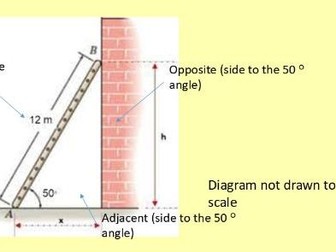
Make GCSE Foundation Maths more meaningful and inclusive with this collection of themed worksheets that link core mathematical skills to key Equality, Diversity and Inclusion (EDI) events throughout the calendar year. Designed for use across secondary year groups and adult learners working at Foundation level, this resource provides engaging, real-world contexts to support learning and promote wider awareness. Each worksheet focuses on a specific maths topic (such as fractions, algebra, rounding, percentages, standard form, bearings, and statistics) framed through significant cultural, historical, or social themes. Topics include: Sixteen Days of Activism Against Gender-Based Violence ( Interpreting data and raising awareness) Diwali & Aryabhata (Fractions and rounding in a historical and cultural context) Carers Rights Day (UK) (Algebra through the theme of care and rights) Katherine Johnson & NASA (Black History Month/ Exploring standard form through space) Lunar New Year Bearings (Bearings and scale drawing linked to a global celebration) UK Ramp Regulations & Trigonometry (Applying real-world gradients and slope rules) Women’s History Month (Data analysis, fractions and percentages with Florence Nightingale & Harriet Martineau) Garrett Morgan’s Traffic Lights (Black History Month/ LCM revision with a focus on invention and safety) Plus: contextual tasks on Christo’s art, Abraham Nemeth’s contributions to accessibility, and ancient Egyptian and Russian papyri algebra. Also included are some “Blast from the Past” mini-tests: quick, revision-style starters with an EDI focus, perfect for warm-ups, retrieval practice, or formative assessment. Ideal for: Culturally responsive teaching, inclusive lesson planning, enrichment activities, and cross-curricular learning. Supports key elements of the GCSE Foundation Maths curriculum while fostering discussion around diversity, equality, and global citizenship.
GCSE Indices & Standard Form PackQuick View
laurabbarton

GCSE Indices & Standard Form Pack

(0)
A comprehensive GCSE Maths resource pack covering Indices and Standard Form, ideal for Foundation to Crossover level students. This engaging and versatile bundle includes: Two full PowerPoint presentations: One on Indices and one on Standard Form, designed to build understanding step-by-step. Printable handouts for classroom distribution or homework. Starter activity: Blast from the Past W04 to activate prior knowledge. Real-world application worksheet: Katherine Johnson NASA & Standard Form – linking maths to history and science. Group challenge: Maths Indices Challenge (A3 format) to encourage collaboration and deeper thinking. Post-lesson review: Blast from the Past W05 to consolidate learning. Perfect for lesson delivery, revision sessions, or independent study. This resource supports differentiation and promotes mathematical reasoning, fluency, and problem-solving.
GCSE Rounding & Estimating PackQuick View
laurabbarton

GCSE Rounding & Estimating Pack

(0)
A two-part GCSE Maths lesson pack on Rounding and Estimating, ideal for Foundation to Crossover level students. This resource is designed to be delivered over two sessions (Part 1 and Part 2), with a mix of engaging presentations, real-world themed worksheets, and collaborative activities. Included in this pack: Two PowerPoint presentations: Part 1: Rounding Basics Part 2: Estimating & Crossover Skills Starter activities: Blast from the Past Part 1 Blast from the Past Part 2 (W07) Themed worksheets: Bonfire Night Number Revision Diwali Fractions & Rounding Group challenges: Maths Rounding Challenge A3 (Part 1) Maths Rounding Challenge A3 (Part 2) Post-lesson review: Blast from the Past W08 This resource supports fluency, reasoning, and problem-solving, while incorporating seasonal and cultural themes to boost engagement. Perfect for classroom delivery, revision, or homework.
GCSE Maths Foundation: Fractions – Complete Lesson PackageQuick View
laurabbarton

GCSE Maths Foundation: Fractions – Complete Lesson Package

(0)
A fully-prepared resource pack for teaching fractions at GCSE Foundation level, covering key skills including simplification and the four operations. This detailed package includes: PowerPoint Presentation – Fractions Introduction & Four Operations: A step-by-step guide to understanding fractions, including simplifying, adding, subtracting, multiplying, and dividing. Includes worked examples and class practice. Maths Fractions Challenge (Group Activity, A3): An interactive and engaging A3-sized task designed to encourage group problem-solving and consolidate fraction skills. Post-Lesson ‘Blast from the Past’ Mini Test: A short assessment to revisit key fraction concepts and support retention through retrieval practice. Diwali Fractions, Percentages & Rounding Worksheet: A themed worksheet that blends fractions with percentages and rounding – great for seasonal engagement while reinforcing number skills. Blast from the Past (Starter): A warm-up activity to review previous learning before diving into new content. Perfect for GCSE Foundation learners, this resource works well for lessons, revision, or intervention. All materials are editable to suit your students’ needs.
GCSE Maths Foundation Factors Multiples Primes HCF LCM PackageQuick View
laurabbarton

GCSE Maths Foundation Factors Multiples Primes HCF LCM Package

(0)
A ready-to-teach resource for GCSE Foundation Maths covering key number topics: factors, multiples, prime numbers, HCF and LCM. This comprehensive download includes: PowerPoint Presentation: A clear, step-by-step teaching slideshow covering all key concepts with examples and class questions. LCM Traffic Light Task: A differentiated activity to help students practise LCM skills. Maths Number Challenge (Group Activity, A3): An engaging, collaborative group task to reinforce learning through problem-solving and discussion. Designed for printing on A3. Post-Lesson ‘Blast from the Past’ Mini Test: A short, low-stakes retrieval quiz to check understanding and consolidate key points after the lesson. Ideal for Foundation-tier GCSE students or as a revision tool. Suitable for whole-class teaching, small groups, or intervention sessions. All files are editable for easy customisation.
GCSE Compound Measures Revision - Presentation and ActivitiesQuick View
laurabbarton

GCSE Compound Measures Revision - Presentation and Activities

(0)
This resource provides a structured and engaging revision presentation on compound measures and the use of formulae, ideal for crossover-tier GCSE Maths students. Activities include problem-solving questions on: Speed: calculating average speed and total distance Area & Volume: cylinder volumes, composite shapes including semicircles Density: calculating mass from volume and density Pressure: solving problems involving force and surface area Real-life applications: snowshoes, cans, and materials Critical thinking: comparing substances, effects of changing surface area on pressure Includes a warm-up starter, detailed questions with scaffolding, full worked solutions, and a link to a supporting video on pressure (Clean Heels - Dragons’ Den: Series 12 Episode 7 - BBC2). Supports students aiming for grades 4–6, consolidating key skills and reasoning with real-life contexts.
Excel Spreadsheets Training - Intermediate to Advanced - Full LessonQuick View
laurabbarton

Excel Spreadsheets Training - Intermediate to Advanced - Full Lesson

(0)
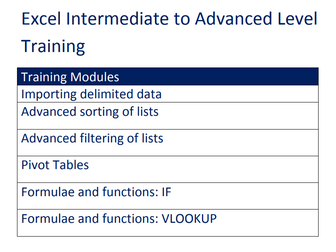
Resource bundle include PowerPoint Presentation, lesson plan and Task Booklet (10 tasks, 15 pp) Importing delimited data Advanced sorting of lists Advanced filtering of lists Pivot tables Formulae and functions: IF and VLOOKUP The PowerPoint presentation will serve as a visual aid during the training, explaining concepts and demonstrating examples. The lesson plan will provide a detailed outline for the trainer, including suggested timings and activities. The task booklet will contain a series of 10 practical tasks with step-by-step instructions and sample data for participants to practice and apply the learned skills. Examples of scenarios covered: Importing records of employees saved as delimited text and sort this list in hierarchical order (Director, Manager, Supervisor…) Using advanced filtering to find invoices; invoice numbers less than 170 and amounts of more than £1,000 excluding Creating and updating a pivot table for a list of people surveyed so that the data items in the pivot table are a count of the people surveyed, organised by town and subdivided into gender Using a Lookup function to search a product code in a table of products and return the description of the product or its unit price, without copying and pasting it. Using the IF function to calculate travel expenses refunds when mileage is differentiated into two different tiers. e.g. Each employee is reimbursed £0.35 per mile for the first 500 miles travelled (Tier 1) and £0.25 thereafter (Tier 2).