

 Quick View
French Conditional Tense Interactive Task
An interactive, self-marking KS4 French classroom task for teaching and practising the conditional tense. This is a single, self-contained HTML file designed for use on laptops and Chromebooks. It contains 50 marks across five activities and takes approximately 35 minutes.
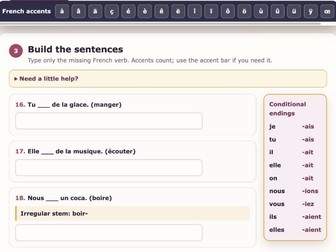
Students first learn how the conditional is formed, including the full pronoun paradigm, regular formation, -re verbs, spelling changes and useful irregular stems. They then move through meaning recognition, grammar checks, typed sentence-building, a substantial reading text with comprehension questions, and final sentence discrimination.
Teaching and support features
Clear teaching section before students begin.
All six subject forms used throughout, rather than practice limited to je.
Visible irregular-stem prompts where students may not have learned every stem.
Sticky conditional-endings reference during the sentence-building activity.
Permanent French accent keyboard for typed answers.
Activity-by-activity marking with immediate feedback.
First-attempt marks remain fixed while students make and check corrections.
A final result card with mark, rounded percentage, completion time, correction status and completion code.
Progress is saved locally in that browser; no student name, answer or result is transmitted to EllivEd.
Reading activity
The continuous French passage remains visible while students work through the comprehension questions. Wheel and trackpad gestures over the passage continue to scroll the questions rather than trapping the page. “Show me where to look” highlights the relevant sentence without moving the student’s question out of position.
Display and accessibility aids
The compact Display options menu includes:
light and dark modes;
a choice of reading-overlay colours;
OpenDyslexic;
Focus mode.
The task also supports keyboard navigation, clear focus states, responsive layouts and narrow Chromebook screens. These are practical display and access aids rather than a claim of formal accessibility certification.
OpenDyslexic is included under the SIL Open Font License 1.1. The downloadable HTML contains the full copyright notice and licence text.
How to use the file
No installation is required. Download the HTML file and open it directly in a modern browser such as Chrome or Edge, or place it in school-approved web space.
It can also be:
embedded in Google Sites using its HTML/embed-code option;
hosted on a school website or web server;
uploaded to a VLE or learning platform that permits self-contained HTML and JavaScript files;
hosted in approved web space and then linked or embedded from Microsoft Teams, SharePoint, Moodle, Canvas, Firefly or another VLE.
Direct HTML and JavaScript support varies between school platforms. Where a VLE removes scripts, hosting the file in school-approved web space and linking or embedding the hosted page is the most reliable option.
Created by EllivEd.