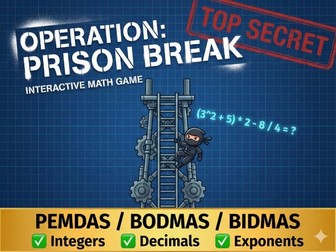
***Turn your math lesson into a high-stakes escape mission! ***
Are you tired of students guessing the final answer without showing their work? Operation: Prison Break is a game-changer. It is an interactive HTML5 arcade game that forces students to visualize and solve equations step-by-step, exactly how they should in their notebooks.
To escape the “Number Fortress,” students must climb the tower by breaking down complex equations one line at a time.
This is a self-contained HTML5 file. It runs instantly in any web browser on Interactive Whiteboards, Laptops, iPads, and Chromebooks. No internet connection is required after download.
**BONUS: **
The “Mission Log” Worksheet (PDF)
Included in this download is a high-contrast, print-ready PDF Workbook designed to keep students accountable while they play.
Sabotage Check: Students must find errors in “Enemy Intel” (incorrectly solved problems).
The Funnel Box: Dedicated space for students to write out their steps alongside the game.
Teacher Tip: Use this worksheet as an “Exit Ticket” to assess if the skills from the game transferred to paper.
**Transform your Geometry lessons into an exciting space mission! **
Are you looking for a fun, interactive way to teach the Coordinate Plane without relying on boring worksheets? Coordinates Alien Attack is the perfect solution! It is an arcade-style educational game that has students racing to solve math problems to defend Earth from an alien invasion.
This resource is a self-contained HTML5 file that runs directly in any web browser. It works perfectly on Interactive Whiteboards, Laptops/Chromebooks, iPads, and even Mobile Phones.
Key Features:
1- Strict Educational Mode (Anti-Cheat): Designed to ensure actual learning. The “Click-to-Kill” feature is disabled. Clicking an alien only highlights the grid cell visually; students MUST read the grid and manually type the (X, Y) coordinates to fire the laser. No guessing allowed!
2- Cross-Platform & Responsive: Works seamlessly on all devices:
PC, Mac, and Chromebooks.
Interactive Whiteboards (Smartboards/Promethean).
Tablets (iPad/Android) and Phones (optimized touch controls).
3- Gamification & Engagement:
5 Levels of increasing difficulty.
Lives & High Score systems to spark friendly competition.
Exciting sound effects and visual particles (can be muted).
Hint Button to support struggling students.
4- Safe & Easy to Use:
100% Offline: Does not require an internet connection after downloading.
No Installation: No software or plugins required.
Ad-Free: Completely safe for the classroom environment.
** Educational Learning Goals:**
Perfect for Upper Elementary and Middle School students (Grades 4-8) to practice:
Identifying points on the Coordinate Plane (All 4 Quadrants included).
Writing Ordered Pairs accurately.
Distinguishing between the X-axis and Y-axis.
Developing spatial reasoning and quick mental math.
** What is Included?**
When you download this resource, you will receive a ZIP folder containing:
Game_Alien_Attack.html: The main game file.
Guide.txt: A simple instruction file.
Logo.jpg: Required asset for the start screen display.
How to Use:
Unzip the downloaded folder.
Double-click the Game_Alien_Attack.html file.
The game will open instantly in your default browser (Chrome, Edge, Safari).
Click “LAUNCH MISSION” to begin!
Perfect for: Review sessions, Math Centers/Stations, Independent Practice, Homework, or a fun “Friday Finisher” activity.
**Transform boring math drills into a thrilling Jurassic adventure!
**
Introducing the “Dino Math Ultimate Bundle”—a comprehensive collection of 3 interactive HTML5 games designed to master multiplication tables (2-12).
As a teacher and developer, I know that one size does not fit all. That’s why this bundle includes three distinct versions to target differentiation in your classroom, ensuring every student—from the hesitant beginner to the math whiz—finds their perfect challenge.
** What’s Included? (3 Games in 1 Folder)**
You will receive three separate game files to suit every learner:
*1- Kids Runner Edition (Ages 7-11) *
Vibe: Bright, sunny, and cheerful.
Gameplay: Slow-paced endless runner with floaty, easy jumps.
Goal: Perfect for building confidence and introducing times tables without stress.
*2- Pro Runner Edition (Ages 11-14) *
Vibe: Cool, dark, and intense.
Gameplay: Fast-paced action with quick, snappy jumps.
The Challenge: Features “Tricky Math” logic—wrong answers are very close to the correct ones (e.g., 20 vs 21), demanding sharp focus and rapid mental math.
*3- Dino Feast Classic (Interactive Mode) *
Vibe: Relaxed and funny.
Gameplay: A point-and-click feeding game (not a race). The Dino jumps to eat the number you select.
Best For: Smartboards (Interactive Whiteboards) where students can come up and tap the screen, or for students who prefer a non-competitive pace.
Key Features
No Installation Needed: Runs directly in any web browser (Chrome, Edge, Safari). Just double-click and play!
100% Offline: Does not require an internet connection. No ads, no tracking, safe for schools.
Audio & Visual Feedback: Encouraging sound effects, “Magic Chime” for correct answers, and fun animations keep engagement high.
Comprehensive Practice: Covers all multiplication tables from 2x to 12x.
Device Friendly: Works seamlessly on PCs, Laptops, Chromebooks, and Interactive Whiteboards.
** How It Works**
Unzip the downloaded folder.
You will see 3 clearly numbered files (e.g., 1-Kids_Runner.html).
Select the version that fits your student’s level.
Play instantly!
Developer Note
This resource is custom-coded from scratch (not a template). It is designed to be lightweight, bug-free, and highly responsive to ensure a smooth educational experience for your students.
Grab this bundle today and watch your students ask for “just one more round” of math!
Engage students and boost math skills with Prime Racer, a high-quality, interactive HTML5 educational game designed to teach Prime Numbers in a fun, racing environment.
Perfect for educational websites, school portals, and smartboard activities. The player must identify prime numbers to fuel their car and race to the finish line!
Key Features:
100% Pure HTML5/JS: No external heavy libraries or plugins required. Runs offline.
** Fully Responsive**: Optimized for Desktop, Mobile, and Tablets.
** Built-in Audio Engine**: Synthesized sound effects for correct/wrong answers and victory (no large audio files).
** 7 Difficulty Levels**: Progressively covers numbers from 1 to 100.
Engaging UI: Includes a professional Splash Screen, Victory Confetti effects, and animations.
** Easy to Reskin**: Clean, commented code allows you to easily change colors, game speed, and text.
What’s Included:
Full Source Code (index.html).
Game Assets (Images/Logos).
Documentation Guide (How to edit & customize).
Ideal For:
Math Teachers & Schools.
Web Developers building educational portals.
EdTech Startups.
Keywords: HTML5 Game, Educational Game, Math Game, Source Code, JavaScript Game, Prime Numbers, Racing Game, Kids Education, Smartboard Resource, Browser Game.
Make multiplication drills exciting with Tractor Math Race!
Say goodbye to boring worksheets. Tractor Math Race is a high-energy, interactive HTML5 game designed to help students master their Times Tables (2-12) through a competitive racing format.
Students race their blue tractor against a smart computer opponent (the red tractor). Speed and accuracy are key—answer correctly to zoom forward, but watch out! The computer is always chasing.
KEY FEATURES:*
Smart AI Opponent: A computer-controlled tractor races in real-time, creating a fun sense of urgency and competition.
Voice Commentary: Built-in encouraging voice feedback (e.g., “Excellent!”, “You are the Champion!”) to keep students motivated.
3 Difficulty Levels (Differentiation):
Easy: 10 Questions (Short race for beginners).
Medium: 20 Questions (Standard practice).
Hard: 30 Questions (Endurance challenge for pros).
Optional Timer Mode: Teachers can toggle a “60-Second Timer” ON or OFF for an extra speed challenge.
Smart Questioning: The game logic ensures no repeated questions within the same race unless necessary.
Tech-Friendly*: Works instantly on Interactive Whiteboards (Smartboards), PCs, Laptops, and Tablets.
Note: Runs directly in the browser (Chrome, Edge, Safari). No installation or internet connection required!
EDUCATIONAL VALUE:
Reinforces multiplication facts (2 through 12).
Improves mental math speed and fluency.
Engaging format reduces math anxiety.
WHAT’S INCLUDED?
The full game file (index.html).
Game assets and instructions.
A “Read Me” guide for easy setup.
** HOW TO USE: **Simply unzip the folder and double-click index.html. The game launches immediately in your default web browser. Perfect for warm-ups, station rotations, or whole-class competitions on the smartboard!
Resource Description
WANT THE FULL EXPERIENCE? CLICK HERE TO DOWNLOAD THE FULL VERSION (24 Levels + Hard Mode) (The Full Version includes Medium & Hard modes with Decimals, Exponents, and a Printable Worksheet.)
About This Free Demo
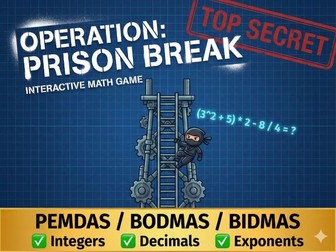
Turn your math lesson into a high-stakes escape mission! This is a Free Playable Demo of Operation: Prison Break, an interactive HTML5 game designed to help students master the Order of Operations.
In this demo, students can play the first 5 Levels of Easy Mode. It focuses on basic integer operations (Addition, Subtraction, Multiplication, Division) to test the concept.
Why Your Students Will Love It
Gamified Learning: Students play as a secret agent trying to climb a security tower by solving “mathematical locks.”
Instant Feedback: No more waiting for grading. Correct steps turn Green instantly; incorrect steps flash Red.
Visual Scaffolding: The game uses a unique “Funnel Method” where equations visually shrink as they are solved, reinforcing line-by-line working out.
** What’s Included in this Demo?**
5 Interactive Levels (Easy Mode).
Dynamic Questions: The numbers change every time you play, allowing for repeated practice even in the demo!
Two-Phase Solving: Students must first identify the correct operation (e.g., click 5 x 2) before they can calculate the result. This prevents guessing!
**
** Technical Specs
File Type: HTML5 (Runs in browser).
Device Friendly: Works on Chromebooks, iPads, Laptops, and Interactive Whiteboards.
No Install Needed: Just download, unzip, and click to play.
Offline Ready: Does not require an internet connection to run.
How to Use
Download this free file.
Unzip the folder.
Double-click the .html file to launch the game in your browser.
Enjoy the mission!
[Download this demo now and let your students break out of boring math drills!]


 Quick View