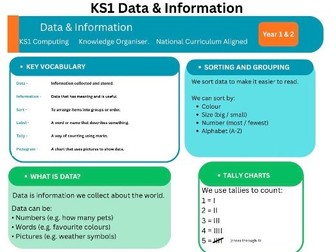
This colourful, curriculum-aligned knowledge organiser covers Data & Information for KS1 Computing (Year 1 & 2).
Perfect for classroom display, independent learning, homework support or revision.
What’s included:
• Key vocabulary with clear definitions
• What is data? — explained simply
• Ways to collect data
• Reading a pictogram — with visual example
• Sorting & grouping explained
• Tally charts
• I Can self-assessment statements
• National Curriculum links
Fully aligned to the KS1 National Curriculum for Computing. No preparation needed — print and use straight away.
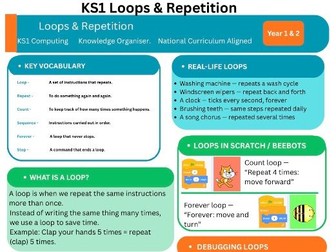
Master KS1 Computing Loops and Repetition with this colourful, curriculum-aligned knowledge organiser for Year 1 and Year 2. Perfect for classroom displays, independent primary programming lessons, homework support, or quick computing revision.
What is a loop in coding? A loop is a programming command that repeats a set of instructions until a specific condition is met, helping young learners understand efficiency in computer science.
What’s included in this premium computing resource:
• Key vocabulary with clear, simple primary computing definitions
• What is a loop? — explained in child-friendly language with visual examples
• Types of loops — count loops and forever loops clearly explained for KS1
• Visual loop diagrams showing how count and forever loops work in practice
• Real-life loop examples children will recognise instantly
• Loops in Scratch and BeeBots — featuring visual code block examples
• Debugging loops — common primary coding mistakes and how to fix them
• ‘I Can’ self-assessment statements with student tick boxes
• Direct National Curriculum links for Key Stage 1 Computing
How to use this primary computing resource in your classroom:
• Hand out at the start of the computing unit as a handy reference guide
• Stick into computing exercise books for children to refer to during lessons
• Enlarge to A3 for an eye-catching classroom or computing working wall display
• Send home for homework support and parent reference during coding tasks
• Ideal for SEN pupils needing visual support and clear vocabulary breakdowns
• Children can self-assess their programming skills using the ‘I Can’ statements
This resource is fully tailored for Year 1 and Year 2. It works brilliantly alongside Scratch, BeeBot, and ScratchJr loop activities.
Fully aligned to the KS1 National Curriculum for Computing (including purposeful programming, creating and debugging simple programs, and using logical reasoning). No preparation needed — simply print and use straight away to save hours of lesson planning!
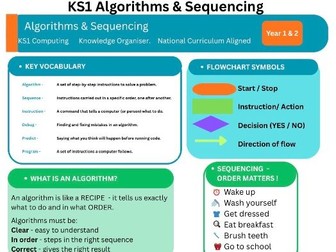
This colourful, curriculum-aligned knowledge organiser covers Algorithms & Sequencing for KS1 Computing (Year 1 & 2).
Perfect for classroom display, independent learning, homework support or revision.
What’s included:
• Key vocabulary with clear definitions
• What is an algorithm? — explained simply
• Real-life algorithm examples
• Sequencing steps with visuals
• Flowchart symbols explained
• Debugging steps
• I Can self-assessment statements
• National Curriculum links
Fully aligned to the KS1 National Curriculum for Computing. No preparation needed — print and use straight away.
Bring the UK National Curriculum computing targets to life with this complete, ready-to-print, unplugged activity pack designed for Key Stage 1 and lower Key Stage 2 pupils.
Teaching algorithms does not have to require screens or charging laptops. An algorithm is simply a precise, step-by-step set of instructions given to a computer to achieve a goal. This screen-free “Unplugged” lesson allows pupils to explore core computational thinking concepts like sequencing, instructions, and debugging through a physical, hands-on grid game.
This resource is completely click-print-and-teach, perfect for busy primary school teachers, computing coordinators, supply teachers, or as a reliable backup plan when the school Internet network fails!
What is included in this Download?
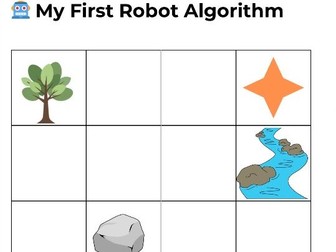
A Grid Map Worksheet: A bright, engaging classroom grid featuring a starting robot character and an energy star target, blocked by school-themed obstacles.
Directional Command Cards: A full printable sheet of arrow cut-outs featuring directional movements.
Complete Teacher Guide: A step-by-step lesson delivery script, including clear opening hooks, activities and differentiation instructions.
Aligned UK National Curriculum Objectives:
Understand what algorithms are, how they are implemented as programs on digital devices, and that programs execute by following precise and unambiguous instructions.
Problem Solving: Create and debug simple programs by detecting and correcting errors (“bugs”).
Classroom Lesson:
Introduce: Use the teacher guide to explain that computers need clear directions.
Build: Pupils work in pairs (“pair programming”) to map out a sequence of directional cards on their desks to guide the robot safely across the grid map.
Debug: Pupils test their steps. If their finger hits a classroom obstacle, they learn to isolate the error and debug their code until the robot reaches the star!
Please leave a review if you find it helpful for your class!


 Quick View