This progress tracker follows the new Edexcel 9-1 Combined Science Chemistry GCSE SoW. It can be used for students to assess their progress through lessons / revision or for your department staff to monitor where they are up to in their teaching.
ALL Combined Science Chemistry units, CC1-CC17 are covered in this document. I will look to do the same for the Combined Science Biology and Physics and the Separate Science units but it takes ages!
I have left the number of recommended teaching hours per topic on there as a guide but this is a document that you can edit so feel free to remove these if you wish.
Topic 7D - Ecosystems
These documents are made to go with the Exploring Science topic 7D - Ecosystems. I made these documents for teaching topic 7D remotely. The lessons covered are:
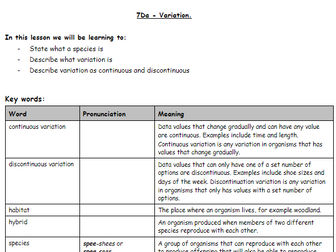
7Da - Variation
7Db - Adaptations
7Dc - Effects of the Environment
7Dd - Effects on the Environment
7De - Transfers in Food Chains
For each lesson, I made a GoogleDoc for the students (I have converted these into word docs / doc.x as well for download). The google doc has space for their name/date and the title, the list of key words for the lesson (for all except 7De) and the learning outcomes.
I use the ActiveLearn Digital Services package for Exploring Science so if you have this, these topics will link up to all of the additional material on there like videos.
I have typed up the topic information for the students and included the questions for them to work their way through. I delivered these as live lessons, so guided the students through the work. As the information is all there on the sheet, they could work their way through by themselves and you could use these as documents for students to complete at home if they miss a lesson too.
I have included a version saved as in word (doc.x) but have also given also a link to a GoogleDoc version so this can be used in-class or for online learning. If you click on the link it should tell you to ask for permission to view which I can grant, you can then ‘make a copy’ of each document to use. Alternatively, you could convert the doc.x to googledoc yourself but it may alter some of the formatting.
Topic 7D - Ecosystems
These documents are made to go with the Exploring Science topic 7D - Ecosystems. I made these documents for teaching topic 7D remotely. The lesson covered is:
- 7Da - Variation
I have made resources for the remaining lessons if you would like to purchase a full set (see my other resources)
7Db - Adaptations
7Dc - Effects of the Environment
7Dd - Effects on the Environment
7De - Transfers in Food Chains
For each lesson, I made a GoogleDoc for the students (I have converted these into word docs / doc.x as well for download). The google doc has space for their name/date and the title, the list of key words for the lesson (for all except 7De) and the learning outcomes.
I use the ActiveLearn Digital Services package for Exploring Science so if you have this, these topics will link up to all of the additional material on there like videos.
I have typed up the topic information for the students and included the questions for them to work their way through. I delivered these as live lessons, so guided the students through the work. As the information is all there on the sheet, they could work their way through by themselves and you could use these as documents for students to complete at home if they miss a lesson too.
I have included a version saved as in word (doc.x) but have also given also a link to a GoogleDoc version so this can be used in-class or for online learning. If you click on the link it should tell you to ask for permission to view which I can grant, you can then ‘make a copy’ of each document to use. Alternatively, you could convert the doc.x to googledoc yourself but it may alter some of the formatting.


 Quick View