Scratch Maze Game — Complete Computing Unit (Years 5–6) | 6 Lessons, Slides, Workbook & AssessmentQuick View
mullo666

Scratch Maze Game — Complete Computing Unit (Years 5–6) | 6 Lessons, Slides, Workbook & Assessment

(0)
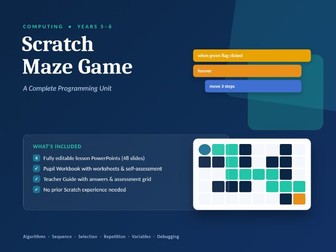
A complete, ready-to-teach 6-lesson Computing unit in which pupils design, code, test and evaluate their own maze game in Scratch - no prior Scratch experience needed, for pupils or teachers. Pupils progress from unplugged algorithm work through to a fully playable game with sprite movement, collision detection, scoring, a moving enemy and a working debugging process - exactly the kind of sustained, purposeful project that OFSTED and subject leads want to see in a Computing curriculum. What’s included: 6 fully editable PowerPoint lesson decks (48 slides), each with a starter, success criteria, key vocabulary, a visual teacher demo (code shown as colour-coded Scratch-style blocks), a step-by-step main task, MILD/SPICY/HOT differentiated challenges, and a plenary quiz An editable Pupil Workbook (Word) with a glossary, maze-planning grids, bug-hunt exercises, a scoring/variables planner, peer feedback sheet and a unit self-assessment tracker A Teacher Guide (Word) with National Curriculum links, lesson-by-lesson notes, full quiz answers, common misconceptions, a blank assessment grid and an e-safety note Lessons: Plan Your Maze Game - algorithms and unplugged coding Make It Move - events and motion Build the Walls - selection and repetition (if/then, forever) Goals and Scores - variables and win conditions Enemies and Debugging - a proper debugging routine (Stop, Read, Guess, Fix, Test) Level Up, Test and Share - play testing, peer feedback and evaluation Why teachers love it: Zero-prep - just open Scratch and go Every resource is fully editable, so you can adapt names, challenge levels or vocabulary to your class Written for non-specialists - no computing background assumed
Staying Safe Online — Complete Computing Unit (Years 3–6) | 6 Lessons, Slides, Workbook & SafeguardiQuick View
mullo666

Staying Safe Online — Complete Computing Unit (Years 3–6) | 6 Lessons, Slides, Workbook & Safeguardi

(0)
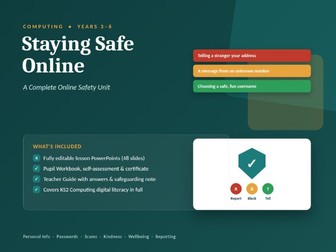
A complete, ready-to-teach 6-lesson Online Safety unit covering everything KS2 pupils need: personal information, password security, spotting scams, digital kindness, screen time wellbeing, and knowing what to do when something goes wrong - with a genuine safeguarding note for teachers, not just a token mention. Every lesson uses a consistent “Sort It: Red/Amber/Green” activity to build real judgement rather than rule-recital, so pupils learn to think it through, not just recite “stranger danger.” What’s included: 6 fully editable PowerPoint lesson decks (48 slides), each with a starter, success criteria, key vocabulary, a Red/Amber/Green sort activity, a step-by-step main task, MILD/SPICY/HOT differentiated challenges, and a plenary quiz An editable Pupil Workbook (Word) with a glossary, sort-and-justify worksheets, a password builder, a spot-the-scam exercise, an upstander pledge, a screen-time diary, a unit self-assessment tracker and a certificate of completion A Teacher Guide (Word) with curriculum links, lesson-by-lesson notes, full quiz answers, common misconceptions, a blank assessment grid - and a safeguarding note on handling disclosures, because this topic can surface real ones Lessons: What is Personal Information? - privacy and what to keep private Strong Passwords, Safe Accounts - building and protecting a strong password Think Before You Click - spotting scams, phishing and fake links Kind Online: Be an Upstander - cyberbullying, bystanders and upstanders Screen Time and Wellbeing - healthy habits and balance If Something Goes Wrong - report, block, tell, plus a unit review and pledge Why teachers love it: Zero-prep - covers your statutory annual online safety teaching in one unit Fully editable, so you can adapt scenarios, names or difficulty to your class A real safeguarding note, not a disclaimer - practical steps for what to do if a pupil discloses something during the unit A certificate of completion pupils genuinely enjoy receiving
Pairs Cricket Scoresheet Template | KS2 & KS3 PE Lesson ResourceQuick View
mullo666

Pairs Cricket Scoresheet Template | KS2 & KS3 PE Lesson Resource

(0)
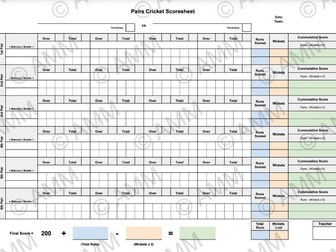
Struggling to track runs and wickets during school Pairs Cricket matches? > This high-contrast, clipboard-ready Pairs Cricket Scoresheet is specifically designed for PE teachers, supply staff, and school games coaches running school fixtures or tournament days. Managing pairs rotations while calculating deduction penalties on a windy boundary line can be chaotic. This template fixes that by embedding the official school match scoring logic directly into a clean visual grid. What’s Included: 5-Pair & 6-Pair Match Matrix Tables: Clear horizontal tracking for up to 6 distinct pairs. Built-in Penalty Logic Fields: Dedicated columns for tracking Runs Scored, Wickets, and the required Cumulative Score Formula: Runs - (Wickets x 5). Standard School Baseline Check: Top-level space for Home/Away tracking, team names, dates, and the mandatory Final Score = 200 + (Total Runs) - (Wickets x 5) starting baseline adjustment field. Teacher Sign-Off Section: Clean signature box at the base for official school tournament logging. Perfect for: Key Stage 2 and Key Stage 3 PE lessons, sports days, intramural school tournaments, and primary/secondary afternoon games sessions. Print it out for your clipboard or laminate it for continuous dry-wipe use on the field!
Simplified T20 Cricket Scoresheet | Secondary PE & After-School Club Match TrackerQuick View
mullo666

Simplified T20 Cricket Scoresheet | Secondary PE & After-School Club Match Tracker

(0)
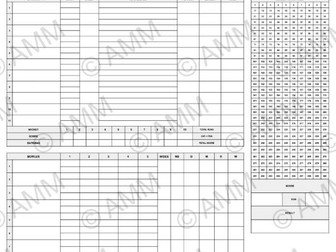
Simplify your school T20 cricket fixtures with a streamlined, high-density score tracker designed for the school sports field. Standard cricket scorebooks are overly dense and confusing for students or non-specialist staff to fill out quickly. This simplified template strips away the fluff to focus entirely on fast-moving school context logistics. What’s Included: Visual Cumulative Run Tally Grid: A giant, sequential 1-to-288 numbered grid so you can simply cross out runs as they happen for instantaneous score checks. Clean Batsman & Bowler Matrices: Simple tracking boxes for Batsman Name, Info/Out, Balls Faced, Wickets, and individual Bowler Statistics (Wides, No Balls, Maidens). Over-by-Over Scoreboard: A dedicated 20-over horizontal grid checking Score, Wickets, and Bowler changes at the end of every over block. Match Result Summary Box: Clear final calculation area tracking Total Runs, Extras/Penalties, Total Score, and the definitive Match Result along with a Teacher verification sign-off. Eliminate the stress of messy tally marks. This clean A4 PDF ensures your school fixtures run smoothly, looking professional to visiting schools, parents, and Senior Leadership.