The Enigma MachineQuick View
eli17

The Enigma Machine

(12)
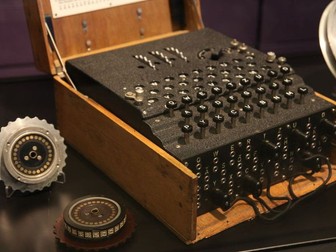
In the Enigma Machine lesson, students will learn the intricacies of cryptography used in World War II to convey secret messages to soldiers in the field. Students will start by looking at a simple shift cipher and will create their own cipher wheel to send and receive encoded messages. Students will then learn about the German Enigma Machine and will run a web-based emulated version to better understand how it works. Finally, students will discover how the Allies broke the Enigma’s code in WWII and the effect that had on winning the war. Part of this lesson was adapted from a lesson plan by Northern Illinois University. For Google Docs and Slides links, please visit https://www.ctlessons.org/social-studies/the-enigma-machine.html Topics addressed: Basic cryptography and relevant vocabulary Shift ciphers and how they encode plain text using a simple algorithm The Enigma Machine and its impact on the outcome of World War II Primary CT concept: algorithms. Students will consider different algorithms used in various forms of cryptography, including the very complicated logic involved in the Enigma Machine. Students will be able to: Explain why cryptography is necessary to keep messages secret Explain the algorithm of a simple shift cipher Understand at a high level how the Enigma Machine operates Understand at a high level how the Enigma Machine was defeated Materials: PowerPoint presentation Shift cipher template and instructions Suggested lesson breakdown: 10-15min – introduction to cryptography 10-15min – students create and test cipher wheels 5min – discussion on shift cipher 7min – Enigma Machine video 10min – Enigma Machine web emulator 10min – Cracking the Enigma Machine video
Creating a PodcastQuick View
eli17

Creating a Podcast

(3)
In the Creating a Podcast project, students team up to write and record elements of a podcast about a novel they are reading. Students choose components from a list of ideas, each of which are worth a certain number of points towards the effort portion of the project grade. After brainstorming and scripting each segment, students act out and record their podcast using Soundtrap. The materials for this project are based on Harper Lee’s “To Kill a Mockingbird”, but this project would work well with most novels. For Google Docs and Slides links, please visit https://www.ctlessons.org/ela/creating-a-podcast.html Topics addressed: Central themes in novels Symbolism and imagery in novels Characters and relationships in novels Primary CT concept: decomposition. Students break down a complicated novel into distinct elements, relating them to one another in discrete and creative podcast segments. Students will be able to: Create a podcast based on elements on a novel they are reading Identify themes and symbols within a novel Write and act out interviews and conversations with characters from a novel Materials: PowerPoint presentation Student packet Prep: Familiarize yourself with Soundtrap and create an account before students begin recording Students should be finished or nearly finished with the novel they will be writing about before finishing their podcasts Suggested lesson breakdown: This project can be done in a few days or spread over a couple of weeks Day one 10min – introduce project using PowerPoint presentation 10-30min – place students into their teams, allow them to start brainstorming podcast segment ideas Day two 30-90min – students collaborate within their teams to write and rehearse each podcast segment Day three 30-60min – teams record their podcast segments Day four 30-60min – teams edit their podcasts For further information and relevant standards, please visit https://www.ctlessons.org/ela/creating-a-podcast.html
Showcase - a student-owned digital portfolioQuick View
eli17

Showcase - a student-owned digital portfolio

(0)
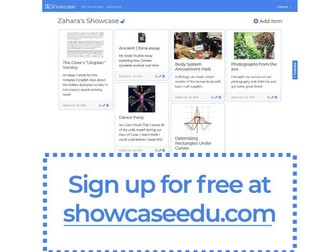
To sign up for free, check out https://showcaseedu.com - the included file is a screenshot of this tool. Showcase is a lightweight, student-driven portfolio that represents only the work students are proud to share. Students can add files from Google Drive and Microsoft OneDrive, upload documents and images of physical work, and link to any publicly accessible link (graphs on Desmos, projects on Code.org, video presentations on YouTube…). Showcase is not a place for teachers to assign a grade, nor decide what is included. Students have complete control over their Showcase portfolio, and never need to justify a low grade or include a plan to improve. With this control, students can share their Showcase portfolios at family conferences, with potential employers or even when applying to colleges. Students, teachers and other school staff members can join their school using a school code. Students’ portfolios can be viewed by all school staff members, and students can additionally choose to share their portfolios publicly with a personal URL.