Apprenons le Français: French Vocabulary and Verb PracticeQuick View
phildallman

Apprenons le Français: French Vocabulary and Verb Practice

(0)
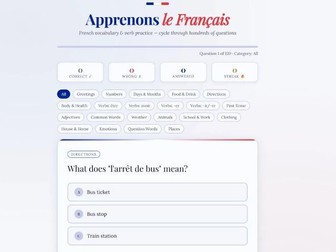
What is Apprenons le Français? Apprenons le Français is a browser-based French vocabulary and verb quiz for adult learners at any stage. It cycles through hundreds of multiple-choice questions covering a wide range of everyday topics and grammar areas. There is nothing to install, no account required, and no subscription. Simply open the file and start practising. What it covers Questions are presented one at a time with three answer options. Topics are organised into categories including Greetings, Numbers, Days & Months, Food & Drink, Directions, Body & Health, Weather, Animals, School & Work, Clothing, House & Home, Emotions, Question Words, and Places. Verb categories cover specific conjugations for être, avoir, -er, and -ir/-re verbs, as well as Past Tense forms. Each question includes expandable explanations after you answer, available in both French and English, providing related vocabulary and usage notes alongside the correct answer. French-specific nuances, such as the use of avoir for physical states (e.g., j’ai faim), irregular past participles, and common false friends like actuel and librairie, are woven throughout the question bank. Keeping track A live stats bar at the top of the screen tracks Correct answers, Wrong answers, the Total number of questions answered, and your current Streak. A progress bar shows how far through the current question set you are. Questions shuffle automatically and loop continuously so you can practise for as long as you like. How to use it The download is a single HTML file. Find it in your downloads folder and double-click it to open in your browser. Chrome, Edge, Firefox, and Safari all work. Use the category filter buttons to focus on a specific topic area or leave it set to All to draw from the full question bank. Use the Restart button to reset your stats and reshuffle, or Shuffle All to reorder the questions without resetting your progress.
SAT Star: Year 6 Practice Tests App Description and User GuideQuick View
phildallman

SAT Star: Year 6 Practice Tests App Description and User Guide

(0)
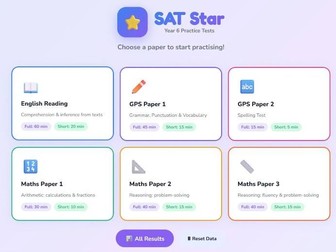
What is SAT Star? SAT Star is a browser-based practice test app for Year 6 pupils preparing for their KS2 SATs. It covers all six SAT papers across English and Maths and replicates the real exam format as closely as possible. There is nothing to install, no account and no subscription. Open the file and start practising. What it covers Papers are presented one question at a time with a countdown timer and progress bar throughout. The app covers English Reading (comprehension and inference), GPS Paper 1 (grammar, punctuation and vocabulary), GPS Paper 2 (spelling), and Maths Papers 1, 2 and 3 (arithmetic and reasoning). Question types include multiple choice, short answer and spelling. Two modes are available for each paper. Full Test replicates the real exam with full time limits ranging from 15 to 60 minutes depending on the paper. Short Practice offers a quicker session with fewer questions, suited to a fast confidence check. Reviewing performance On completing a session the app shows the mark, percentage score and time used. Every question can then be reviewed in detail, with correct and incorrect answers clearly marked and brief explanations provided where available. All results are saved in the browser and accessible at any time from the Results screen, split by Full Test and Short Practice. How to use it The download is a single HTML file. Find it in your downloads folder and double-click it to open in your browser. Chrome, Edge, Firefox and Safari all work. No internet connection is needed once the file has downloaded and all progress saves locally on the device. Note that progress is stored separately on each device you use. To clear all saved results and start fresh, use the Reset Data button at the bottom of the home screen.
PSC Practice - Year 1 Phonics Screening Check AppQuick View
phildallman

PSC Practice - Year 1 Phonics Screening Check App

(0)
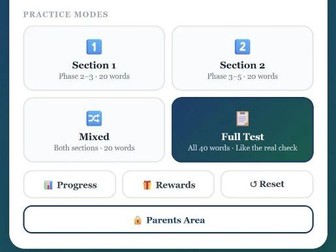
PSC Practice — Year 1 Phonics Screening Check App I built this app for my son Finnbar when he was preparing for his Year 1 Phonics Screening Check. I wanted to help him practise at home but couldn’t find anything that felt right for a six-year-old. The worksheets we tried were either too dry or too far from the real check format. So I made this. It runs entirely in a browser. Nothing to install, no account, no subscription. Just open the file and start practising. What it does The app shows words one at a time on screen. Your child reads aloud and you mark each word correct or incorrect. There are four modes: Section 1 covers Phase 2 to 3 GPCs including CVC words, consonant blends and digraphs. Section 2 adds split digraphs, less common vowel digraphs and two-syllable words. Mixed mode draws from both. Full Test replicates the actual PSC format with 40 words across two sections, matching the real check structure. The word bank is aligned to the DfE Year 1 PSC specification and includes both real words and pseudo-words. After each session the app shows which words were missed, split by category. Keeping children motivated Children earn coins for correct answers and can redeem them against rewards parents set in advance. The reward shop is PIN-protected and fully customisable. The app tracks daily streaks, session history, average scores and a projected PSC score based on the most recent full test. A printable progress report is also included. Who this is for A home practice tool for Year 1 children approaching the Phonics Screening Check, used with a parent who marks each word. Tested with a six-year-old and designed to be calm and straightforward rather than flashy. How to run it The download is a single HTML file. Find it in your downloads folder and double-click it to open in your browser. Chrome, Edge, Firefox and Safari all work. No internet connection is needed after download and progress saves locally on the device. Note that progress is stored separately on each device you use.
Aprende el Español: Spanish Vocabulary and Verb PracticeQuick View
phildallman

Aprende el Español: Spanish Vocabulary and Verb Practice

(0)
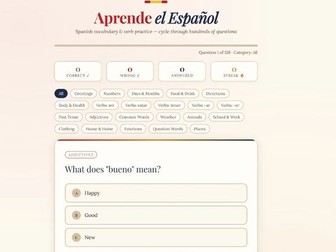
What is Aprende el Español? Aprende el Español is a browser-based Spanish vocabulary and verb quiz for adult learners at any stage. It cycles through hundreds of multiple choice questions covering a wide range of everyday topics and grammar areas. There is nothing to install, no account and no subscription. Open the file and start practising. What it covers Questions are presented one at a time with three answer options. Topics are organised into categories including Greetings, Numbers, Days and Months, Food and Drink, Directions, Body and Health, Weather, Animals, School and Work, Clothing, House and Home, Emotions, Question Words, and Places. Verb categories cover ser, estar, tener, -ar, -er and -ir verb conjugations, and past tense forms. Each question includes expandable explanations after you answer, available in both Spanish and English, with related vocabulary and usage notes alongside the correct answer. Spanish-specific challenges such as the ser versus estar distinction, stem-changing verbs, and common false friends are woven throughout. Keeping track A live stats bar at the top of the screen tracks correct answers, wrong answers, total questions answered and your current streak. A progress bar shows how far through the current question set you are. Questions shuffle automatically and loop continuously so you can practise for as long as you like. How to use it The download is a single HTML file. Find it in your downloads folder and double-click it to open in your browser. Chrome, Edge, Firefox and Safari all work. Use the category filter buttons to focus on a specific topic area or leave it set to All to draw from the full question bank. Use the Restart button to reset your stats and reshuffle, or Shuffle to reorder without resetting.
Impara l'Italiano: Italian Vocabulary and Verb Practice AppQuick View
phildallman

Impara l'Italiano: Italian Vocabulary and Verb Practice App

(0)
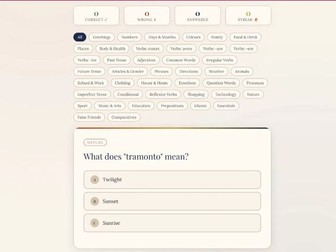
What is Impara l’Italiano? Impara l’Italiano is a browser-based Italian vocabulary and verb quiz for adult learners at any stage. It cycles through hundreds of multiple choice questions covering a wide range of everyday topics and grammar areas. There is nothing to install, no account and no subscription. Open the file and start practising. What it covers Questions are presented one at a time with three answer options. Topics are organised into categories including Greetings, Numbers, Food and Drink, Travel, House and Home, Question Words, and more. Each question includes expandable explanations after you answer, available in both Italian and English, with related vocabulary and usage notes provided alongside the correct answer. Keeping track A live stats bar at the top of the screen tracks correct answers, wrong answers, total questions answered and your current streak. A progress bar shows how far through the current question set you are. Questions shuffle automatically and loop continuously so you can practise for as long as you like. How to use it The download is a single HTML file. Find it in your downloads folder and double-click it to open in your browser. Chrome, Edge, Firefox and Safari all work. Use the category filter buttons to focus on a specific topic area or leave it set to All to draw from the full question bank. Use the Restart button to reset your stats and reshuffle, or Shuffle to reorder without resetting.