

 Quick View
Python Basics - HTML Worksheet
Interactive Python Basics Worksheet | OCR J277 GCSE Computer Science
Master fundamental Python concepts with this interactive HTML worksheet! Students learn through coding challenges, trace tables, and an XP leveling system.
Resource Overview
This self-contained HTML5 interactive worksheet is designed specifically for GCSE Computer Science (OCR J277) but is suitable for any introductory Python course (KS3 or KS4). It eliminates the need for external software or VLE logins—simply download the file and open it in any web browser.
Key Features
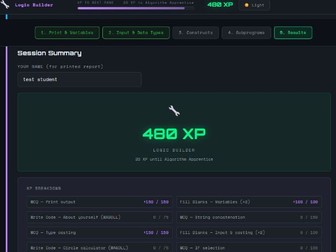
Gamified Learning: Includes a built-in XP (Experience Points) system. Students earn points for correct answers, unlocking ranks from “Novice Coder” to “Computer Science Guru.”
Automatic Feedback: Features instant validation for multiple-choice questions, fill-in-the-blanks, and trace tables.
WAGOLL Solutions: “What A Good One Looks Like” sections are locked until students attempt a challenge, providing model answers and marking schemes for self-assessment.
Dark & Light Mode: A sleek, modern UI with a toggle to suit different classroom lighting environments or student preferences.
Printable Progress Report: Students can enter their name and generate a professional PDF/Print results certificate that breaks down their score by topic—perfect for evidence of learning or homework submission.
Curriculum Coverage
The worksheet is divided into five logical sections:
Print & Variables: Basic output and naming conventions.
Input & Data Types: Handling user input and mastering Type Casting (int, float, str).
Programming Constructs: Sequence, Selection (IF/ELIF/ELSE), and Iteration (FOR/WHILE loops).
Subprograms: The difference between Procedures and Functions, including parameters and return values.
Review & Results: A final summary and XP breakdown.
Teacher Benefits
No Setup Required: No Python installation needed to use the worksheet—ideal for schools with restricted software environments.
Active Revision: Includes “blurt” prompts and reflection tasks based on active recall principles.
Trace Table Practice: Provides digital trace tables to help students practice the logic required for Paper 2 exam questions.
How to Use
Download the .html file.
Distribute it to students via your school VLE (Teams, Google Classroom, etc.) or a shared drive.
Students open the file in their browser and work through at their own pace.
At the end of the lesson, students click “Print / Save as PDF” to submit their results to you.
File Format: Single HTML File (Self-contained CSS/JS)
Target Age: 14-16 (GCSE)
Subject: Computer Science / Information Technology