 Quick View
Qualifications Scotland Estimate Tracker for National 5 and Higher (Excel)
After every prelim, the same job lands on your desk. You add up marks across papers and assignments, work out where each pupil sits against the boundaries, decide who is close to the next band, and compare it all with target grades. Most departments do this with home-made spreadsheets or mental arithmetic, and the results are hard to explain when a parent, a pupil or a depute asks how an estimate was reached. This tracker does the work for you and shows its working on screen.
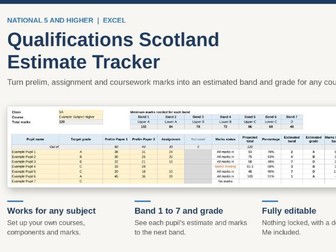
Enter each pupil’s marks and the tracker adds them up, compares the total with the grade boundaries, and shows the estimated band from 1 to 7, the estimated grade, how many marks the pupil needs to reach the next band, and whether they are above, on or below their target grade. Because it is built around Scottish bands and the Qualifications Scotland boundary method, rather than GCSE grades, you don’t have to adapt anything. The marks-to-next-band and marks-to-target columns also show at a glance which pupils are a few marks from a boundary, so you can decide where to put your support before the exam.
It works for any subject because you set up the courses yourself. On the Courses sheet you type in your course names, the components that make up each course, such as prelim papers and the assignment, and the maximum mark for each. You then pick a course from a drop-down on a class sheet, and the column headings change to match. There are four class sheets, each with space for 35 pupils, and a Summary sheet that fills itself in with grade, band and target counts for every class. If everyone in a department uses the same file, everyone is working from the same boundaries and the same method.
The boundaries use the notional percentages Qualifications Scotland publishes: 50% of the total marks for C, 70% for A and 85% for upper A. The other bands are worked out with the published formulas. If you have the actual cut-off marks for a course, you can type them in and the tracker uses those instead. Missing marks are handled sensibly: if an assignment hasn’t been marked yet, the estimate is scaled up from the marks entered and flagged as provisional.
Nothing is locked or protected, so you can change any cell, rename sheets and adjust the colours. Every cell you type in is shaded yellow, and a detailed Read Me sheet explains each step, including how to edit courses, change boundaries, add classes and fix common problems. The file is a standard Excel workbook in Arial, and it comes with example courses and pupils so you can see how it works before clearing them out.
Please note that the example courses and marks are placeholders, so check them against the Qualifications Scotland course specifications before you use them. Estimates are a guide to support your professional judgement, not a prediction of final results, because the real boundaries are set each year after marking.