Scratch Loops Coding Activity | Repeat and Forever Blocks | No-Prep STEM LessonQuick View
AyashaSahla

Scratch Loops Coding Activity | Repeat and Forever Blocks | No-Prep STEM Lesson

(0)
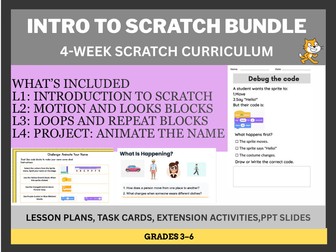
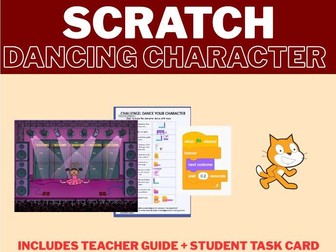
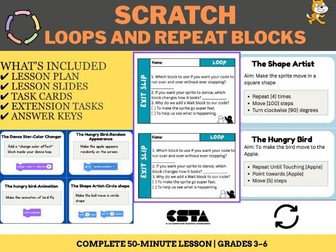
Help your students develop coding efficiency and computational thinking with this engaging Scratch lesson on Repeat and Forever loops. Designed for learners aged Years 4–6 / Grades 3–6), this resource introduces students to the concept of repetition in programming through a fun, project-based “Dancing Sprite” activity. Students will learn how to replace repetitive code with loops, create continuous animations, and build confidence in block-based programming. What’s Included: • Lesson Presentation (PPTX) – A step-by-step slide deck for whole-class teaching and guided demonstrations. • Detailed Lesson Plan (PDF) – Includes learning objectives, lesson sequence, teaching notes, and troubleshooting guidance. • Student Task Cards (PDF) – Practical coding challenges that help reinforce the use of Repeat and Forever blocks. • Video Tutorial (MOV) – A guided walkthrough demonstrating the activity. • Assessment Materials – Exit ticket with answer key and a project rubric for assessing student understanding and project completion. • Bonus Challenge Cards – Extension activities for early finishers, including colour effects, size changes, and creative enhancements. Learning Objectives: • Understand the purpose of Repeat and Forever loops in Scratch. • Recognise when loops can make code more efficient. • Create simple animations using repetition blocks. • Apply coding concepts in a creative project. • Develop problem-solving and debugging skills. Suitable For: • Computing and ICT lessons • STEM and coding clubs • Technology enrichment programmes • Homeschool learning • Beginner Scratch programmers This ready-to-use resource requires minimal preparation and provides a structured introduction to programming concepts through hands-on learning and creative exploration.
Scratch Programming: Motion & Coordinates | X-Y Grid Activities | STEM Coding LessonQuick View
AyashaSahla

Scratch Programming: Motion & Coordinates | X-Y Grid Activities | STEM Coding Lesson

(0)
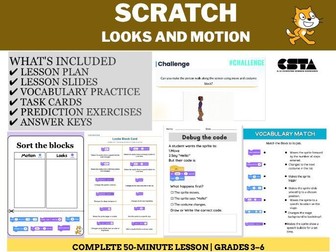
Everything you need to teach Scratch motion blocks and coordinates to upper primary and middle school students. This premium lesson pack contains a structured plan, presentation slides, a detective-themed game arena worksheet, 4 hands-on mission cards, and student exit tickets for easy grading. Detailed Lesson Plan: A step-by-step, 40-minute ICT lesson layout covering introductory hooks, coordinate grid mapping, live modeling, an active “Motion Maze” challenge, and structured discussion questions. Presentation (Presentation Deck): A colorful, student-friendly slide deck that introduces Key Vocabulary (Sprites, Backdrops, Coordinates, Degrees), features interactive “Guess the Output” warm-ups, explains the X/Y stage grid, and sets up live coding tasks. “Find the Banana!” Detective Worksheet: A themed activity guide where students set up their game arena, track down hidden coordinate numbers in the Sprite Info Box, and write scripts to navigate an explorer from (0,0) to the food. 4 Differentiated Activity Mission Cards: Card 1 (The Victory Spin): Mastering 360-degree rotational turns. Card 2 (The Magic Teleport): Instant movement using random positioning. Card 3 (Smooth Glide Return): Transitioning from teleportation to smooth, timed gliding. Card 4 (Step-by-Step Mission): Using incremental movement steps for controlled pacing. Formative Assessment Exit Tickets: Double-up printable slips designed for quick student reflection on final $X/Y$ locations and identification of core motion blocks.
Scratch Coding: Introduction to Scratch | Beginner Programming ActivitiesQuick View
AyashaSahla

Scratch Coding: Introduction to Scratch | Beginner Programming Activities

(0)
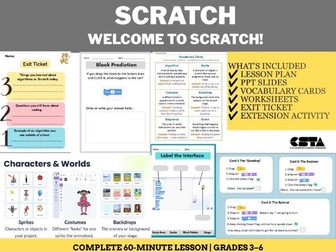
Scratch Programming Lesson 1 | Grades 3-5 | Block coding intro with lesson plan, worksheets, task cards & Google Slides. No experience needed! Description: Introduce your students to block-based coding with this complete, ready-to-teach Scratch Programming Lesson 1 for Grades 3–5. No prior coding experience needed for teachers or students! What’s Included (6 Resources): Lesson Plan – A fully structured lesson with timed activities, hook, discussion questions, main activity and closure. Walk in and teach with confidence. Google Slides Presentation – Ready-to-display slide deck for whole-class teaching. Fully editable. Link provided inside the download. Label the Interface Worksheet – Students identify and label the Stage, Sprite, Block Palette and Scripts Area. Vocabulary Matching Worksheet – Match Scratch terms to definitions. Includes student version and full answer key. Block Prediction Activity – Students predict what a block does before running it. Builds computational thinking skills. 4 Task Cards – Self-directed challenges for early finishers.