

 Quick View
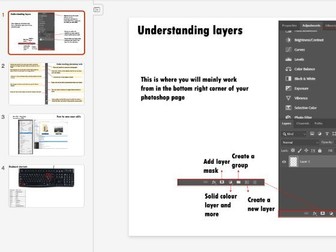
Photoshop basics
Four pages to help teachers and pupils learn the basics of using photoshop.
I have uploaded as PDF an PPT
Slide 1 - Unerstanding layers
Slide 2 - Photoshop tools
Slide 3 - How to save edits as JPEGS
Slide 4 - Keyboard shortcuts
Could be printed for posters, made into a booklet or used on powerpoint slides.
I printed, cut out and laminated the key for keyboard short cuts which helped pupils gain confidence with the software.
My Y11 pupils found it very useful during their exams as I had saved this into the shared area so they could access anytime.