Phonics Voice Battle Interactive GameQuick View
Kyrie_Zheng

Phonics Voice Battle Interactive Game

(0)
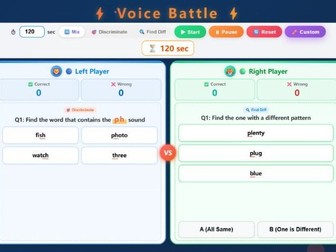
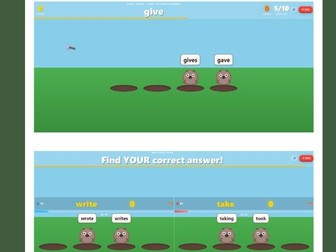
A no-prep 2-player phonics game where students practise sound discrimination, consonant blends and word pattern recognition. Make phonics practice more exciting with this interactive Voice Battle game. Students compete in a 2-player classroom challenge by identifying target sounds, choosing words that contain specific phonics patterns, and finding the word with a different sound pattern. This browser-based game is ideal for phonics review, sound discrimination, consonant blends, digraph practice, ESL / EFL lessons, intervention groups, literacy centres, whole-class review and fun end-of-lesson competitions. The game includes: 2-player phonics battle mode Sound discrimination questions Find the difference questions Mix mode for varied practice Target sound practice Consonant blend and digraph review Built-in question bank Custom question creator Batch question import Countdown timer Pause and reset buttons Correct and wrong answer tracking Streak display Wrong answer collection Colourful classroom-friendly design Browser-based HTML format Students can practise common sound patterns such as pl, bl, fl, cl, br, tr, dr, st, sp, gr, cr, pr, fr, sk, sn, sw, sl, tw, ch, sh, th, wh, ph, str and spr. How to use: Download the HTML file and open it in a modern web browser such as Chrome, Edge or Safari. Display it on a projector, interactive whiteboard or classroom screen. Students can play in pairs, teams, small groups or as a whole-class phonics challenge. Best for: Phonics practice Sound discrimination Consonant blends Digraph review Word pattern recognition English / literacy lessons ESL / EFL classes Primary classrooms Intervention groups Interactive whiteboard activities No-prep classroom revision Please note: This is an HTML digital resource. For best results, download the file and open it in a modern web browser.
Telling Time Interactive Clock GameQuick View
Kyrie_Zheng

Telling Time Interactive Clock Game

(0)
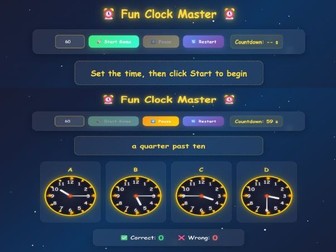
A no-prep telling time game where students match time expressions to analogue clocks. Great for primary, ESL, EFL and whole-class review. Make telling time practice more engaging with this interactive HTML clock game. Students read a time expression, look at four analogue clock options, and click the correct clock before the timer runs out. This resource is ideal for practising common time expressions such as o’clock, a quarter past, half past and a quarter to. It works well as a whole-class game, warm-up activity, review task, team competition, starter activity, maths centre activity or end-of-lesson challenge. The game includes: Interactive analogue clock questions Four multiple-choice clock options Countdown timer Start, pause and restart buttons Correct and wrong answer scoring Mistakes review section Colourful classroom-friendly design Browser-based HTML format Best for: Primary lessons Telling time practice ESL / EFL classes Maths / measurement review Vocabulary practice Speaking warm-ups Whole-class games Interactive whiteboard activities No-prep classroom revision Please note: This is an HTML digital resource. For best results, download the file and open it in a modern web browser such as Chrome, Edge or Safari.
Spelling Word Battle Interactive GameQuick View
Kyrie_Zheng

Spelling Word Battle Interactive Game

(0)
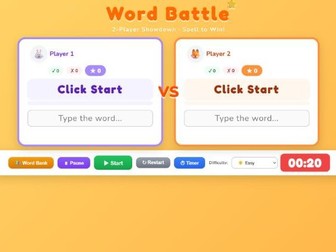
A no-prep 2-player spelling game where students use definitions and missing-letter clues to complete words before the timer runs out. Make spelling and vocabulary practice more exciting with this interactive Word Battle game. Students compete in a 2-player showdown by reading word definitions, looking at missing-letter clues, and typing the correct word before time runs out. This browser-based game is ideal for spelling review, vocabulary practice, word work, ESL / EFL lessons, starter activities, intervention groups, literacy centres, whole-class review and fun end-of-lesson competitions. The game includes: 2-player spelling battle mode Missing-letter word clues Word definitions for each question Built-in word bank Editable player names Countdown timer Pause, restart and timer controls Easy, medium and hard difficulty levels On-screen keyboard Correct, wrong and total score tracking Combo scoring effects Wrong answer review High score record Bulk word import feature Custom unit / word list management Colourful classroom-friendly design Browser-based HTML format Teachers can use the built-in word bank or add their own words and definitions. The bulk import tool makes it easy to paste a class vocabulary list and turn it into a spelling game. How to use: Download the HTML file and open it in a modern web browser such as Chrome, Edge or Safari. Display it on a projector, interactive whiteboard or classroom screen. Students can play in pairs, teams, small groups or as a whole-class challenge. Best for: Spelling practice Vocabulary review Word work English / literacy lessons ESL / EFL classes Primary classrooms Review games Team competitions Interactive whiteboard activities No-prep classroom revision Please note: This is an HTML digital resource. For best results, download the file and open it in a modern web browser.
English Grammar Quiz Clash GameQuick View
Kyrie_Zheng

English Grammar Quiz Clash Game

(0)
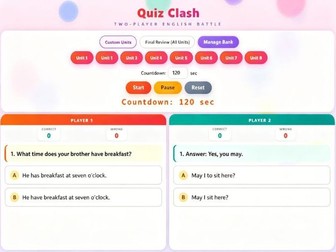
A no-prep 2-player English review game where students choose the correct sentence, practise grammar, and review mistakes with explanations. Make English review more exciting with this interactive Quiz Clash game. Students compete in a 2-player classroom battle by choosing the correct answer from two options. Each question focuses on common English sentence patterns, grammar mistakes, vocabulary use, question forms, short answers and meaning-based choices. This browser-based game is ideal for unit review, final review, grammar correction, sentence practice, ESL / EFL lessons, whole-class revision, team competitions, starter activities and end-of-lesson challenges. The game includes: 2-player English quiz battle mode A / B answer choices Built-in unit question banks Custom unit selection Final Review mode for all units Question Bank Manager Editable questions Add and delete units Countdown timer Start, pause and reset controls Correct and wrong answer tracking Wrong answer review Explanation pop-ups for mistakes Colourful classroom-friendly design Browser-based HTML format Students practise choosing the correct English sentence and identifying common mistakes, such as subject-verb agreement, do / does questions, short answers, time expressions, question formation, meaning in context and sentence logic. How to use: Download the HTML file and open it in a modern web browser such as Chrome, Edge or Safari. Display it on a projector, interactive whiteboard or classroom screen. Students can play individually, in pairs, in teams, or as a whole-class review game. Best for: English grammar review Sentence correction Unit revision Final review ESL / EFL classes Primary English Whole-class quiz games Team competitions Interactive whiteboard activities No-prep classroom revision Please note: This is an HTML digital resource. For best results, download the file and open it in a modern web browser.