Interactive Multilingual Crossword CreatorQuick View
Eduinteractive

Interactive Multilingual Crossword Creator

(0)
CrossBuilder is a comprehensive crossword creation and play tool designed to make educational content more interactive, engaging, and enjoyable. Add your own questions and answers, automatically generate crossword layouts, and create multiple alternative pattern/layout options from the same content. CrossBuilder checks word placement automatically and helps identify answers that need to be changed when a valid crossword structure cannot be created. The interface supports Turkish, English, French, German, Spanish, and Russian. Native and accented characters are preserved during answer validation, allowing activities to be created accurately for different languages. CrossBuilder provides a responsive experience across desktop, tablet, and mobile devices. Crossword cells dynamically scale according to the number of questions, grid dimensions, and available screen space so both compact and larger activities can fit the interface efficiently. The player includes optional learning and gamification features such as a countdown timer, letter hints, progress-based time jokers, achievement badges, sound feedback, a complete clue list, and visual feedback for correct answers. Content creators can enable or disable many of these features through the Generator’s player settings. Projects can be saved as reusable templates, loaded again for editing, previewed before publishing, printed with or without answers, and saved as standalone HTML activities to a location and filename selected by the user. With SCORM support, CrossBuilder is also suitable for creating interactive crossword activities for compatible LMS and digital learning environments. Key features: alternative crossword layouts, 5–15 question support, automatic compatibility checking, dynamic cell scaling, multilingual interfaces, responsive mobile support, SCORM integration, reusable templates, hints, jokers, badges, timer controls, printing, and standalone HTML saving. What’s included? • File format: HTML5 + SCORM 1.2 ZIP • LMS compatibility: Any SCORM-compliant platform; runs standalone in browser • Language support: Multiple language input supported • License: 1 teacher, unlimited students (same institution) • Delivery: Instant download link after purchase Youtube Link: https://youtu.be/hLom39Z7Rto Demo Link: https://ulasseker78-star.github.io/crossBuilder/
Correct Letter Formation for English & Turkish Alphabets | Animated Video SetQuick View
Eduinteractive

Correct Letter Formation for English & Turkish Alphabets | Animated Video Set

(0)
Make handwriting practice engaging and accurate! This comprehensive video set demonstrates the exact stroke order and direction for every uppercase and lowercase letter in both the English and Turkish alphabets. Designed to help children build strong writing habits from day one. Demo: https://youtu.be/Q_pWkTk7Brk What’s Included in This Bundle? Comprehensive Library: Includes a total of 64 videos, featuring the correct formation of 32 lowercase and 32 uppercase letters. Full HD (1920x1080) Quality: Perfect for smartboards, tablets, and desktop displays. Clear Visual Cues: Numbered arrows guiding the exact starting points and stroke directions. Engaging Animations: A moving hand/pencil graphic that makes mimicking the motions easy for young learners. Who is it for? Primary school teachers looking for high-quality, solution-oriented classroom resources. Parents and homeschoolers wanting to support their child’s handwriting journey. Educators focusing on special education and occupational therapy. Get Instant Access Today!
Multilingual Braille Activity Generator – HTML & SCORM 1.2Quick View
Eduinteractive

Multilingual Braille Activity Generator – HTML & SCORM 1.2

(0)
Create interactive Braille learning activities in minutes — no coding required. Export Demo Link: https://ulasseker78-star.github.io/brail/ Youtube Link: https://youtu.be/9dMIN0HydOQ Linkedin Link: www.linkedin.com/in/eduinteractive-249324263 Multilingual Braille Activity Generator is a browser-based authoring tool designed for teachers, instructional designers, accessibility specialists, and digital learning content developers. Simply select a language, enter the words or short expressions you want students to practice, and the generator automatically creates the appropriate Braille patterns for the selected language. No coding is required. The generator currently supports English, Turkish, Spanish, Italian, and German, including language-specific letters and punctuation rules. Students can first learn individual Braille characters and then recreate complete words through an interactive six-dot Braille interface. Activities can be previewed directly inside the generator and exported for independent use. Key Features English, Turkish, Spanish, Italian and German Braille profiles Language-specific letters and punctuation patterns Lowercase-focused learning workflow Automatic Braille pattern generation Support for spaces and common punctuation/symbols Custom Braille pattern support for additional characters Character-learning activity Word-building activity One-stage or two-stage activity structure Optional hints Configurable incorrect-answer limit Character order or shuffle mode Optional custom logo Responsive Braille pattern layouts Built-in activity preview Standalone HTML export SCORM 1.2 ZIP export LMS reporting for completion, pass/fail, score and session time No installation required No coding required Who is it for? Ideal for special education teachers, Braille instructors, accessibility professionals, instructional designers, e-learning developers, schools, universities and organizations producing accessible digital learning materials. What you receive A downloadable Braille Activity Generator that runs locally in a modern web browser and allows you to create multiple reusable Braille activities. Generated activities can be exported as standalone HTML files or SCORM 1.2 packages for compatible LMS platforms. Important note Braille conventions may vary according to language, context and educational standard. Always review generated activities against the Braille standard required by your institution or curriculum before publishing them to learners. Create your own interactive Braille activities without writing a single line of code.
CueMark – Transform Videos into Interactive Learning ExperiencesQuick View
Eduinteractive

CueMark – Transform Videos into Interactive Learning Experiences

(0)
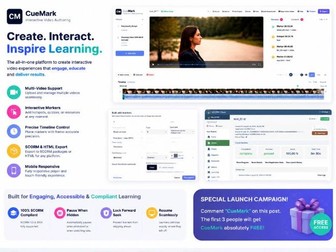
Create engaging, interactive videos without complex authoring tools. CueMark is a powerful Interactive Video Authoring Platform designed for educators, instructional designers, e-learning developers, and organizations that want to transform traditional videos into engaging learning experiences. Instead of passive video watching, CueMark helps you create active learning journeys by adding interactions, resources, checkpoints, and meaningful engagement moments directly into your videos.