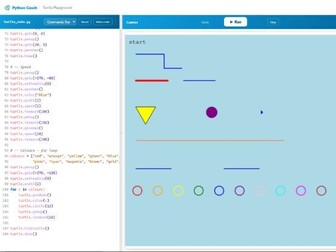
The hardest moment in teaching programming is the gap between “I wrote some code” and “I made something.” Text output narrows that gap slowly. A shape appearing on screen closes it immediately.
This tool runs Python turtle code in the browser. Students write code, press Run, and watch it draw. No installation. No setup. No waiting for a school network to cooperate.
Use it to introduce loops by drawing squares and spirals. Use it to show how changing one angle produces a completely different shape. Use it when you want a lesson where students leave with something they actually made.
The code is Python. The output is instant. The moment a student’s shape appears for the first time is the moment they start writing more code.
Try it at pythoncoach.org/turtle
Works in any browser. No login required.
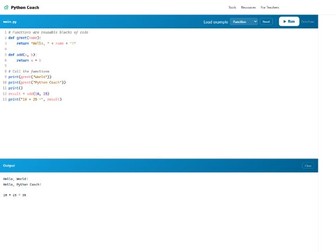
Every Python lesson has a moment where a student cannot run code. Wrong browser. No install. Blocked network. Forgotten password. The lesson waits.
This tool runs Python in the browser. Students open it and start typing. Nothing to install. Nothing to log in to. Nothing to configure.
Use it as a scratch space when students need to test a small idea without opening a full IDE. Use it when a school device cannot run anything locally. Use it when you want every student writing code in under ten seconds.
It is not a full development environment. It is a place to write Python and run it immediately, from any device, without asking IT for anything.
Try it at pythoncoach.org/playground
Works in any browser. No login required.
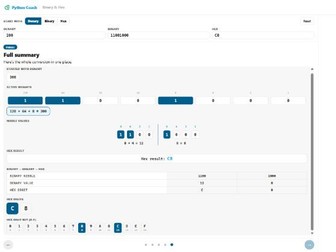
Binary and hex conversion questions follow a fixed structure. The mark scheme awards marks for working, not just the final answer. Students who lose those marks usually know the method. They just cannot see their own errors.
This tool walks through every conversion step by step. Denary to binary, binary to hex, hex to binary. Each one broken into the same stages that appear in AQA, OCR, and Edexcel mark schemes: the 8-bit weighting line, the active bits, the nibble split, the hex digit lookup.
Students choose a starting value and a direction, then follow the steps at their own pace. Every intermediate value appears before the next step begins.
Use it to introduce the method for the first time. Use it when a student gets the right answer but cannot show their working. Use it the week before an exam when these questions need to feel automatic.
Try it at pythoncoach.org/binary-hex
Works in any browser. No login required.
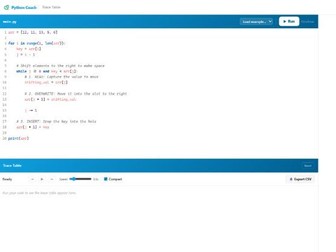
Trace table questions are one of the most predictable parts of the GCSE Computer Science exam. Students still lose marks on them.
Not because they cannot read the code. Because they have never watched a trace table build itself step by step.
This tool runs any Python program one line at a time and fills in the trace table as it goes. Students see exactly which variables exist, when each one updates, and what every cell holds at every point in the execution. The output follows the format expected in exam mark schemes.
Show it before asking students to attempt one themselves. Use it to check whether a student’s handwritten trace is correct. Come back to it when a student is certain their answer is right but the mark scheme disagrees.
Paste the code. Press Run. Step through it. The table builds itself.
Works in any browser. Try it at pythoncoach.org/trace-table No login required.
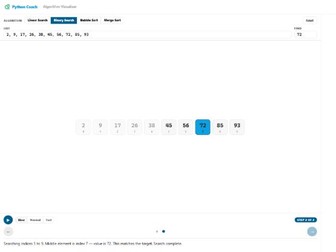
Students can describe an algorithm but still fail the trace question. This tool makes every step visible in the exact language of GCSE mark schemes. Linear search, binary search, bubble sort, merge sort.
Trace-style questions ask students to identify what happens at a specific step: “what is the value of mid at the end of pass 2?” The difficulty is rarely a failure to understand the concept. It is not having seen enough steps, slowly enough, to know how the algorithm behaves at each individual moment.
This tool solves that. Students choose an algorithm, enter their own list and target value, and step through one comparison or swap at a time. Every step is explained in plain language: “checking index 0, value is 3, not a match”, using the same phrasing that appears in mark scheme guidance.
Why mark scheme language matters
Students who understand an algorithm intuitively still lose marks because they write their answers in the wrong register. Seeing the correct phrasing at every step, rather than reading it once in a textbook, builds the habit passively.
Self-paced, private practice
Students who don’t follow an in-class explanation rarely say so. This tool lets them revisit every step as many times as they need, privately, without the classroom pressure of admitting confusion.
Algorithms covered
Linear search
Binary search
Bubble sort
Merge sort
All four are required content in AQA, OCR, and Edexcel GCSE Computer Science specifications.
No setup required
Open the link and start. No login, no download, no IT request. Works on any device including school Chromebooks.
https://pythoncoach.org/algorithm-visualiser
Built by a UK Computing teacher.