

 Quick View
Stage 1 Computing: Are Computers Clever?
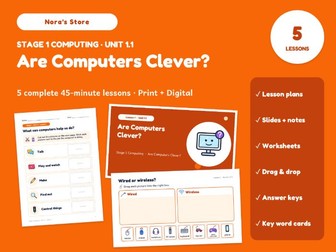
5 ready-to-teach 45-minute computing lessons for Stage 1 (ages 5-6), aligned to the Cambridge Primary Computing curriculum framework (0059). Lesson plans, slides with teacher notes, printable worksheets and digital drag-and-drop activities - no prep needed.
Young learners discover what computers are, the many jobs they do for us, and the big idea that computers only work when people give them instructions. Along the way they meet the internet, wired and wireless connections, the school network, inputs and outputs, and what to do when the internet is not there.
What’s included
5 lesson plans (editable Word + PDF): objectives, success criteria, a timed 45-minute sequence, misconceptions, differentiation (support, challenge, EAL), assessment questions and answers
60 slides in PowerPoint (works in Google Slides) with teacher notes on every slide
3 printable worksheets in A4 and US Letter, with answer keys
2 digital drag-and-drop activities for PowerPoint or Google Slides, with answer keys
16 illustrated key word cards (A4 + US Letter)
Unit assessment checklist (Word + PDF)
A Start Here teacher guide
Lessons
Lesson 1: Are Computers Clever? (1CS.01, 1CS.02, 1DC.02) - printable worksheet
Lesson 2: Wired or Wireless? (1DC.03, 1CS.02) - digital drag-and-drop
Lesson 3: Input and Output (1DC.01, 1CS.03, 1CS.04) - printable worksheet
Lesson 4: Talking Through the Internet (1DC.02, 1DC.04, 1CS.03, 1CS.04) - digital drag-and-drop
Lesson 5: Computers Help Us Find Answers (1CS.01, 1CS.03, 1DC.04) - printable worksheet
Learning objectives covered
1CS.01 Computer systems do many different jobs (talking, playing, making, finding out, controlling)
1CS.02 Computers run many different programs
1CS.03 Ways to put information into a computer (input)
1CS.04 Ways a computer gives information out (output)
1DC.01 Devices can connect to make a network
1DC.02 The internet: computers joined together around the world
1DC.03 Wired and wireless connections
1DC.04 The internet is not always available
Why it works in class
Bright, simple slides made for young learners, with all-original illustrations
Print-and-go worksheets, cut-and-stick sheets and role-play cards
Digital boards are locked backgrounds, so pupils can only move the pictures
Every digital activity also works as a whole-class activity on the board
Format
PDF, Word (.docx) and PowerPoint (.pptx) - fully editable. Works in PowerPoint and Google Slides. Fonts are embedded in the slides; the free fonts Fredoka and Andika are used.
Please note
This is an independent resource aligned to the Cambridge Primary Computing curriculum framework (0059). It is not produced, endorsed or affiliated with Cambridge University Press & Assessment.