Leaving Cert Assessment Tracker (spreadsheet)Quick View
tmca_resources

Leaving Cert Assessment Tracker (spreadsheet)

(0)
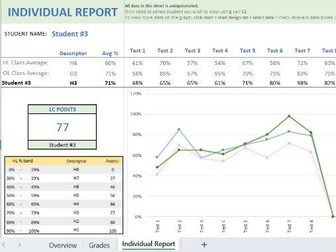
Save time and make tracking student’s progress and PT Meetings easy. Once you have added the student names, simply input assessment name and the grade achieved. All the rest will be automatically generated! Each page has simple instructions provided to ensure ease of use - No Excel skills required. Once off payment - simply create a copy of the file for each new class. With the Leaving Certificate Assessment Tracker you will easily be able to do all of the following: Overview page: See a class overview based on your classes assessment data. Compare class averages across levels and all assesments completed. Overall class grade breakdowns for both HL and OL. Quickly identify areas where the whole class did well or needs improvement. Grades Page: Track all your assessments for the class group during the whole Senior Cycle. Select whether each student should be included in either HL or OL grade calculations. Automatically generate class averages by level based on each assessment. Easily keep record of students grade, absence, or non-submission of each assessment. Individual Report Page: Use to look at individual students progress across all assessments. See the individual student’s results visually graphed against the class average in each assessment. Predicted Leaving Certificate grade and CAO points based on individuals average results and subject level. Great for Parent-Teacher meetings or giving individual feedback to students on progress and areas to focus on. Fast drop-down menu to quickly switch between individuals. Note: Downloads as an Excel file, but can easily be converted to Google Sheets by importing it.
Junior Cycle Assessment Tracker (spreadsheet)Quick View
tmca_resources

Junior Cycle Assessment Tracker (spreadsheet)

(0)
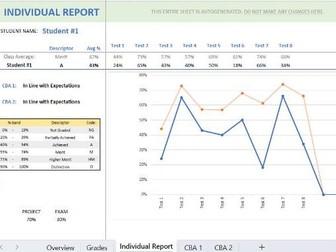
Save time and make tracking student’s progress and PT Meetings easy. With the Junior Cycle Grade Tracker you will easily be able to do all of the following: 1. Overview page: See a class overview based on your classes assessment data. Compare class averages across all assesments completed. Overall class descriptor breakdowns. See overall breakdown for CBA 1 and 2. Quickly identify areas where the whole class did well or needs improvement. 2. Grades Page: Track all your assessments for the class group over the whole Junior Cycle. Automatically generate class averages based on each assessment. Easily keep record of students grade, absence, or non-submission of each assessment. 3. Individual Report Page: Use to look at individual students progress across all assessments. See the individual student’s results visually graphed against the class average in each assessment. Predicted JCPA grade descriptor based on individuals average results. Great for Parent-Teacher meetings or giving individual feedback to students. Fast drop-down menu to quickly switch between individuals. 4. CBA 1 and 2 pages: Easily keep track of CBA results, teacher comments, and which CBAs to bring to your SLAR meeting. Automatically tally number of students awarded each descriptor. Once you have added the student names, simply input assessment name and the grade achieved. All the rest will be automatically generated! Each page has simple instructions provided to ensure ease of use - No Excel skills required. Note: Downloads as an Excel file, but can easily be converted to Google Sheets by importing it.