AS Pure Maths Past Papers by Topic EdexcelQuick View
TST_BestMaths

AS Pure Maths Past Papers by Topic Edexcel

(0)
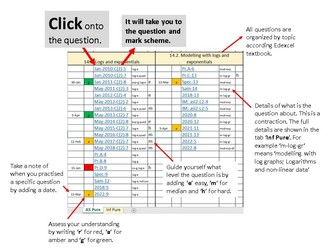
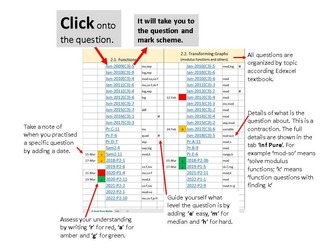
Edexcel AS Pure Maths Past Paper Questions by Topic + the easy-to-use topic-by-topic Excel Question Tracker Bundle Perfect for exam revision, homework and boosting grades quickly. Designed for both students and teachers, this pack helps build confidence through maths exam practice across all key AS Pure Maths topics and supports effective revision and exam preparation. PowerPoint features: Past paper questions grouped by topic (2010-2022) Full AS Pure Maths coverage Topics include: Algebra (index laws, surds, factorising, expanding) Quadratics and modelling Simultaneous equations Graphs and transformations Points, lines and linear models Circles Polynomials and proof Ideal for revision, homework, or lesson use Clean and easy-to-use format Excel Tracker features: Lists every relevant past paper question with paper reference, year and key skills. Fully hyperlinked taking you to the corresponding slide from the PowerPoint. Colour-code questions as you complete them – perfect for planning focused revision and identifying weak areas. Ideal for Year 12 AS Pure Mathematics students and teachers. Save hours of planning and boost exam technique with real past paper questions, especially modelling, proof and application questions. Files included: PowerPoint (.ppsx) – 1000+ slides with navigation Excel Spreadsheet (.xlsx) – fully editable Perfect companion resources that work together for complete AS Pure revision. Important Notes: You must keep the two files together in the same folder. Do not place in different folders, as the links in the Excel file will not work. Do not change the name of the PowerPoint because the links in the Excel file will not work.
AQA AS Pure Maths Past Papers + TrackerQuick View
TST_BestMaths

AQA AS Pure Maths Past Papers + Tracker

(0)
AQA AS Pure Maths past paper questions by topic with full mark schemes + Excel tracker. Specimen + 2018-2023 papers. Perfect for AS Pure revision, lessons & homework in differentiation, integration, trigonometry, quadratics, logs & more. AQA AS Pure Maths Past Papers + Tracker Bundle Provided by Best Math Tutor Two essential files for maximum teaching efficiency: 1. PowerPoint (.ppsx – 71 MB) Huge ready-to-use slide deck with hundreds of real AQA AS Pure exam questions neatly organised by topic. Each question is followed immediately by its official mark scheme. Includes clear navigation menu. 2. Excel Tracker (.xlsx) Professional spreadsheet listing every question with exact paper references (Specimen + 2018–2023), topic codes, and a full legend. Makes it easy to locate any question quickly by topic or paper. Includes: • All Specimen Papers + 2018, 2019, 2020, 2021, 2022 & 2023 papers (P1 & P2) • Full official mark schemes for every single question • Selected high-quality Integral Maths topic test questions • No duplicated questions – placed under the most relevant topic Topics covered: Algebraic expressions (index laws, surds, factorising), Quadratics & modelling, Coordinate Geometry (lines, circles, inequalities), Sketching & Transforming Graphs, Vectors, Proof, Differentiation (first principles & modelling), Integration, Polynomials, Binomial Expansion, Logs & Exponentials (incl. modelling), Trigonometry (ratios, identities, equations & modelling). Perfect for: • Topic-based revision lessons • Homework & independent practice • Starters, plenaries & mock exams • Planning and tracking student progress Ideal for Year 12 teachers and tutors following the AQA AS Mathematics Pure specification (7356). Format: PowerPoint Show (.ppsx) + Excel Spreadsheet (.xlsx) – both open instantly and ready to use. Search tags: AQA AS Pure Maths, past paper questions, topic questions with mark schemes, AS Pure revision tracker, AQA AS differentiation integration, trigonometry binomial logs vectors, AS level maths question bank, AQA 7356 Important Notes: You must keep the two files together in the same folder. Do not place in different folders, as the links in the Excel file will not work. Do not change the name of the PowerPoint file or add or change the places of the slides because the links in the Excel file will not work.