Inclusive GCSE Maths Worksheets with EDI Themes
Make GCSE Foundation Maths more meaningful and inclusive with this collection of themed worksheets that link core mathematical skills to key Equality, Diversity and Inclusion (EDI) events throughout the calendar year.
Designed for use across secondary year groups and adult learners working at Foundation level, this resource provides engaging, real-world contexts to support learning and promote wider awareness.
Each worksheet focuses on a specific maths topic (such as fractions, algebra, rounding, percentages, standard form, bearings, and statistics) framed through significant cultural, historical, or social themes.
Topics include:
Sixteen Days of Activism Against Gender-Based Violence ( Interpreting data and raising awareness)
Diwali & Aryabhata (Fractions and rounding in a historical and cultural context)
Carers Rights Day (UK) (Algebra through the theme of care and rights)
Katherine Johnson & NASA (Black History Month/ Exploring standard form through space)
Lunar New Year Bearings (Bearings and scale drawing linked to a global celebration)
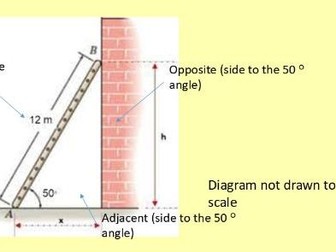
UK Ramp Regulations & Trigonometry (Applying real-world gradients and slope rules)
Women’s History Month (Data analysis, fractions and percentages with Florence Nightingale & Harriet Martineau)
Garrett Morgan’s Traffic Lights (Black History Month/ LCM revision with a focus on invention and safety)
Ramadan and Eid Handling Data: Tables and Charts
Plus: contextual tasks on Christo’s art, Abraham Nemeth’s contributions to accessibility, and ancient Egyptian and Russian papyri algebra.
Also included are some “Blast from the Past” mini-tests: quick, revision-style starters with an EDI focus, perfect for warm-ups, retrieval practice, or formative assessment.
Ideal for: Culturally responsive teaching, inclusive lesson planning, enrichment activities, and cross-curricular learning. Supports key elements of the GCSE Foundation Maths curriculum while fostering discussion around diversity, equality, and global citizenship.