Qualifications Scotland Estimate Tracker for National 5 and Higher (Excel)Quick View
ldwdouglas

Qualifications Scotland Estimate Tracker for National 5 and Higher (Excel)

(0)
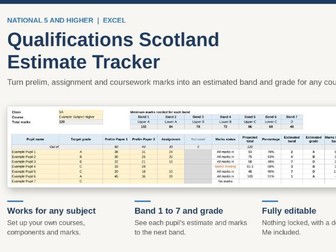
After every prelim, the same job lands on your desk. You add up marks across papers and assignments, work out where each pupil sits against the boundaries, decide who is close to the next band, and compare it all with target grades. Most departments do this with home-made spreadsheets or mental arithmetic, and the results are hard to explain when a parent, a pupil or a depute asks how an estimate was reached. This tracker does the work for you and shows its working on screen. Enter each pupil’s marks and the tracker adds them up, compares the total with the grade boundaries, and shows the estimated band from 1 to 7, the estimated grade, how many marks the pupil needs to reach the next band, and whether they are above, on or below their target grade. Because it is built around Scottish bands and the Qualifications Scotland boundary method, rather than GCSE grades, you don’t have to adapt anything. The marks-to-next-band and marks-to-target columns also show at a glance which pupils are a few marks from a boundary, so you can decide where to put your support before the exam. It works for any subject because you set up the courses yourself. On the Courses sheet you type in your course names, the components that make up each course, such as prelim papers and the assignment, and the maximum mark for each. You then pick a course from a drop-down on a class sheet, and the column headings change to match. There are four class sheets, each with space for 35 pupils, and a Summary sheet that fills itself in with grade, band and target counts for every class. If everyone in a department uses the same file, everyone is working from the same boundaries and the same method. The boundaries use the notional percentages Qualifications Scotland publishes: 50% of the total marks for C, 70% for A and 85% for upper A. The other bands are worked out with the published formulas. If you have the actual cut-off marks for a course, you can type them in and the tracker uses those instead. Missing marks are handled sensibly: if an assignment hasn’t been marked yet, the estimate is scaled up from the marks entered and flagged as provisional. Nothing is locked or protected, so you can change any cell, rename sheets and adjust the colours. Every cell you type in is shaded yellow, and a detailed Read Me sheet explains each step, including how to edit courses, change boundaries, add classes and fix common problems. The file is a standard Excel workbook in Arial, and it comes with example courses and pupils so you can see how it works before clearing them out. Please note that the example courses and marks are placeholders, so check them against the Qualifications Scotland course specifications before you use them. Estimates are a guide to support your professional judgement, not a prediction of final results, because the real boundaries are set each year after marking.
Excel Seating Plan Generator Bundle: Scotland and England EditionsQuick View
ldwdouglas

Excel Seating Plan Generator Bundle: Scotland and England Editions

(0)
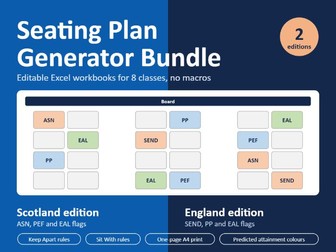
Stop redoing seating plans by hand every time a class changes. This bundle gives you two ready-to-use Excel seating plan generators, one for Scottish schools and one for English schools. Each one is built around the support flags and terminology your school actually uses. What’s included Scotland edition: flags for ASN, PEF and EAL, plus predicted attainment bands England edition: flags for SEND, PP and EAL, plus predicted attainment bands What each workbook does Holds 8 classes in one file, with a Setup sheet and a Plan sheet for each Lets you design any room layout (rows, pairs, groups, horseshoe) by typing 1 for a seat and 0 for a gap Offers three arrangements: random, alphabetical, or lowest predicted attainment at the front Always seats pupils who need the front first Keep Apart rules warn you if two pupils are sitting next to each other or diagonally Sit With rules place buddies and support partners side by side where the layout allows Colour-codes the plan by support flag or by predicted attainment band Has a “show flags” switch, so you can project or share a plan without showing support information Prints on one A4 landscape page Includes example data and a Start Here sheet with clear instructions No macros, so it works with school IT restrictions Change one seed number for a fresh plan, and nothing reshuffles by accident when you edit Fully editable, so you can change anything to suit your classroom
Tracking Bundle: Whole Class and Single Subject GSCE TrackerQuick View
ldwdouglas

Tracking Bundle: Whole Class and Single Subject GSCE Tracker

(0)
Track every pupil’s GCSE progress from target to final grade with this two-file Excel bundle designed by a teacher, for teachers. Enter your data once and let the spreadsheets do the rest, with automatic RAG status, grade gaps, and whole-cohort summaries updating instantly. This bundle includes two trackers: 1. Whole Class GCSE Tracker A bird’s-eye view of your entire cohort across 12 subjects. Track target, predicted, and actual grades for every pupil side by side, with an automatic overall RAG status flagging pupils who need attention across multiple subjects. Perfect for Heads of Year, form tutors, and senior leaders monitoring whole-cohort performance. 2. Single Subject GCSE Tracker A deeper, subject-level tracker for classroom teachers and Heads of Department. Track target, predicted, and actual grades alongside percentages, automatic grade gap, and RAG status per pupil. A colour scaled grade gap column instantly highlights who is above, on, or below target, ideal for identifying intervention priorities. Both files include: Target, predicted, and actual grades (1–9) with percentage columns Automatic RAG status : GREEN Above Target, YELLOW On Target, RED Below Target Class/cohort summary tab with averages and percentage breakdowns Built-in user guide tab — no instruction sheet needed 5.Formula-protected cells — pupils and colleagues can’t break it Up to 50 pupils per tracker No macros, works on any version of Excel Instant download, open and use today Perfect for: Classroom teachers, Heads of Department, Heads of Year, and Data Managers in English secondary schools tracking GCSE cohorts.
Progress 8 TrackerQuick View
ldwdouglas

Progress 8 Tracker

(0)
Save hours of admin with this ready-to-use Progress 8 Tracker for Excel, just enter your pupil data and let the spreadsheet do the rest. Designed by a teacher for busy secondary school educators, this tracker automatically calculates Attainment 8 and Progress 8 scores for up to 50 pupils based on their KS2 starting points and GCSE grades. What’s included: Tracker sheet enter KS2 scores and GCSE grades (1–9) and Progress 8 calculates instantly Automatic colour-coded status Above Expected (GREEN), On Track (YELLOW), Below Expected (RED) Summary sheet whole cohort averages, breakdown, and percentage above/below expected progress Full user guide tab step-by-step instructions built into the file Formula protected cells, pupils and colleagues can’t accidentally break it Perfect for: Secondary teachers, Heads of Department, Heads of Year, and Data Managers tracking GCSE cohort progress in English schools. Key features: Covers all 8 GCSE slots with correct double weighting for English and Maths EBacc and open slot buckets clearly labelled Works for both actual results and predicted/estimated grades No macros works on any version of Excel Instant download open and use today
Department Support & Intervention Tracker – Excel Tracking & Monitoring for Underperforming PupilsQuick View
ldwdouglas

Department Support & Intervention Tracker – Excel Tracking & Monitoring for Underperforming Pupils

(0)
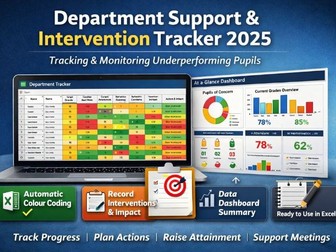
This Excel pupil tracking and intervention tracker is designed to help teachers and departments quickly identify and monitor pupils of concern and underperforming learners. It provides a simple, ready-made system for data tracking, monitoring progress, and recording interventions, supporting raising attainment across a department. All formulas and colour coding are already built in. There is no setup required just enter pupil information and the tracker automatically updates and highlights concerns, saving valuable teacher workload time. This resource is ideal for secondary teachers, Principal Teachers, Faculty Heads, Data Leads and Senior Leaders who need clear evidence of support, intervention and impact. Perfect for: tracking underachieving pupils recording concerns and barriers to learning departmental monitoring and review meetings inspection or quality assurance evidence raising attainment strategies targeted support planning closing the attainment gap What this tracker records This resource allows you to record and monitor: pupil name and candidate number class, teacher and stage/year group course/level (e.g. National, Higher, GCSE, A-Level etc.) target grade/band current working grade baseline data or prior attainment assessment results and progress over time homework completion attendance percentage behaviour/engagement concerns barriers to learning pupils of concern / underperforming pupils tier/level of intervention actions and support strategies put in place review date and follow-up outcome/impact of intervention staff member responsible parent/carer contact notes additional pastoral notes or comments Key features fully editable Excel file automatic colour coding and formulas already applied intervention tier system built in fields for attendance, behaviour, homework and progress space to record actions, outcomes and impact dashboard overview for departmental data suitable for whole-school or department use What it helps you do identify pupils who are not meeting targets plan and record interventions evaluate impact over time evidence support for inspections or SLT streamline departmental tracking and monitoring reduce admin and teacher workload This is a ready-to-use pupil data tracker designed to make tracking and monitoring simpler, faster, and more consistent across your department.
Higher Politics Unit 1 Political Theory PackQuick View
ldwdouglas

Higher Politics Unit 1 Political Theory Pack

(0)
This resource features PowerPoints and resources for Unit 1 of Higher Politics. There is a full presentation covering Power, Legitimacy and Authority along with a full presentation on Direct and Representative Democracy and Political Ideologies. There are accompanying worksheets and a full booklet with additional, in depth information.
The Inclusive AI Toolkit: Save 6+ Hours Per Week on ASN-Friendly DifferentiationQuick View
ldwdouglas

The Inclusive AI Toolkit: Save 6+ Hours Per Week on ASN-Friendly Differentiation

(0)
Transform your approach to inclusive teaching with this comprehensive toolkit that has helped me save an average of 6+ hours per week on lesson planning and differentiation. This isn’t just another list of generic AI prompts, it’s a professionally designed system specifically created for ASN and inclusive pedagogy that maintains high expectations while removing barriers to learning. This is a product of my use over a year. This toolkit includes two professionally formatted Word documents. The Main Guide (10 comprehensive sections) provides everything you need to understand and implement AI-assisted differentiation, including the “Golden Prompt Formula,” ethical guidelines, troubleshooting tips, and a complete framework organised by learner need. The Prompt Bank contains 20+ copy-and-paste ready prompts organized by specific needs, with a Quick-Start section to get you creating materials immediately.
National 4/5 Excel Tracking SpreadsheetQuick View
ldwdouglas

National 4/5 Excel Tracking Spreadsheet

(0)
This Excel tracking template for Scottish National 4 & 5 classes helps teachers easily manage student progress, assessment data, and attainment. Includes charts & macros to save you time. This is a user-friendly Microsoft Excel tracking template (.xlsm file) specifically designed for teachers in Scotland to manage National 4 (N4) and National 5 (N5) level classes. It’s an essential tool for keeping precise records of student progress, assessment results, and overall attainment against SQA benchmarks. The template comes pre-built with multiple worksheets, allowing you to organise different aspects of your N4/N5 tracking, such as individual unit assessments, coursework progress, final grades, or specific skill development for each student or class group. It also has sections to record concerns and department interventions. You’ll find a variety of charts included, ready to visualize student attainment and identify trends quickly, helping you pinpoint students who might need targeted intervention or additional support to meet course requirements. Furthmore, there is a tab to track individual attendance to help with tracking concerns in relation to attendance. It is user friendly, full editable and tabs can be easily copied and pasted for multiple classes.