 Quick View
KS3 Scheme of Work - Minimalism
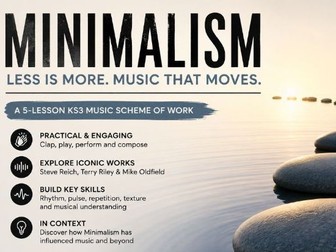
A fully resourced 5-lesson KS3 Music scheme exploring Minimalism through practical performance, listening and analysis activities.
KS3 Music: Minimalism – 5 Lesson Scheme of Work
Engage students with one of the most influential musical movements of the 20th century through this practical and accessible scheme of work on Minimalism.
Across five fully resourced lessons, students explore the key features of minimalist music including repetition, pulse, ostinato, phasing and gradual change through a combination of performance, listening, discussion and musical analysis.
Students are introduced to the works of Steve Reich, Terry Riley and Mike Oldfield, developing their understanding of how minimalist composers create complex musical ideas from simple musical materials.
The scheme is designed for KS3 learners and balances practical music-making with contextual understanding, making it suitable for both specialists and non-specialists.
Lessons Included
Lesson 1 – Introduction to Rhythm and Clapping Music
Pulse, rhythm and ensemble skills
Introduction to minimalism
Practical clapping activities
Lesson 2 – Steve Reich: Clapping Music
Explore Reich’s innovative use of rhythm
Perform extracts from Clapping Music
Understand phasing and rhythmic displacement
Lesson 3 – Terry Riley: In C
Explore one of the most influential minimalist works
Perform and improvise using repeating patterns
Develop understanding of structure and musical choice
Lesson 4 – Mike Oldfield: Tubular Bells
Analyse key musical features
Perform thematic material
Explore repetition, texture and layering
Lesson 5 – Tubular Bells Continued & Minimalism in Context
Consolidate learning
Explore the wider influence of minimalism in popular music, film and contemporary culture
Review key concepts and musical vocabulary
Included Resources
✔ 5 fully resourced PowerPoint lessons
✔ Practical performance activities
✔ Listening and appraisal tasks
✔ Worksheets and supporting resources
✔ Composer/context information
✔ Differentiated tasks and extension opportunities
Learning Outcomes
Students will:
Perform rhythmic and melodic patterns confidently
Identify key characteristics of minimalist music
Analyse and discuss musical works using appropriate terminology
Understand the historical and cultural context of minimalism
Develop ensemble, listening and creative music-making skills
Ideal for KS3 Music (Years 7–9), cover lessons, non-specialists, and departments looking for engaging, ready-to-teach resources.