 Quick View
MCQ Template in PowerPoint
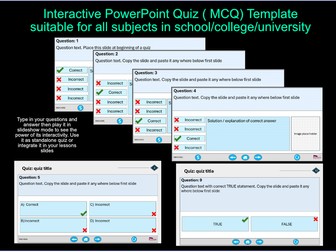
Power Point Multiple Choice Quiz (MCQ) interactive template – suitable for all subjects in school, college and university. This template is designed for widescreen (16:9). It can be used as quiz or copied into your lesson presentation.
You can easily create a customized quiz by adding your own questions related to the topic you teach. No technical skills are needed – just edit the question and answer text on the slides to create your quiz. Instruction included in the template.
This Power Point template features a clean design for multiple-choice quizzes. It includes three types of questions: multiple choice with explanations and images, multiple choice with a single correct answer, and true/false. The template can be used as a standalone quiz or integrated into your power point lesson slides. It is suitable for starter activities, knowledge checks after completing learning objectives or outcomes, or as a plenary task. When run in slide show mode, especially on an interactive white board or screen, you can engage students by selecting answers directly and discussing whether they are correct or incorrect.