Standalone HTML Phonics App (FULL VERSION)Quick View
TeacherToolsStudio

Standalone HTML Phonics App (FULL VERSION)

(0)
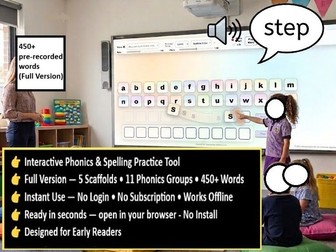
Interactive Phonics and Spelling Practice Tool Full Version Created by Aniruddha Das. Teacher Tools Studio. https://youtu.be/wJgTnq7m8Ao?si=hQv9waY7vJAeOQ4H No install. No login. No subscription. Works offline. This standalone HTML app supports phonics and spelling through structured word building, clear audio, drag and drop interaction, and immediate feedback. It is designed for use on desktop and laptop computers and interactive whiteboards. A free unrestricted trial version is available and should be tested before purchasing the full version. Important: Download the HTML file onto a desktop or laptop computer before opening it. Do not run the file directly from cloud storage services such as OneDrive or Dropbox. The app is not intended for mobile phones. Game Mode: Pupils hear a word spoken using pre recorded audio in a neutral British English accent and then build the word by dragging the correct letter tiles into place. This supports blending, segmenting, decoding and spelling through structured and repeatable practice. Game Mode works entirely offline and does not rely on browser voices or online text to speech services. Full Version Features: More than 450 built in words. 11 phonics groups. 5 scaffold modes. Pre recorded Game Mode audio. Drag and drop letter tiles. Two independent word building rows. Uppercase and lowercase toggle. Scoring and feedback system. Open word building mode. Built in profanity filter. Classroom Use. The expanded word bank and wider phonics coverage make this version suitable for whole class teaching, intervention groups, catch up programmes, independent practice and SEND support. Teachers can adjust scaffold levels to provide appropriate support and gradually increase pupil independence. The two row layout allows modelling, comparison and paired work. Teachers can demonstrate on one row while pupils attempt the other, or compare similar words to address misconceptions. Open Word Building Mode: Outside Game Mode, pupils and teachers can freely construct words using the available letter tiles. When Browser Voice is enabled, constructed words can be spoken aloud using browser provided voices. Availability depends on the device and browser being used. Profanity Filter: A built in profanity filter is included to support safer use in open word building mode. Teacher supervision is recommended when pupils are working independently. Copyright: All content is original and does not reproduce copyrighted material from any published phonics scheme, programme or source.
Standalone HTML Phonics App (FREE TRIAL)Quick View
TeacherToolsStudio

Standalone HTML Phonics App (FREE TRIAL)

(0)
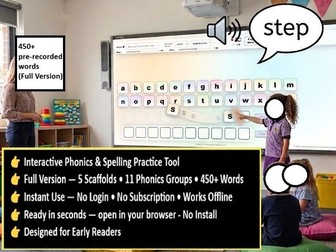
Interactive Phonics and Spelling Practice Tool – Trial Version Created by Aniruddha Das - Teacher Tools Studio No install. No login. No subscription. Works offline. This standalone HTML app supports phonics and early spelling through structured word-building, clear audio, drag-and-drop interaction and immediate feedback. It is designed for classroom use on desktop or laptop devices and interactive whiteboards. This is the trial version of the full app. Please download and test this version first to check that it works smoothly on your device and suits your classroom setup before purchasing the full version (TBA). Important: do not run the HTML file directly from cloud storage such as OneDrive or Dropbox. Download it onto a laptop or desktop computer first, then open it in your browser. As it runs as a single HTML file, you may need to adjust your browser zoom (+/−) slightly so all controls are visible on your screen. This app is not intended for mobile phones. The main feature is Game Mode. Pupils hear a word spoken using pre-recorded audio in a neutral British English accent, then build the word by dragging the correct letter tiles into place. This supports blending, segmenting and spelling through structured, repeatable practice. Game Mode works offline using the included pre-recorded word audio. It does not rely on browser voices or online text-to-speech. This trial version includes: • 197 built-in words • 5 phonics groups • 2 scaffold modes • Pre-recorded Game Mode audio • Drag-and-drop letter tiles • Two independent word-building rows • Tile-lowering option for younger pupils • Uppercase/lowercase toggle • Scoring and feedback in Game Mode • Open word-building mode • Built-in profanity filter The two-row layout is useful for modelling, comparison and paired work. A teacher can model on one row while pupils attempt the other, or both rows can be used to compare similar words and address misconceptions. Outside Game Mode, the app also includes an open word-building mode where teachers or pupils can freely construct words. When browser voice is enabled, the app can speak constructed words aloud using browser-provided voices. This optional feature may require an internet connection because browsers may need access to different voices and accents. A built-in profanity filter is included to support safer use in open word-building mode. However, as pupils can freely arrange letter tiles in this mode, teacher guidance and supervision are recommended, especially when pupils are using the app independently or in pairs. This trial version gives you a practical way to evaluate the app’s teaching approach, layout, interaction model and classroom suitability before moving to the full version. The full version includes a larger word bank, more phonics coverage and additional scaffold options. All content is original and does not reproduce copyrighted material from any published phonics scheme or source.