Telling Time Interactive Clock GameQuick View
Kyrie_Zheng

Telling Time Interactive Clock Game

(0)
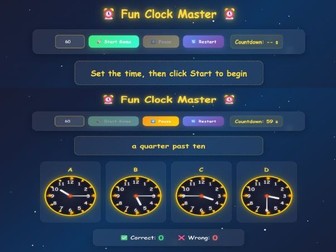
A no-prep telling time game where students match time expressions to analogue clocks. Great for primary, ESL, EFL and whole-class review. Make telling time practice more engaging with this interactive HTML clock game. Students read a time expression, look at four analogue clock options, and click the correct clock before the timer runs out. This resource is ideal for practising common time expressions such as o’clock, a quarter past, half past and a quarter to. It works well as a whole-class game, warm-up activity, review task, team competition, starter activity, maths centre activity or end-of-lesson challenge. The game includes: Interactive analogue clock questions Four multiple-choice clock options Countdown timer Start, pause and restart buttons Correct and wrong answer scoring Mistakes review section Colourful classroom-friendly design Browser-based HTML format Best for: Primary lessons Telling time practice ESL / EFL classes Maths / measurement review Vocabulary practice Speaking warm-ups Whole-class games Interactive whiteboard activities No-prep classroom revision Please note: This is an HTML digital resource. For best results, download the file and open it in a modern web browser such as Chrome, Edge or Safari.
Spelling Word Battle Interactive GameQuick View
Kyrie_Zheng

Spelling Word Battle Interactive Game

(0)
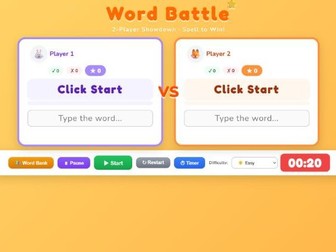
A no-prep 2-player spelling game where students use definitions and missing-letter clues to complete words before the timer runs out. Make spelling and vocabulary practice more exciting with this interactive Word Battle game. Students compete in a 2-player showdown by reading word definitions, looking at missing-letter clues, and typing the correct word before time runs out. This browser-based game is ideal for spelling review, vocabulary practice, word work, ESL / EFL lessons, starter activities, intervention groups, literacy centres, whole-class review and fun end-of-lesson competitions. The game includes: 2-player spelling battle mode Missing-letter word clues Word definitions for each question Built-in word bank Editable player names Countdown timer Pause, restart and timer controls Easy, medium and hard difficulty levels On-screen keyboard Correct, wrong and total score tracking Combo scoring effects Wrong answer review High score record Bulk word import feature Custom unit / word list management Colourful classroom-friendly design Browser-based HTML format Teachers can use the built-in word bank or add their own words and definitions. The bulk import tool makes it easy to paste a class vocabulary list and turn it into a spelling game. How to use: Download the HTML file and open it in a modern web browser such as Chrome, Edge or Safari. Display it on a projector, interactive whiteboard or classroom screen. Students can play in pairs, teams, small groups or as a whole-class challenge. Best for: Spelling practice Vocabulary review Word work English / literacy lessons ESL / EFL classes Primary classrooms Review games Team competitions Interactive whiteboard activities No-prep classroom revision Please note: This is an HTML digital resource. For best results, download the file and open it in a modern web browser.