

 Quick View
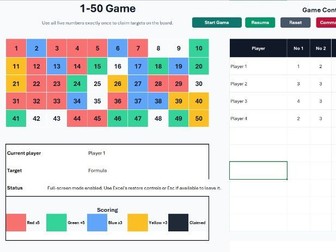
1-50 BIDMAS Excel Game
A numbers challenge game for classrooms.
Teams race to claim numbers from 1 to 50 by combining five given numbers into a valid formula using the rules of BIDMAS. Every turn uses new numbers; choose your target, build the formula, and score points from clever placement on the board.
Features:
Runs in Excel, so no installation required.
Supports multiple players or teams.
Automatic scoring.
Colour-based bonus squares.
Pause and resume game play.
Full-screen presentation mode.
Simple commands for skipping, docking points, pausing, and exiting.
Also included is a macro-free solutions spreadsheet that you can use to demonstrate if a number can be created using BIDMAS from the numbers given during the game.
The game is a remastered version of one I found online over a decade ago and have used in the classroom many times. It has been remastered using Microsoft Office 2024, so please ensure you have this version or later, and that you are able to run macro enabled Excel files on your computer.
I have had great success using this in the classroom over the years and it works really well for an end of term “fun” lesson, while still being educational. I would highly recommend you practice using it prior to deploying it in the classroom so you become familiar with how it works. I have had most success when keeping the teams to no more that 6, and using mini white boards.
A typical use case can look like this:
The children organise themselves into teams.
You choose team names. The children can seldom be trusted.
Each team gets mini white boards for their rough work and solution.
The first team gets a few minutes to decide and work out a solution.
You input their target and solution. The emphasis is on them to check you are entering it correctly. Note: The solution should be presented to you using BIDMAS. You will enter exactly what they write on their white board and will not be held responsible for incorrect syntax.
Once that teams solution has been entered, the next teams has 2 minutes to decide on their solutions. Setting a time limit keeps it snappy.
Teams taking too long, squabling or generally misbehaving can have points docked or their turn skipped.
Use the solutions spreadsheet to demonstrate how target numbers can made.
Note: I would not recommend merging cells on the spreadsheet because this often breaks the macro.