AI in Schools Leadership Toolkit - KCSiE 2026: Action Plan, Policy Checklist, Framework and PosterQuick View
Metapedagogy

AI in Schools Leadership Toolkit - KCSiE 2026: Action Plan, Policy Checklist, Framework and Poster

4 Resources
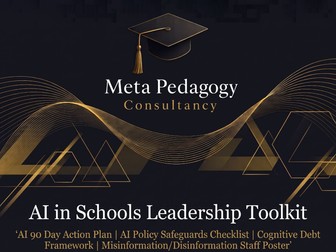
Four resources giving school leaders everything they need to introduce AI safely, with full KCSiE 2026 compliance. Save over 30% compared to buying individually. This bundle brings together the core leadership and CPD resources for implementing AI in schools. Each resource is fully aligned to KCSiE 2026 and referenced to specific statutory paragraphs so you can demonstrate compliance to governors and Ofsted at every stage. What’s included: 90-Day AI Action Plan (£5.00 individually): a 12-week implementation template covering Listen, Prepare, Pilot, Review and Scale. Every action is mapped to KCSiE 2026 paragraph references with named owners and space for dates and status tracking. Take it straight to SLT and start. AI Policy and Safeguards Checklist (£5.00 individually): a three-page audit checklist covering nine areas: governance, policy and acceptable use, data protection, safeguarding, academic integrity, pupils and parents, image and data exposure, procurement, and training and review. Every item tells you which school policy it belongs in and whether it is statutory or local practice. The Cognitive Debt Framework (£5.00 individually): a one-page pedagogical framework showing how to use AI at five stages of learning so students think harder, not less. Mapped to Bloom’s taxonomy with ready-to-use prompts and referenced to Piaget, Vygotsky, Dewey, Bruner and others. Use it for department CPD, INSET or whole-school training. Misinformation, Disinformation and Malinformation Staff Poster (free individually): a staffroom display poster covering the three types of false information students encounter online, with a staff response protocol. Supports KCSIE 2026 paragraph 135. All resources are provided as print-ready PDFs with Meta Pedagogy branding. Tags: AI in schools, KCSiE 2026, AI policy, AI action plan, safeguarding, headteacher, SLT, governors, AI implementation, cognitive debt, school leadership, CPD, INSET, online safety, data protection, deepfakes, filtering and monitoring

AI-Assisted Planning: Prompt Guide for TeachersQuick View
Metapedagogy

AI-Assisted Planning: Prompt Guide for Teachers

(0)
Two-page prompt guide showing teachers exactly how to use AI tools for lesson planning. Step-by-step prompts with built-in checks. Works with any AI tool. This is not a theoretical guide about AI in education. It is a practical, ready-to-use set of prompts that teachers copy into ChatGPT, Claude, Gemini, Copilot or any general-purpose AI tool and start planning immediately. Every prompt includes a check step and a reprompt so teachers stay in control of the output. The guide follows a three-step workflow: Specify (set up the AI with your subject, year group, exam board, prior knowledge and learning objective), Draft (generate the content you need using targeted prompts), and Check, Fix, Build (review everything before creating the final resource). The drafting prompts cover: retrieval questions, content explanation, key vocabulary, worked examples with success criteria, model answers annotated to mark schemes, tasks with success criteria, differentiation into support, core and stretch, misconceptions and diagnostic questions, practice questions by cognitive demand, adapting existing resources, and plenary or exit tasks. Every prompt is written so teachers replace the square brackets with their own details. Every prompt has a check step telling the teacher exactly what to look for in the output. Every prompt has a reprompt showing how to fix the output when it is wrong, too generic or pitched incorrectly. The guide includes a clear safeguarding warning about not entering student names or identifying information into AI tools, and reminds teachers that AI generates plausible content, not verified content. Works across all subjects, all year groups and all exam boards. Suitable for NQTs learning to use AI for the first time and experienced teachers who want a structured workflow. Provided as a print-ready PDF. Two pages, dark background, designed to be kept open next to the AI tool while planning. Tags: AI planning, AI for teachers, AI prompts, ChatGPT, Claude, Gemini, Copilot, lesson planning, AI in education, prompt engineering, teacher workload, CPD, retrieval questions, differentiation, mark scheme, model answer, worked example, AI tools for schools
The Cognitive Debt Framework: Using AI to Deepen Student Thinking - 5 Stage Model for TeachersQuick View
Metapedagogy

The Cognitive Debt Framework: Using AI to Deepen Student Thinking - 5 Stage Model for Teachers

(0)
A one-page framework showing teachers how to use AI at five stages of learning so students think harder, not less. Practical prompts with pedagogy built in. Cognitive debt is what builds when students produce correct outputs without constructing the understanding behind them. The work looks right but the learning hasn’t happened. This framework gives teachers a five-stage structure for using AI in lessons that prevents students offloading thinking to the tool. The five stages are: Surface (AI as Questioner, probing what the student already knows without correcting), Struggle (AI as Scaffolder, giving hints not answers within the zone of proximal development), Speak (AI as Challenger, pressure-testing arguments the student has already articulated to a peer), Show (AI as Mirror, reflecting the student’s own thinking journey back to them) and Spiral (AI as Connector, retrieving earlier work and building on it at greater depth weeks later). Every stage defines what the student does, what the AI does, what it prevents and includes a ready-to-use prompt. The framework maps each stage to Bloom’s taxonomy (Anderson and Krathwohl’s revised taxonomy, 2001) and references the pedagogy underpinning each one: Piaget, Kelly, Dewey, Vygotsky, Wood, Bruner and Ross, Kapur, von Glasersfeld and Bruner’s spiral curriculum. The debt test at the bottom gives teachers a quick diagnostic: if a student can produce an answer but cannot do stages 1, 3 or 4 out loud, the thinking was offloaded and the debt is accumulating. This is not a policy document or a set of rules about AI. It is a pedagogical framework that shows how task design protects learning when AI is in the room. The protection comes from the structure, not from restricting the tool. Works across all subjects, all year groups and all key stages. Suitable for individual teacher CPD, department meetings, INSET sessions or whole-school AI training. Provided as a print-ready PDF. One page, dark background, designed for display or reference. Tags: cognitive debt, AI in education, AI for teachers, Bloom’s taxonomy, scaffolding, zone of proximal development, student thinking, AI prompts, pedagogy, CPD, INSET, deeper thinking, metacognition, AI framework, productive failure, spiral curriculum, critical thinking, Vygotsky, Piaget, lesson design
90-Day AI Action Plan for Schools - KCSiE 2026 (Headteachers / SLT)Quick View
Metapedagogy

90-Day AI Action Plan for Schools - KCSiE 2026 (Headteachers / SLT)

(0)
Step-by-step 12-week action plan for introducing AI safely in your school. Fully aligned to KCSiE 2026 requirements. Ready to use, written for headteachers and senior leaders. This two-page template gives school leaders a structured 90-day plan for rolling out AI to staff, from initial listening to full policy sign-off. Every action is mapped to specific KCSiE 2026 paragraph references so you can demonstrate compliance to governors and inspectors at each stage. The plan is built around four stages: Listen (weeks 1 to 2), Prepare (weeks 3 to 4), Pilot (weeks 5 to 6), Review (weeks 7 to 8) and Scale (weeks 9 to 12). Each stage includes named actions, practical examples, suggested owners and space to record dates and status. KCSiE 2026 compliance is built into every stage. The plan addresses the updated 4Cs of online risk (para 163), AI-generated imagery including deepfakes and the expanded definition of nudes and semi-nudes, filtering and monitoring requirements including the named SLT lead and annual review (para 171), cyber security as a safeguarding concern (paras 176 to 178), all staff responsibilities (para 12) and the child protection policy checklist (para 191). Approved tools are checked against the DfE product safety standards and data protection law (DPA 2018, UK GDPR and the Data (Use and Access) Act 2025). The plan is principle-led: staff use approved accounts only, personal AI subscriptions are a clear breach of policy, there is no unsupervised pupil-facing use during the pilot, and SLT holds oversight throughout with reporting to governors at each stage. Includes a governor summary section so heads can take the plan directly to a governing body meeting. Provided as a print-ready PDF. Tags: AI in schools, artificial intelligence, school AI policy, KCSiE 2026, safeguarding, headteacher, senior leaders, SLT, AI implementation, AI action plan, school leadership, online safety, deepfakes, AI-generated imagery, filtering and monitoring, governors, DfE, data protection, GDPR, cyber security
AI Policy and Safeguards Checklist for Schools - KCSiE 2026 (Headteachers / SLT)Quick View
Metapedagogy

AI Policy and Safeguards Checklist for Schools - KCSiE 2026 (Headteachers / SLT)

(0)
Complete AI policy checklist for school leaders covering governance, safeguarding, data protection and academic integrity. Fully aligned to KCSiE 2026. This three-page checklist gives headteachers and senior leaders a structured way to audit their school’s AI readiness across nine areas. Every item is mapped to specific statutory requirements or named guidance documents so you can identify gaps, assign actions to your working group and demonstrate compliance to governors and Ofsted. The nine sections cover: governance and ownership, policy and acceptable use, data protection, safeguarding, academic integrity and assessment (exam and assessment centres), pupils and parents, image and data exposure, procurement, and training and review. KCSiE 2026 compliance is built into every section. The checklist addresses the updated 4Cs of online risk (para 163), AI-generated imagery including deepfakes and the expanded definition of nudes and semi-nudes, filtering and monitoring requirements including the named SLT lead and annual review (para 171), all staff responsibilities at induction (para 12), the child protection policy checklist (para 191) and cyber security as a safeguarding concern (paras 176 to 178). Each item is referenced to its source: KCSiE 2026, DPA 2018, UK GDPR, Data (Use and Access) Act 2025, DfE product safety standards, DfE policy paper on generative AI in education, JCQ AI Use in Assessments, NGA model AI policy, ICO guidance and DfE digital and technology standards. Items marked as local practice are clearly distinguished from statutory duties so schools can adapt them to their context. The checklist tells you which school policy each item belongs in: AI policy, child protection and safeguarding policy, data protection policy, acceptable use policy, assessment and malpractice policy, procurement process, CPD plan and governance risk register. Provided as a print-ready PDF. Tags: AI policy, AI in schools, artificial intelligence, school AI checklist, KCSiE 2026, safeguarding, headteacher, senior leaders, SLT, governors, data protection, GDPR, deepfakes, AI-generated imagery, filtering and monitoring, DfE, JCQ, academic integrity, online safety, cyber security, procurement, acceptable use
Misinformation, Disinformation : Complete Lesson Pack and Posters (KS3/KS4)Quick View
Metapedagogy

Misinformation, Disinformation : Complete Lesson Pack and Posters (KS3/KS4)

(0)
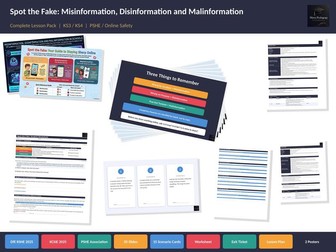
Complete lesson pack teaching students to identify and respond to misinformation, disinformation, malinformation and conspiracy theories. Aligned to DfE RSHE 2025 and KCSIE 2025. This ready-to-teach resource pack contains everything you need to deliver a 50 to 60 minute PSHE or online safety lesson on false information for KS3 and KS4 students. The lesson covers the three types of false information, how conspiracy theories spread, how to evaluate online content before sharing it, and what to do when you encounter false information online. What’s included: Lesson PowerPoint (.pptx, 20 slides) with full speaker notes on every slide, class discussion questions, a quick check activity and built-in instruction slides for the worksheet and exit ticket. Scenario Sorting Cards (.pptx, 15 cards with answer key) for a group classification activity. Cards are printed as handouts, 3 per page, and cut for groups of 3 to 4 students. Categories are randomised so students cannot spot patterns. Student Worksheet (.pdf, 2 pages, 18 marks) with six sections covering all learning objectives: definitions matching, conspiracy theory classification, students’ own examples, same event with different intent, source evaluation using the Source/Evidence/Motive/Impact checklist, and action planning. Exit Ticket (.pdf, 4 per A4 page) with three open-response questions testing recall, application and response to false information. Lesson Plan (.pdf, 2 pages) with full curriculum mapping, timings, differentiation for lower and higher ability, and assessment guidance. Student Poster (.pdf) and Staff Poster (.pdf) for classroom and staffroom display. Curriculum alignment: DfE RSHE Statutory Guidance (July 2025, mandatory September 2026): p.19 (countering misinformation) and p.28 (being a discerning consumer of information online, understanding the prevalence of misinformation and disinformation including conspiracy theories). KCSIE 2025, paragraph 135: misinformation, disinformation and conspiracy theories classified as safeguarding harms. PSHE Association Programme of Study: KS4 L6, L7; KS3 R28, R35, R36; Essential Skills (analysis, assessing validity and reliability of information). Learning objectives: Define misinformation, disinformation and malinformation Recognise how conspiracy theories spread as false information Identify real-world examples of each type Explain why the intent behind false information matters Evaluate online content before sharing it Know how to respond when you encounter false information PowerPoint files are editable for classroom use. All other resources are provided as print-ready PDFs. The lesson PowerPoint includes speaker notes throughout so non-specialist teachers can deliver the lesson with confidence. Suitable for PSHE lessons, online safety weeks, safeguarding drop-down days and computing lessons.
AI Wearables in Schools: Staff Safeguarding PosterQuick View
Metapedagogy

AI Wearables in Schools: Staff Safeguarding Poster

(0)
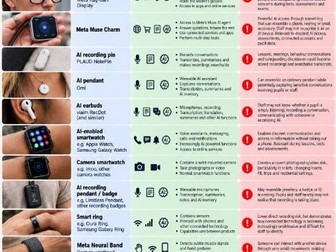
Staff poster covering 13 AI wearables, from smart glasses to recording pins: what they look like, what they can do and the safeguarding risks in school. Many AI devices now look like ordinary glasses, jewellery, watches or earbuds. They can record conversations, take photos and video, transcribe what they hear and connect to AI assistants, often without anyone nearby realising. Most staff have never been shown what these devices look like, which makes them easy to miss in lessons, exams, toilets, changing rooms and on residential trips. This single-page poster gives staff a quick visual reference for each device, with a photograph, a summary of its capabilities and the specific safeguarding implications for schools. Devices covered: AI smart glasses and AI display glasses AI recording pins, pendants and badges AI earbuds with recording and transcription AI-enabled smartwatches and camera smartwatches Smart rings and gesture-control wristbands Body-worn AI cameras AI accessibility glasses, including how to distinguish legitimate SEND reasonable adjustments from prohibited use Ideal for: Staffrooms, offices and exam halls Safeguarding briefings and INSET DSLs and SLT reviewing device and AI policies Exams officers and invigilators Trip and residential leads Produced by Meta Pedagogy Consultancy, which provides AI strategy, safeguarding training and INSET for UK schools and trusts.
MISINFORMATION, DISINFORMATION AND MALINFORMATION Staff PosterQuick View
Metapedagogy

MISINFORMATION, DISINFORMATION AND MALINFORMATION Staff Poster

(0)
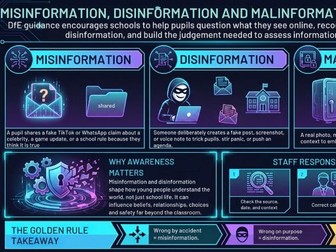
Staffroom display poster covering the three types of false information students encounter online: misinformation, disinformation and malinformation. Designed for school staff. This poster gives teachers and support staff a clear overview of how false information operates in a school context, with definitions, school-specific examples and a three-step staff response protocol: check the source, correct calmly, escalate if harmful. It explains why awareness of false information matters beyond the classroom, including its impact on student beliefs, relationships, choices and safety. Designed for display in staffrooms, staff workrooms or pastoral offices. Useful as a quick reference during safeguarding briefings, INSET sessions or online safety weeks. KCSIE 2025 (paragraph 135) now classifies misinformation, disinformation (including fake news) and conspiracy theories as safeguarding harms. This poster supports schools in meeting that requirement by ensuring all staff can recognise and respond to false information when they encounter it among students. Provided as a print-ready PDF. Part of the Spot the Fake complete lesson pack, available separately. Tags: misinformation, disinformation, malinformation, staff training, staffroom display, online safety, safeguarding, KCSIE 2025, school poster, false information, fake news, staff CPD, pastoral, PSHE
Identifying Types of False information Student PosterQuick View
Metapedagogy

Identifying Types of False information Student Poster

(0)
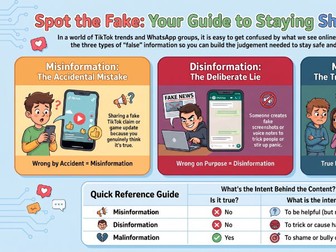
Classroom display poster explaining the three types of false information: misinformation, disinformation and malinformation. Designed for KS3 and KS4 students. This colourful A3 display poster breaks down the differences between misinformation (wrong by accident), disinformation (wrong on purpose) and malinformation (true but twisted) using age-appropriate examples set in TikTok, WhatsApp, Instagram and Snapchat. Each type has a clear definition, a relatable student scenario and a simple key phrase students can remember. The poster includes a quick reference table showing whether the information is true or false and what the intent behind it is, giving students a quick visual check they can refer back to during lessons or independent work. Suitable for display in PSHE classrooms, computing rooms, form rooms or school corridors as part of online safety provision. Aligned to DfE RSHE Statutory Guidance (July 2025, mandatory September 2026) p.28: students should learn how to be a discerning consumer of information online, understanding the prevalence of misinformation and disinformation online, including conspiracy theories. Supports KCSIE 2025 paragraph 135, which classifies misinformation, disinformation and conspiracy theories as safeguarding harms. Provided as a print-ready PDF. Part of the Spot the Fake complete lesson pack, available separately. Tags: misinformation, disinformation, malinformation, false information, fake news, online safety, PSHE, KS3, KS4, classroom display, poster, KCSIE 2025, RSHE, safeguarding, digital literacy