4IT1 Quick-fire Revision Starters (Edexcel International GCSE ICT) with answersQuick View
pedrorosariolopes

4IT1 Quick-fire Revision Starters (Edexcel International GCSE ICT) with answers

(0)
Five ready-to-use lesson starters for Pearson Edexcel International GCSE ICT (4IT1), each with an answer slide. Covers Topics 1 to 6. Free. Five quick, no-prep lesson starters for Pearson Edexcel International GCSE ICT (4IT1). Each starter has a question slide followed by an answer slide, so you can use it live in class, let students self-mark or peer-mark, or hide the answers and print it as a worksheet. Every slide shows a suggested time, and the speaker notes include teaching tips and common mistakes. What’s inside (16 slides, editable PowerPoint): Starter 1, Quick-fire 8 (Topics 1–2): eight short questions on digital devices, storage and networks. Starter 2, Odd one out (Topics 1–3): four sets where students choose the odd one out and give a reason. Starter 3, Key term match (Topics 2–4): match six key terms, such as encryption, cookie and two-factor authentication, to their meanings. Starter 4, Formula detective (Topic 6): work out what SUM, AVERAGE, MAX/MIN, COUNTIF and IF return from a small spreadsheet. Starter 5, Exam-style question (Topic 3): a 4-mark “Explain” question on keeping data secure when working from home, with a mark scheme and a 1-mark vs 2-mark example answer. The last slides introduce ICT Revise (ictrevise.com), a free 4IT1 revision website I made for my own students. It has short learning units, quizzes, revision activities, practice papers and practical exam preparation, with no sign-up and no adverts. It’s useful for homework and independent revision. All questions are original and written for this resource. They are not taken from Pearson textbooks or past papers. This is an independent resource and is not affiliated with or endorsed by Pearson Education Ltd. Feedback is very welcome. Please leave a review or get in touch through ictrevise.com/contact.html.
Battleships Spreadsheets / Excel Game: Cell References KS3Quick View
pedrorosariolopes

Battleships Spreadsheets / Excel Game: Cell References KS3

(0)
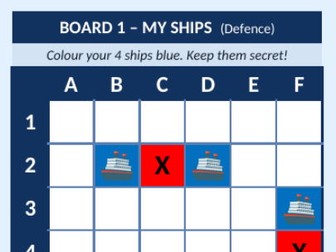
Battleships in Excel for Year 7 Computing. Pairs hide ships, call out cell references like C4 and colour hits and misses. No macros, ready to play. Each student plays on their own computer with their own copy of the file. They secretly colour 4 ships on a 6 × 6 grid, then take turns with a partner calling out cell references: column letter first, then row number. The defender answers “Hit!” or “Miss!”, and the attacker records the result with Excel’s Fill Colour tool. The first player to sink all 4 ships wins. What’s included Welcome & Instructions sheet: the mission, 7 numbered steps, a visual guide to finding a cell, examples of allowed and not-allowed ship placements, and a colour and symbol key. A My Game sheet with two 6 × 6 boards, My Ships (Defence) and My Shots (Attack), labelled A–F and 1–6. A ship placement guide where students type their ships’ cell references (e.g. B2, C2, D2), plus an Enemy Ships Sunk tracker. A short teacher guide (PDF) with a 55-minute lesson plan, starter and plenary questions, and support and stretch ideas. Skills practised Understanding rows, columns and cell references Finding and selecting cells Using Fill Colour and entering data Formatting and organising information Why it works in the classroom No macros, formulas or internet connection needed: just a standard Excel (.xlsx) file. Large square cells, clear row and column labels and an ocean theme. Labels are locked (no password), so students can only change the game cells. Teachers can unlock them with Review > Unprotect Sheet. Each sheet prints on one A4 page. The fleet: Aircraft Carrier (3 squares), Battleship (2), Submarine (2) and Patrol Boat (1).
IGCSE ICT (4IT1) Topic 1 Digital Devices: 8 Homework Tasks + Mark SchemesQuick View
pedrorosariolopes

IGCSE ICT (4IT1) Topic 1 Digital Devices: 8 Homework Tasks + Mark Schemes

(0)
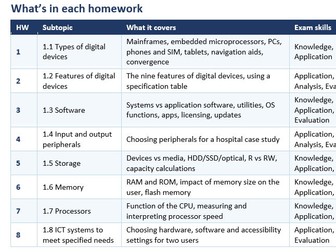
Summary: A ready-to-print homework pack for Pearson Edexcel International GCSE ICT (4IT1), Topic 1 Digital Devices. It has eight one-page tasks, one for each subtopic from 1.1 to 1.8, and each takes 30–40 minutes. The tasks are built around realistic scenarios and case studies, such as a delivery company, a sports journalist, a travel agency, a hospital and two users with accessibility needs. They move from short knowledge questions to application, analysis and exam-style 6-mark extended responses. Every question is mapped to a numbered specification point, and full teacher mark schemes are included. What’s included Cover page with an overview of all 8 tasks (subtopic, content, exam skills, time, marks) 8 one-page student homework tasks (174 marks in total) 1.1 Types of digital devices (23) 1.2 Features of digital devices (23) 1.3 Software (25) 1.4 Input and output peripherals (24) 1.5 Storage, including KiB/MiB/GiB/TiB calculations (22) 1.6 Memory (18) 1.7 Processors (15) 1.8 ICT systems to meet specified needs (24) Four 6-mark extended-response questions (HW2, 3, 4 and 8) A ★ Challenge question on every task for stretch and challenge (outside the totals) Levels-based marking grid for 6-mark answers Full mark schemes for every question, with spec references and indicative content Editable Word format (.docx) Suitable for Year 10/11 homework, cover lessons, revision or end-of-topic assessment. Students can revise first at ictrevise.com.