



Battleships in Excel for Year 7 Computing. Pairs hide ships, call out cell references like C4 and colour hits and misses. No macros, ready to play.
Each student plays on their own computer with their own copy of the file. They secretly colour 4 ships on a 6 × 6 grid, then take turns with a partner calling out cell references: column letter first, then row number. The defender answers “Hit!” or “Miss!”, and the attacker records the result with Excel’s Fill Colour tool. The first player to sink all 4 ships wins.
What’s included
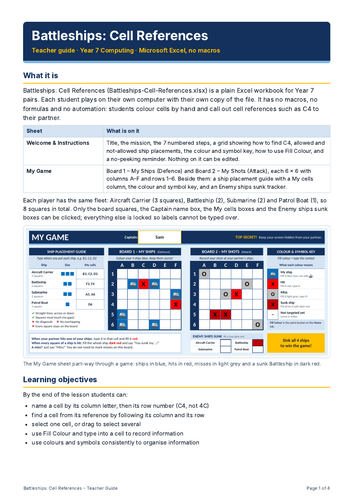
- Welcome & Instructions sheet: the mission, 7 numbered steps, a visual guide to finding a cell, examples of allowed and not-allowed ship placements, and a colour and symbol key.
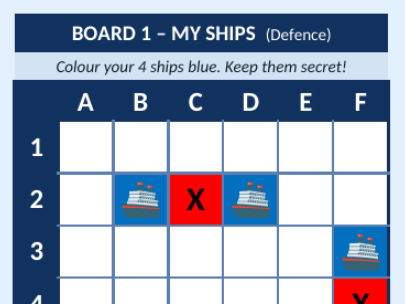
- A My Game sheet with two 6 × 6 boards, My Ships (Defence) and My Shots (Attack), labelled A–F and 1–6.
- A ship placement guide where students type their ships’ cell references (e.g. B2, C2, D2), plus an Enemy Ships Sunk tracker.
- A short teacher guide (PDF) with a 55-minute lesson plan, starter and plenary questions, and support and stretch ideas.
Skills practised
- Understanding rows, columns and cell references
- Finding and selecting cells
- Using Fill Colour and entering data
- Formatting and organising information
Why it works in the classroom
- No macros, formulas or internet connection needed: just a standard Excel (.xlsx) file.
- Large square cells, clear row and column labels and an ocean theme.
- Labels are locked (no password), so students can only change the game cells. Teachers can unlock them with Review > Unprotect Sheet.
- Each sheet prints on one A4 page.
The fleet: Aircraft Carrier (3 squares), Battleship (2), Submarine (2) and Patrol Boat (1).
Something went wrong, please try again later.
This resource hasn't been reviewed yet
To ensure quality for our reviews, only customers who have purchased this resource can review it
Report this resourceto let us know if it violates our terms and conditions.
Our customer service team will review your report and will be in touch.
£3.00