IGCSE 0580 Extended Mathematics Student Progress TrackerQuick View
Darkus

IGCSE 0580 Extended Mathematics Student Progress Tracker

(0)
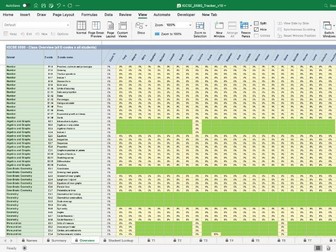
Overview The IGCSE 0580 Extended Mathematics Student Progress Tracker is a purpose-built Excel workbook designed to give mathematics teachers a real-time, at-a-glance view of every student’s mastery across the complete Cambridge IGCSE Extended Mathematics curriculum. Rather than relying on end-of-unit tests alone, this tracker embeds ongoing formative assessment directly into the fabric of day-to-day teaching — one checkbox at a time. The tracker is a fully structured Microsoft Excel workbook (.xlsx) aligned precisely to the nine strands and all 56 E-codes of the Cambridge IGCSE 0580 Extended Mathematics Scheme of Work. It requires no specialist software beyond Excel for Mac or PC, no subscription, and no internet connection — just open, enter your class list once, and begin. It works with the Hodder Education Mathematics ‘Core and Extended’ Fifth edition How It Works in the Classroom The workflow is designed to sit naturally alongside existing teaching practice, adding almost no administrative overhead: 1 Set up once — Enter student names in the Student Names sheet. Names flow automatically to every strand sheet and summary view. 2 Teach — Deliver lessons as normal. As each sub-skill is covered, tick the “Taught?” checkbox in the relevant strand sheet. 3 Track mastery — After assessment or observation, tick the student’s checkbox for each sub-skill they have demonstrated competency in. 4 Review — Open the Class Overview to see a full heat map of the class. Red cells signal skills needing revisiting; green signals confidence. 5 Individual conversations — Use the Student Lookup to pull up any individual student’s profile for parent meetings, tutoring sessions or target-setting reviews. 6 Pre-exam focus — In the weeks before the IGCSE, filter the Class Overview for the lowest-scoring E-codes and focus revision sessions precisely where they are needed most.
Assessment Tracker & Class Analysis Spreadsheet — 6 Assessments, Up to 32 StudentsQuick View
Darkus

Assessment Tracker & Class Analysis Spreadsheet — 6 Assessments, Up to 32 Students

(0)
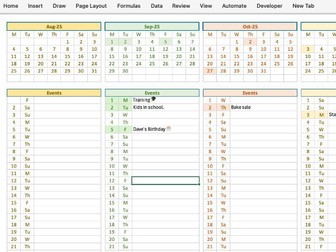
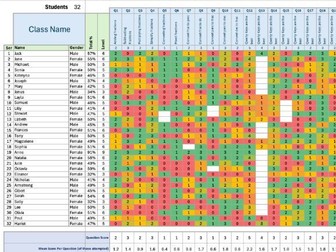
A ready-to-use Excel workbook for tracking a full year of class assessment data in one place. Designed by a secondary maths teacher, but built to be flexible enough for any subject, any age group, and any grading scale — from Key Stage 2 through to A-level, IGCSE, or your own custom levels. Drop in your students once. Enter marks after each assessment. The workbook does the rest. What you control (so it fits your class, not the other way round): Rename every question (Q1–Q30) and add a topic description for each one — Adding Fractions, Photosynthesis, Causes of WWI, whatever your specification calls for Set the marks available for each question individually — a 1-mark recall question and a 6-mark extended-response question can sit side by side Adjust the percentage-to-level conversion table for each assessment independently — useful when an early assessment uses gentler grade boundaries than a mock or end-of-year paper Use as many or as few levels as you need — the standard 0-9 GCSE scale is built in, but you can reduce it to A*–E, 1–4 mastery bands, P-scales, or whatever your school uses Set individual student targets and track every student against their own goal What it shows you automatically: Each student’s percentage and level for every assessment Progress over time — clearly flagged when a student moves up, stays the same, or slips back, even when not all six assessments are complete yet On-target / above-target / below-target status based on each student’s most recent assessment Per-question analysis — class mean, percentage of the marks available, percentage of students who attempted it, and an automatic flag for questions that were too hard or skipped by too many Male vs Female comparison for every question and at whole-class level — useful for spotting topic-specific gaps in attainment Level distribution graphs and counts so you can see the shape of the class briefly A whole-class summary sheet that pulls it all together: Every student’s progress across all six assessments on one page Markers for LAC, Pupil Premium, SEND, FSM, EAL, EHCP and Gifted & Talented students so you can quickly see how different cohorts are tracking Whole-class headline figures — what percentage are on or above target, gender breakdown, completion rates per assessment Identifies students who haven’t yet been assessed so no one quietly slips off your radar Includes a breakdown sheet for individual students Helpful notes in cells so you know what to enter, if unsure Built to be adaptable by a teacher. Whether you teach Year 7 mixed-ability or Year 13 Further Maths, whether your school uses GCSE 1-9, A-E, or in-house mastery bands, this workbook adjusts, whether you teach Maths, Geography or Science. Up to 32 students, up to 32 questions, up to 6 assessments per year. Save the time you’d spend building your own tracker and spend it on the marking instead.
Maths Gradient Questions (Given two points)Quick View
Darkus

Maths Gradient Questions (Given two points)

(0)
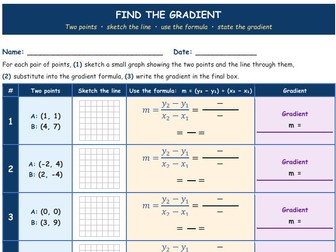
A simple worksheet to answer questions on gradient, given scaffolded support and step by step support to get to the answer. Good as a starter activity or a small main lesson activity. Has an answer sheet. Straight forward layout. Easy to add to, easy to change the values. Support maths KS3 and GCSE / IGCSE lessons.
Algebra PyramidsQuick View
Darkus

Algebra Pyramids

(0)
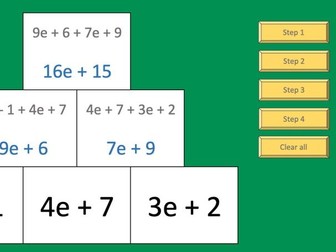
A step by step demo of how to complete an algebra pyramid and a random algebra pyramid sheet of 10 pyramids. You can get a new set of questions by pressing the button. Press ‘Clear All’ to start another demo with different expressions. Just 10 expressions to demo, shown randomly. Aimed at Year 6-7.
Division StarterQuick View
Darkus

Division Starter

(0)
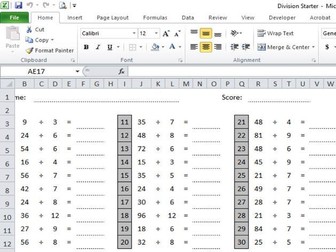
Just a basic division starter. Every time you want a new set of numbers, press the button. I use these occasionally and put a countdown timer on the board, I give them 2 minutes. The time that’s left they record. Try to beat their previous score / time. There are no 2, 10, or 11 divisions. There is 11x11 & 11x12, but no basic 11’s. There are no repeats. Peer mark. Answer sheet on the next tab, if needed or if you want to print and get pairs to share / mark. Objective: to understand all times tables by recall. There are two sheets per page and they can stick in their book, maybe show all of these at the back of the book and / or keep a record to show progress. It will not print the button. It is a macro enabled file, so will ask to be enabled first.