A PowerPoint presentation which can be used by the teacher to teach the purpose of HTML, CSS and Javascript in the development of webpages at KS3, KS4, or KS5.
Learning Objective
1) To understand the purpose of both html and css when creating a web page.
2) To be able to identify the purpose of JavaScript and to understand the difference between client-side and server-side languages.
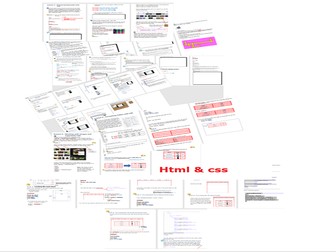
A collection of HTML and CSS posters. Suitable for both KS3 and GCSE levels of ICT / Computing / Computer Science. Useful not only to have on classroom walls but also can be reproduced and handed to your students.
Recommended to laminate and to reuse (to help save the environment).
Includes poster covering the following topics:
Basic html tags
HTML colours (infographic)
HTML and CSS
Anatomy of an HTML page
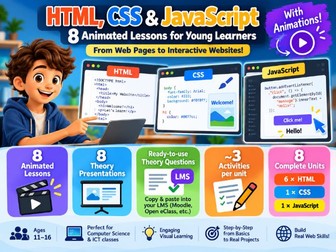
Complete unit of work with HTML, CSS and Javascript examples; 6 lessons; extra resources like sound files, images, web pages, challenges etc are also included along with a sample HTML quiz
This 72 page booklet is the second of three written to cover the process of creating a website from analysis to coding to evaluation.
Booklet 2 is split into two parts and should take between 20 and 40 hours to complete depending on the coding proficiency of your students.
2A - Implementation Examples: This 48 page booklet gives worked examples of HTML, CSS and JavaScript code using a cycling website as a scenario.
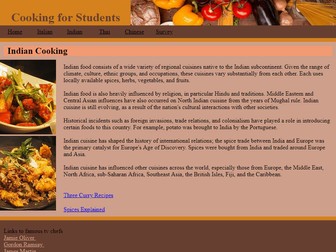
2B - Implementation Tasks: This 24 page booklet contains 13 tasks by the end of which students will have coded a 13 page “student cooking” website.
The content covered can be briefly summarised as:
Building a template page
HTML 5 page structure (header, nav, main and footer)
Positioning content (margins, padding, display & float)
Building a navigation bar using lists and CSS
HTML 5 forms (text, number, radio button, text area and select input)
Interactivity using JavaScript mouse events (roll-over images, changing page styles, showing/hiding content)
Please note that students should have a basic knowledge of HTML (head, body, links, headings, paragraphs and images) and a very basic understanding of CSS (changing text size, font, colour) before starting this course.
The download comes with four additional sets of files:
The complete cycling website created during booklet 2A.
The complete cooking website created by students during the task booklet 2B.
The student files required to get started.
Additional content that can be dropped into blank pages to save student spending hours typing in content.
Booklet 3 (testing and evaluation) will be coming soon.
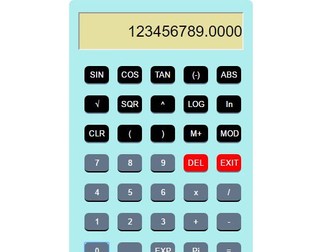
This project is suitable for foundation as well as A levels students. The HTML, CSS and Javascript are zipped for your use as a guide to students project. You can access the video on youtube using the search criteria below.
“Scientific calculator using html, css and javascript + lively and educating”
This is a 7 lesson unit of work.
It covers basic to more advanced skills in html and is broken into 7 lessons:
L1: What is the internet?
L2: Planning a website and understanding basic code
L3: Adding basic code to create a basic webpage (colours, formatting text, adding images)
L4: Adding sound and a marquee
L5: More advanced HTML
L6: Using CSS and understanding the advantages of this
This unit includes starter activities, a clear differentiated guide to use HTML for students. Help sheets for students. A reflection log which can be filled in each lesson by students to show progress.
This unit of work allows students to explore different areas of coding and programming and introduces them to web design. Ideal for KS3 classes.
A beginner-friendly guide to HTML, designed for KS3 to GCSE Computer Science students. This handout introduces web development from scratch, assuming no prior knowledge. With step-by-step tutorials, engaging examples, and clear explanations, it’s the perfect resource for students to learn HTML fundamentals and build their first web pages. Ideal for classroom use or self-study.
Contents
Introduction to HTML
Basic Structure of an HTML Document
HTML Document Layout
Essential Tags: <html>, <head>, <title>, <body>
First Webpage: “Hello, World!”
3. Working with Text
Headings and Paragraphs
Line Breaks and Horizontal Lines
Basic Text Formatting: Bold, Italics, and Underline
4. Adding Links and Images
Creating Hyperlinks with <a>
Adding Images with <img>
Using Alt Text for Accessibility
5. Lists in HTML
Ordered and Unordered Lists
Nesting Lists
6. Tables for Organizing Data
Table Structure: <table>, <tr>, <th>, <td>
Creating a Simple Table
Styling Tables with Borders and Width
7. Introduction to CSS Styling
Inline, Internal, and External CSS
Basic CSS Selectors: Elements, Classes, and IDs
Styling Text and Backgrounds
8. Layout and Structure with Divs and Spans
Grouping Content with <div> and <span>
Applying CSS to Divs and Spans
9. HTML5 Semantic Elements
Header, Footer, Section, Article, and Aside
Organizing Content with Semantic Tags
10. Building a Simple Web Page Project
Project Overview: Personal Web Page
Step-by-Step Guide
Adding Basic CSS for Style
11. Debugging HTML and CSS
Common Errors in HTML
Troubleshooting CSS
Using Developer Tools
12. Resources for Practice
Online HTML Editors and Practice Sites
Further Learning Resources
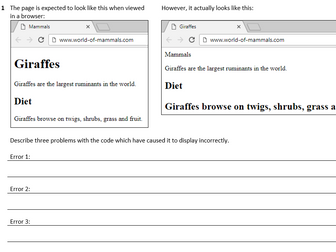
36 tasks testing comprehension of web development code, covering HTML, CSS and a small amount of JavaScript.
Ideal as a homework booklet but could also be used in class.
Includes answer booklet.
HTML:
• basic page structure (head, body)
• headings
• paragraph
• divs
•hyperlinks - a, external and internal
• img - including standard file formats
• audio
• video
• lists - ol, ul and li
CSS:
• selectors
• properties - font (family, size), color, text-align, background-color
Javascript mouse events:
• Onmouseover
• Onmouseout
Objective(s):
LO1 – To introduce HTML and CSS
Outcome(s):
– To create a basic HTML 5 template
– To insert an image into a web page
– To apply basic CSS styles to a web page
Description:
Teach the students the basics of HTML and CSS with this fun and informative HTML / CSS workbook. Students will learn how to build their own web page from scratch using the Notepad++ Text Editor (free and open source software), although any text editor can be used. The workbook is beautifully designed and easy to follow, with clear and simple step-by-step examples to get each section working.
Included files:
– Dive into HTML and CSS Workbook.pdf
– Dive into HTML and CSS Workbook.pages
– Dive into HTML and CSS Workbook.docx
/Pythonista 🐍
8 lesson bundle consisting of lots of practical activities and differentiated tasks with answers (written and html pages), so learners can practise what they have learnt culminating in website project. An introduction to common html tags and CSS styling. Basic - intermediate level. (40 Pages in all).
Lesson 1 : Introduction to Html
Lesson 2 : CSS - formatting text
Lesson 3: CSS - formatting backgrounds
Lesson 4: CSS - styling tables
Lesson 5 : CSS - images and hyperlinks
Lesson 6 and 7 : CSS - Layout styling div tags ( fixed and floating)
Lesson 8 and 9 : Creating your website project
4 additional interactive lessons created in Powerpoint with all source code and answers ( 30 pages in all) - see video preview
This homework is intended for use with Computing or ICT A-Level students. Pupils create a webpage for a geeky crafters guild. They have a choice of jobs to complete depending on their time and ability. They earn experience points (XP) for each task and accumulate these points to earn a rank. They are then awarded a certificate with their rank on. (The certificate will be added soon). The Grandmaster award is reserved for the best website and is entirely subjective....this means it doesn't necessarily have to go to the best programmer, but the hardest worker.
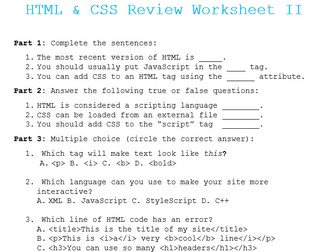
This was created to be an extension to my original HTML & CSS Coding Review Worksheet. I designed it in a very similar way, and simply upped the difficulty. As with the original, this assumes only extremely minimal conceptual knowledge of JavaScript, and requires no JavaScript coding knowledge at all. It was designed to be a short review worksheet, or a pop quiz. It should take around 15-20 minutes for the average students to complete it.
Files Included:
HTML and CSS Coding Review Worksheet II - Easy.docx
HTML and CSS Coding Review Worksheet II - Easy.pdf
HTML and CSS Coding Review Worksheet II.docx
HTML and CSS Coding Review Worksheet II.pdf
Note: You will need the ability to open either .pdf files or .docx files. You also will need the ability to open .zip files. Any modern computer can open .zip files by default, but if you have any issues please leave a comment and I will do my best to help you.
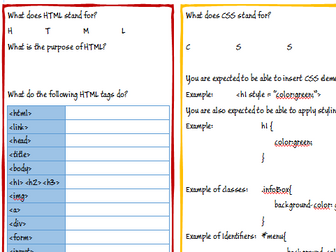
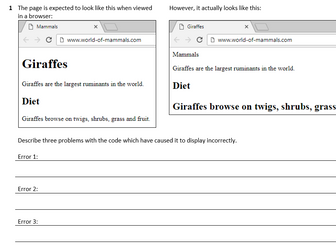
A useful revision worksheet that looks at HTML, CSS and Javascript. Double sided worksheet with a range of questions to check understanding.
Describing Tags
Writing CSS
Embedding CSS in a HTML Tag
Server-side v Client-Side
Purpose of Javascript, CSS and HTML
Transform your BTEC Level 3 Computer Science Unit 15 / IT Unit 6 (Web Design) lessons with our expertly crafted resources! Designed to engage and empower students, these comprehensive teaching materials cover essential coursework topics (HTML, CSS, and JavaScript) to get your students engaged!
Lesson 1: Web design
An overview of the client-server relationship used by websites
Basic design and layout principles
Lesson 2: Introduction to HTML
The structure of an HTML web page
Commonly-used tags
Self-paced worksheet for students
Lesson 3: CSS
CSS syntax
External, internal, and in-line CSS
Self-paced worksheet for students
Lesson 4: Responsive design
Explanation, reasons, and principles behind responsive design
CSS media queries and examples
Self-paced worksheet for students
Lesson 5: Introduction to JavaScript
Client-side vs server-side scripting
Overview of the document object model (DOM) and how JavaScript interacts with it
Self-paced worksheet for students
Simple to deliver, with all answers to practical work, this is an ideal introduction to inspire and prepare your students for Unit 15.
Download today.
I based some of this on bits from a variety of places but most of the content was written by me.
I have not taught the whole thing yet - am on Lesson 5 so any feedback would be great.
Unfortunately I can't upload the CSS files.
There are 3 web languages that web developers must learn. They are all interconnected.
HTML to define the content of web pages.
CSS to specify the layout of web pages.
JavaScript to program the behavior of web pages.
This unit is all about CSS! This Unit covers:
Syntax
Selectors
Text and Fonts
Comments
Background colors
Background images
Borders
Margins
Padding
Icons
Links
Lists
Tables
Display
Position
Float
Overflow
Align
Opacity
Forms
Navigation bar
Daily Tasks
An Assignment + Assessment
There are 6 lessons in total for this CSS unit and a final assignment. The whole package is in a Editable Google Slide. The page size is setup to be printed on a 8.5 x 11 page. This makes it easy to digitally or physically share the handouts with the students.
This resource is apart of a bundle which can be found here.
Web Design - HTML Unit
Web Design - CSS Unit
Web Design - JavaScript Unit
Web Design Bundle
First 5 tasks from my workbook testing comprehension of web development code, covering HTML, CSS and a small amount of JavaScript.
Includes answer booklet.
HTML:
• basic page structure (head, body)
• headings
• paragraph
• divs
•hyperlinks - a, external and internal
• img - including standard file formats
• audio
• video
• lists - ol, ul and li
CSS:
• selectors
• properties - font (family, size), color, text-align, background-color
Javascript mouse events:
• Onmouseover
• Onmouseout