


Ready-to-use Year 6 Computing lesson on web design. Explore websites, identify features, reflect on online safety, and complete creative tasks.
This engaging Year 6 Computing lesson introduces pupils to web design fundamentals while incorporating essential online safety awareness. The comprehensive resource includes a complete PowerPoint lesson with supporting activity sheets.
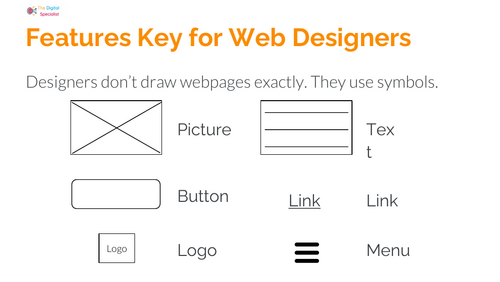
Pupils will discover what makes an effective website, master key terminology (browser, webpage, address bar, tabs), and learn to identify successful design features. The lesson offers hands-on activities including website scavenger hunts, portfolio sketching, and planning with a design “features key.”
The lesson balances creative technology use with safe, responsible online behavior. Teachers benefit from clear discussion prompts, well-defined tasks, and reflection opportunities—all designed for easy delivery with minimal preparation.
What’s included
- PDF resources (step-by-step activities)
- Resource sheets with a features key as used by professional web designers
- Exploration tasks linking to real websites
- Plenary activities for reflection on online safety and design skills
This versatile resource serves perfectly as an introduction to a web design unit or as a standalone creative computing lesson.
Something went wrong, please try again later.
This resource hasn't been reviewed yet
To ensure quality for our reviews, only customers who have downloaded this resource can review it
Report this resourceto let us know if it violates our terms and conditions.
Our customer service team will review your report and will be in touch.
£0.00