








KS3 Computer Science / ICT – Excel Lesson 2: Formulas & Cell Referencing
Fun, Practical Lesson | FREE AI Marking | Updated for 2026
An engaging and practical KS3 Excel lesson introducing students to basic spreadsheet formulas and cell referencing through the fun and motivating theme of “Cheating at Maths!”
Students discover how spreadsheets automate calculations, reduce human error, and perform maths instantly when formulas are used correctly.
UPDATED for 2026 – now includes FREE AI marking for selected written and explanation tasks. Students receive instant feedback on their understanding, while teachers can quickly monitor progress and identify misconceptions without additional marking time.
What Students Will LearnStudents will:
- Use the = sign to create formulas
- Perform basic operations: + − × ÷
- Apply cell referencing to automate calculations
- Understand why referencing is more powerful than typing numbers directly
- Format cells and apply borders for clear presentation
- Explain how formulas improve efficiency, speed, and accuracy
Editable Student Worksheet / Booklet
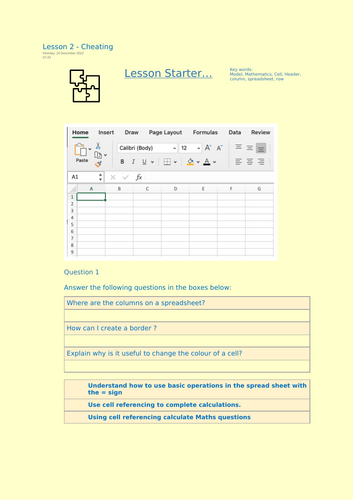
- Retrieval starter
- Guided practice tasks
- Structured formula-building exercises
- Cell referencing activities
- Reflection and explanation tasks
- Plenary questions
Linked Excel Activity Files
- Cheating.xlsx
- Referencing.xlsx
- Challenge.xlsx
Clear Lesson Structure
- Starter task
- Step-by-step modelling
- Independent application
- Challenge extension
- Plenary reflection
FREE AI Marking
- Instant feedback on explanation and reflection tasks
- Supports assessment for learning
- Reduces teacher workload
- Highlights misconceptions quickly
- Fun, real-world hook that engages reluctant learners
- Clear and scaffolded introduction to formulas
- Strong foundations for future spreadsheet modelling
- FREE AI marking supports rapid feedback
- Suitable for specialists and non-specialists
- Designed for mixed-ability KS3 classes
- KS3 Computer Science
- KS3 ICT / Digital Literacy
- Introduction to spreadsheets
- Skills-based computing lessons
- Cover lessons or homework tasks
Part 2 of the 6-Lesson “Learning Excel” Series
Builds on:
- Lesson 1 – Introduction to Spreadsheets
Prepares students for:
- Functions (SUM, MIN, MAX, COUNTIF)
- IF statements and logic
- Conditional formatting
- Self-marking spreadsheet projects
A key lesson in helping students move from basic spreadsheet use to confident formula creation and automation.
Something went wrong, please try again later.
This resource hasn't been reviewed yet
To ensure quality for our reviews, only customers who have purchased this resource can review it
Report this resourceto let us know if it violates our terms and conditions.
Our customer service team will review your report and will be in touch.
£2.50