





KS3 Excel Lesson 3 – Fun Into Functions! Introduction to SUM, AVERAGE, MIN & MAX (Dyslexia-Friendly | High Engagement | Perfect Follow-On Lesson)
Bring Excel to life with this lively, student-friendly introduction to functions. Lesson 3 builds directly on the confidence pupils gained from basic “= calculations” and now shows them how to use Excel’s most popular functions in a fun, accessible and memorable way.
Designed with full dyslexia-friendly formatting — clear fonts, soft pastel backgrounds, spacious layout and colour-coded examples — this resource supports every learner, including SEND and lower-ability students.
What students will learn (Lesson 3):
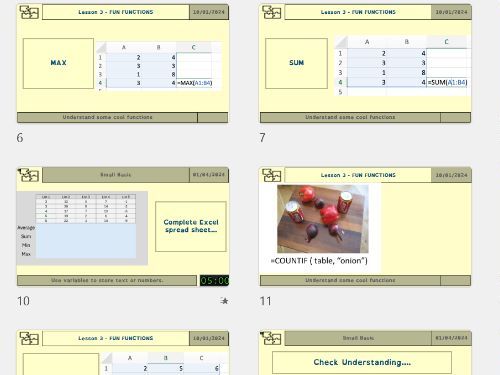
- What a function is — Understanding how Excel can perform more complex maths automatically.
- Core beginner functions — Step-by-step guidance for:
- =SUM()
- =AVERAGE()
- =MIN()
- =MAX()
- Real examples, not abstract maths — Students total scores, average results, find the highest value, and compare results instantly.
- Strengthening modelling skills — Changing numbers shows how functions update the entire spreadsheet automatically.
- Formula building confidence — Pupils use brackets, ranges (e.g. A1:A5), and cell referencing with functions.
Why this resource sells well on TES:
- ✔ Fully dyslexia-friendly design – OpenDyslexic (or similar) font, pastel backgrounds, clean spacing, and clutter-free instructions support every learner.
- ✔ Fun, accessible angle – Keeps the playful tone from Lesson 2, turning formula work into something students enjoy.
- ✔ Perfect for mixed-ability classes – Clear examples, guided practice, extension tasks and minimal writing required.
- ✔ Ready-to-teach package – Includes teacher slides, printable worksheets, and an editable Excel file.
- ✔ Behaviour-proof tasks – Highly structured, step-by-step instructions keep students focused and successful.
By the end of this lesson, students can:
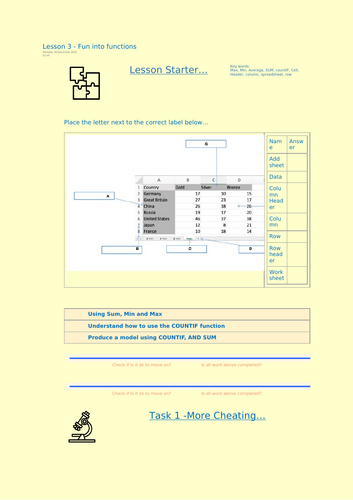
- Use SUM, AVERAGE, MIN and MAX to calculate values
- Apply functions using cell references and ranges
- Recognise real-world uses of functions
- Build early confidence in spreadsheet modelling and automation
Lesson 3 continues the series perfectly — moving from simple maths “cheats” to the powerful world of beginner Excel functions in a fun, accessible and fully inclusive way.
Something went wrong, please try again later.
This resource hasn't been reviewed yet
To ensure quality for our reviews, only customers who have purchased this resource can review it
Report this resourceto let us know if it violates our terms and conditions.
Our customer service team will review your report and will be in touch.
£2.50