


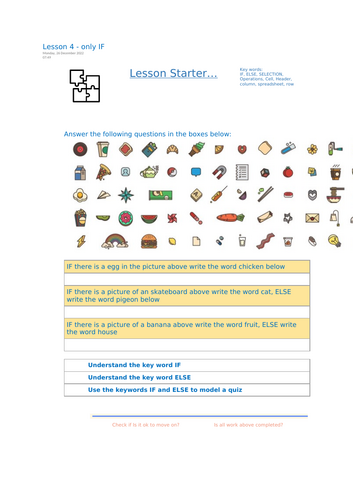




A creative and accessible KS3 Computer Science / ICT Excel lesson introducing students to IF and ELSE functions through practical modelling and fun logic-based challenges.
Building on the previous lessons in the Learning Excel series, learners explore how selection works inside spreadsheets and how to apply logic statements to create dynamic, decision-making models.
Students will:
Understand the keywords IF and ELSE
Learn to write IF statements using logical operators (=, <, >, <>)
Apply IF and ELSE logic to complete real-world spreadsheet challenges
Create a quiz-style model that reacts automatically to user input
Included in this download:
Fully editable student worksheet / booklet
Linked Excel activity files (IF1.xlsx, ELSE3.xlsx, QUIZ.xlsx)
Clear structure with starter, tasks, challenge & plenary
Reflection checks for assessment and progress tracking
Perfect for KS3 Computer Science, ICT, or Digital Literacy units focusing on formulas, logic, and data modelling.
Designed for independent or teacher-led delivery with engaging, progressive activities.
Part 4 of the 6-Lesson “Learning Excel” Series – follows Fun into Functions and prepares students for advanced spreadsheet modelling and self-marking projec
Something went wrong, please try again later.
This resource hasn't been reviewed yet
To ensure quality for our reviews, only customers who have purchased this resource can review it
Report this resourceto let us know if it violates our terms and conditions.
Our customer service team will review your report and will be in touch.
£2.50