


mp4, 16.5 MB
mp4, 16.5 MB
mp4, 12.27 MB
mp4, 12.27 MB
docx, 454.45 KB
docx, 454.45 KB
pptx, 11.74 MB
pptx, 11.74 MB
html, 20.75 KB
html, 20.75 KB

KS3 Computer Science – IF Statements & ELSE Logic in Small Basic (2026 Updated) | FREE Online Compiler | Dyslexia-Friendly

Fully resourced, dyslexia-friendly KS3 Computer Science lesson introducing IF statements, ELSE logic and condition-based decision making in Small Basic.

Includes a complete PowerPoint, structured worksheet and fully guided coding tasks using the FREE online Small Basic compiler — no installation required. Designed with accessible formatting: pastel backgrounds, clear layouts and dyslexia-friendly fonts to support all learners.

Students learn:

  • How IF statements work in real programs
  • How to write and correct IF and IF/ELSE structures in Small Basic
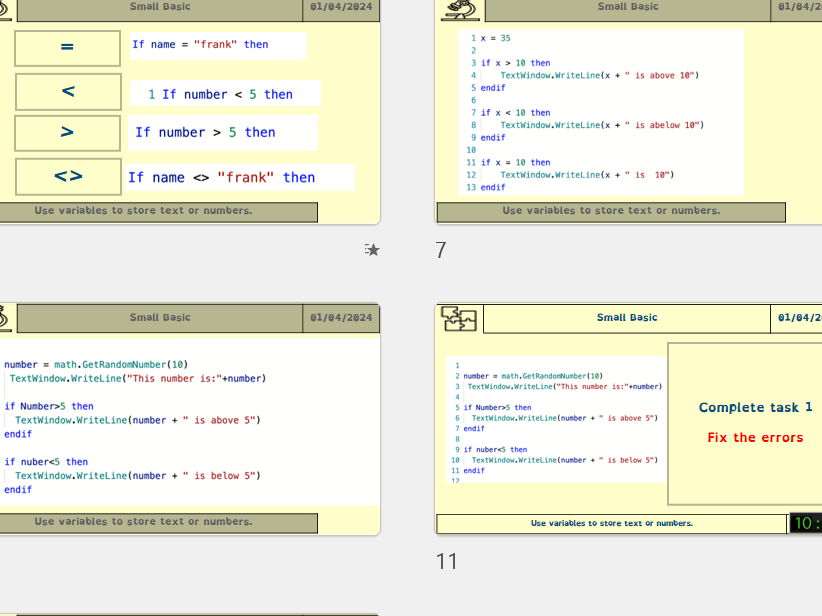
  • What logical symbols mean (=, <>, <, >)
  • How programs make decisions based on conditions

Hands-on coding activities:

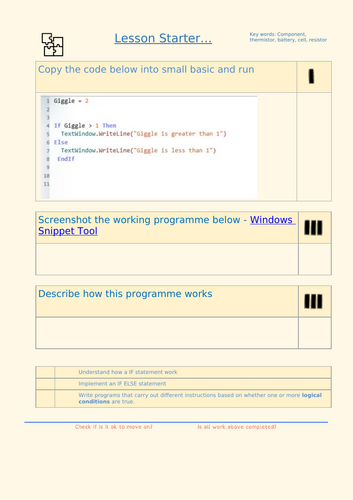
  • Run and explain a starter program to develop computational thinking
  • Complete a logic symbols table and apply operators in real code examples
  • Debug broken IF statements to build resilience and problem-solving skills
  • Implement IF/ELSE structures that produce different outcomes
  • Use conditions to trigger jokes, messages and branching behaviour

Challenge tasks:

  • Modify code to create multiple “knock knock” jokes
  • Add nested IF/ELSE structures for deeper logical understanding
  • Use Math.GetRandomNumber(3) to randomly select one of three jokes
  • Expand into multi-stage interactive programs

Assessment and evidence:

  • Screenshot prompts for each completed coding stage
  • Written explanation boxes to secure conceptual understanding
  • Debugging tasks to demonstrate mastery of logical reasoning

Lesson objectives:

  • Understand how IF and ELSE statements control program flow
  • Write programs that behave differently depending on user input
  • Implement multiple conditions to expand software behaviour

Perfect for:

  • KS3 Computing
  • Coding clubs and enrichment
  • Cover lessons
  • Preparation for Python IF / ELIF / ELSE structures

This engaging, structured lesson makes logical decision-making accessible and enjoyable — building strong foundations for real-world programming.

Get this resource as part of a bundle and save up to 14%

A bundle is a package of resources grouped together to teach a particular topic, or a series of lessons, in one place.

Bundle

KS3 Small Basic – Complete 7 Lesson Programming Scheme + Bonus Game Project (Dyslexia-Friendly PowerPoints & Worksheets)

KS3 Programming Scheme – Microsoft Small Basic (7 Lessons + BONUS Game Project) (2026 Updated) | FREE Online Compiler | Dyslexia-Friendly A complete, fully resourced 7-lesson KS3 programming scheme using Microsoft Small Basic and the FREE online editor — now upgraded with a BONUS Rock–Paper–Scissors game project. Every lesson includes a dyslexia-friendly PowerPoint, differentiated worksheets, model solutions, scaffolding and screenshot-evidence sections for assessment. Ideal for specialists and non-specialists. Zero installation required — perfect for ICT suites, laptops and Chromebooks. =========================================== LESSON BREAKDOWN ================ Lesson 1 – Starting Small Basic (Objects, Operations & Properties) Students run their first program and explore how operations and properties change output. Lesson 2 – Variables, Concatenation & Calculations Students define variables, perform arithmetic and calculate areas of shapes using formulas. Lesson 3 – IF, ELSE & Nested Conditions Learners debug logic, build branching programs and create interactive joke generators. Lesson 4 – FOR Loops, WHILE Loops & Randomness Students master iteration, countdowns, loop conditions and random number operations. Lesson 5 – Subroutines & Calculator Builder Students create Sub…EndSub procedures and develop a fully working calculator application. Lesson 6 – Arrays & Lists Learners build mini-databases using arrays and create a functional shopping list program. Lesson 7 – Full Revision Challenge Six structured programming challenges revisiting sequence, selection, iteration, subroutines, arrays and randomness. =========================================== BONUS LESSON 8 – Rock–Paper–Scissors Game Project ================================================= A creative final project where students build a complete Rock–Paper–Scissors game using: • Random number generation • IF / ELSEIF selection logic • User input • Validation and replay structure Students will: * Collect user input * Generate a computer choice (1–3) * Use IF logic to determine the winner * Display clear outputs * Extend with loops, scoring systems or advanced rules Perfect as a capstone project, assessment task or end-of-unit celebration lesson. =========================================== KEY FEATURES ============ • Uses the FREE online Small Basic editor (no installs required) • Dyslexia-friendly design throughout (accessible fonts, calm backgrounds, low clutter) • Differentiated challenges in every lesson • Screenshot-evidence tasks for easy assessment • Covers all KS3 programming fundamentals: * Sequence * Variables * Selection * Iteration * Subroutines * Arrays * Randomness * Input and output =========================================== WHY THIS BUNDLE? ================ This is a complete half-term programming scheme with no installation issues, clear step-by-step explanations and built-in assessment opportunities. Teachers value the clarity and structure. Students enjoy the creativity, game-building and challenge tasks. Excellent preparation for Python at KS3 or GCSE Computer Science.

£14.99

Reviews

Something went wrong, please try again later.

This resource hasn't been reviewed yet

To ensure quality for our reviews, only customers who have purchased this resource can review it

Report this resourceto let us know if it violates our terms and conditions.
Our customer service team will review your report and will be in touch.