


Build Computational Thinking with ScratchJr
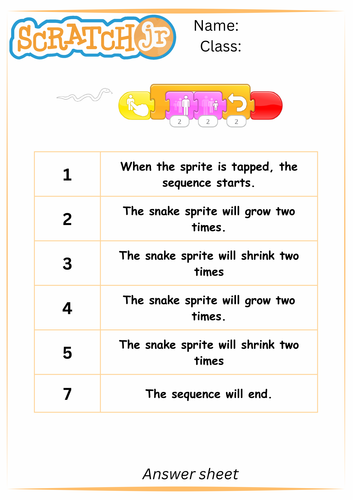
These differentiated ScratchJr sequencing activities help young learners move between visual block commands and simple pseudocode, developing a deeper understanding of how code works.
Children practise reading, writing, ordering and explaining commands while exploring how individual instructions combine to create an algorithm. Reordering commands into the correct sequence encourages logical thinking and helps children understand that the order of instructions matters.
What’s Included
Prepared as easy-to-use A4 activity sheets, the challenges include:
- Sequencing – put commands into the correct order.
- Pseudocode – write simple instructions to describe a ScratchJr sequence.
- Predicting – draw or describe what will happen when the code runs.
- Cloze activities – complete missing words or commands.
- Command descriptions – explain what individual ScratchJr blocks will do.
- Algorithm challenges – plan ScratchJr projects on paper before building them on a device.
Develop Decomposition & Problem Solving
Decomposition—breaking a larger task into smaller, manageable steps—is an important computational thinking skill. These activities make decomposition accessible and enjoyable for young learners while encouraging them to think carefully about how and why a program works.
Once a sequence has been planned on paper, students can build it in ScratchJr and test their predictions. Comparing what they expected with what actually happened creates valuable opportunities for reflection, debugging and discussion.
Teachers can use the activities to prompt questions such as:
- What will happen when this command runs?
- What would happen if we changed the order?
- Why did the character stop here?
- How could we change the algorithm to make it work?
- Can you explain your code step by step?
About ScratchJr
ScratchJr is a beginner-friendly programming language designed for young children, particularly ages 5–7. By connecting graphical programming blocks, children can create their own interactive stories, animations and games, making characters move, speak, dance and interact.
The ScratchJr Paint Editor also allows children to customise characters and backgrounds, while the programming blocks provide an accessible way to introduce core coding concepts.
ScratchJr is available free on iOS and Android, with a desktop version also available through the ScratchJr project.
These activities work particularly well alongside ScratchJr starter projects, giving children opportunities to plan → predict → code → test → explain as they develop their computational thinking skills.
Something went wrong, please try again later.
This resource hasn't been reviewed yet
To ensure quality for our reviews, only customers who have purchased this resource can review it
Report this resourceto let us know if it violates our terms and conditions.
Our customer service team will review your report and will be in touch.
£4.00