



Advert-Free Python Coding Without Installation or Student Accounts
Clean Python Editor is a simple, classroom-friendly Python 3 editor that runs directly in a web browser.
It is designed for teachers who want pupils to practise Python without installing additional software, creating online accounts or working around adverts and distracting website content.
The editor is supplied as a standalone HTML file. Open it in Chrome or Microsoft Edge and pupils can begin writing and running Python programs.
Key features
Runs genuine Python 3 code in the browser
Supports interactive input() statements
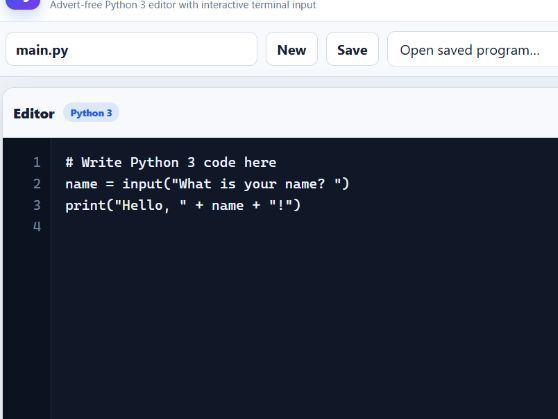
Clear code editor and output terminal
Automatically indents code after if, elif, else, for, while, functions and other statements ending with a colon
Automatically corrects the indentation of elif and else
Displays line numbers to help pupils identify errors
Programs can be run using the Run button or Ctrl + Enter
Programs can be saved inside the browser
Work can be downloaded as a standard .py Python file
Existing .py files can be imported and edited
Pupils can create, open and delete saved programs
Automatic draft recovery helps prevent lost work
Adjustable editor font size
Light and dark display modes
Python error messages are shown clearly in the output terminal
No adverts
No registration required
No student login required
Suitable for
Key Stage 3 Computing
GCSE Computer Science
Python programming clubs
Homework and independent practice
Schools where Python cannot easily be installed
Pupils who need a simple and uncluttered coding environment
How it works
Open the HTML file in Chrome or Microsoft Edge.
The Python engine loads inside the browser. Pupils can then write, run, save, import and download their Python programs.
Programs saved using the Save button remain on that particular browser and computer. Pupils should use the Download .py button when they need to submit their work, email it to a teacher or continue working on another computer.
The editor includes a simple starter program using input() and print(), so pupils can test the editor immediately.
Important technical information
An internet connection is required when the Python engine first loads.
Some school networks may block the external service used to load Python. If this happens, the school network administrator may need to allow access to the Pyodide content-delivery network.
The editor works best in an up-to-date version of Chrome or Microsoft Edge.
No software installation is required.
The HTML file can be shared through Microsoft Teams, OneDrive, SharePoint, Google Classroom, email or a school shared drive.
Something went wrong, please try again later.
This resource hasn't been reviewed yet
To ensure quality for our reviews, only customers who have purchased this resource can review it
Report this resourceto let us know if it violates our terms and conditions.
Our customer service team will review your report and will be in touch.
£1.99