



Year 9 Creative iMedia – Video Editing Resource Pack
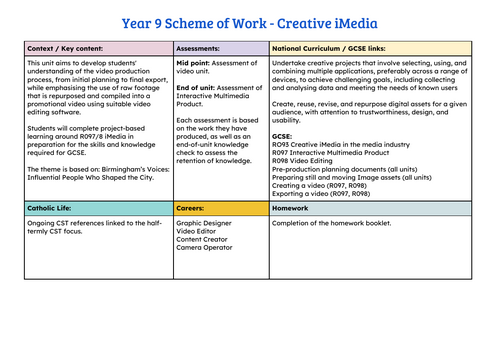
This comprehensive resource supports students in developing video editing skills using Canva, while preparing them for GCSE Creative iMedia units (R097/8). The scheme is themed around Birmingham’s Voices: Influential People Who Shaped the City, encouraging learners to combine research, creativity, and technical skills to produce a short promotional video. This can be edited to a city where your school is.
What Students Will Learn
- Research & Media Techniques – Explore influential figures from Birmingham and understand how camera shots and angles create meaning.
- Storyboarding & Planning – Learn how to structure a narrative and sequence clips effectively.
- Editing Skills – Practise trimming, timing, splitting, and adding transitions to refine video flow.
- Enhancement Tools – Use titles, captions, audio, and effects to strengthen storytelling and mood.
- Professional Standards – Apply final polish, export correctly, and evaluate work against criteria.
- Reflection & Feedback – Develop self-evaluation skills and give constructive peer feedback.
Included Resources
- 6 Lesson PowerPoints – Structured lessons with activities, demonstrations, and AfL strategies.
- 1 Student Work Booklet – Guided tasks, planning sheets, and space for research and reflection.
- 1 Google Form Assessment – End-of-unit knowledge check to assess retention and understanding.
- 1 Scheme of Work (SOW) – Detailed lesson breakdown with objectives, activities, and assessment points.
This pack provides everything needed to deliver a 6-lesson unit that blends creativity with technical skill, scaffolding students from research through to polished video production.
Something went wrong, please try again later.
This resource hasn't been reviewed yet
To ensure quality for our reviews, only customers who have purchased this resource can review it
Report this resourceto let us know if it violates our terms and conditions.
Our customer service team will review your report and will be in touch.
£5.00