


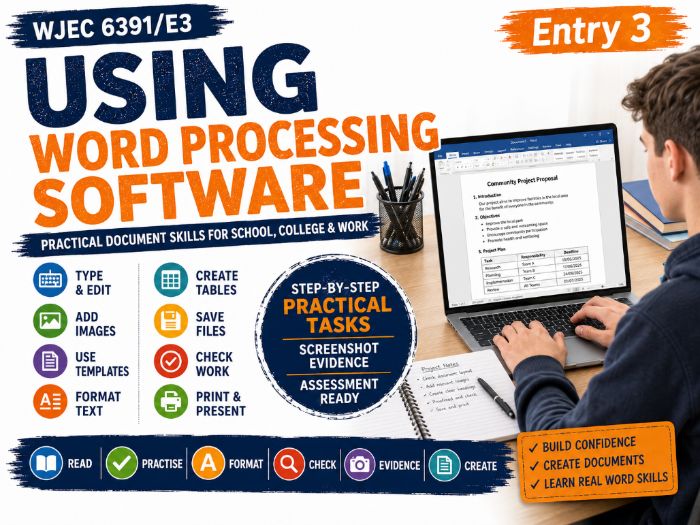
A complete 28 page workbook for the WJEC Entry Pathways Using Word Processing Software unit at Entry 3.
This practical resource is designed to help learners develop the basic word processing skills needed to create, edit, format, save and check straightforward documents.
The workbook covers all assessment criteria:
AC1.1 Identify what types of information are needed in documents
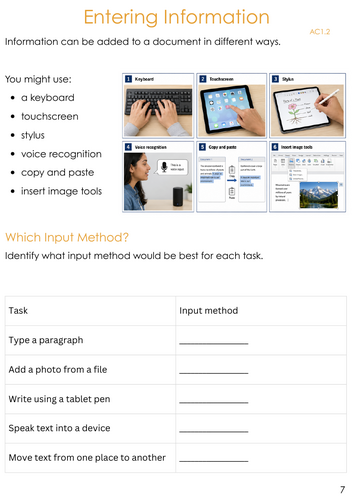
AC1.2 Use keyboard or other input method to enter or insert text and other information
AC1.3 Combine information of different types or from different sources in a document
AC1.4 Enter information into existing tables, forms and templates
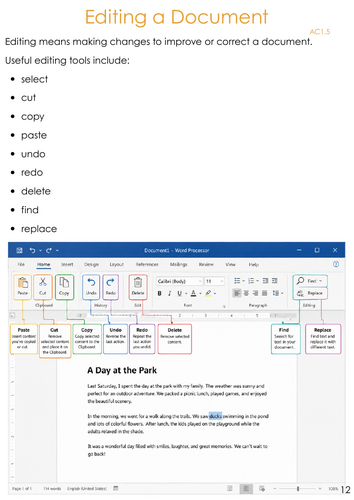
AC1.5 Use editing tools to amend document content
AC1.6 Store and retrieve document files effectively in line with local guidelines
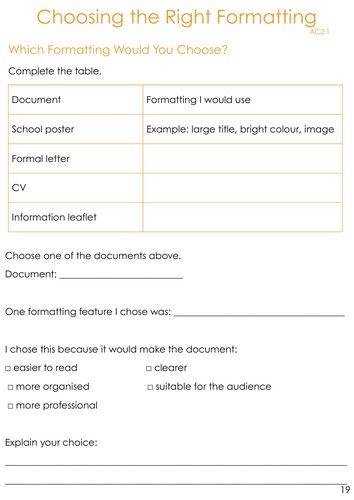
AC2.1 Identify what formatting to use to enhance presentation of the document
AC2.2 Create and modify tables to organise tabular or numeric information
AC2.3 Use appropriate techniques to format characters and paragraphs
AC2.4 Use appropriate page layout to present and print documents
AC2.5 Check documents meet needs using IT tools and making corrections as necessary
Learners complete a range of practical tasks including:
- identifying types of information,
- typing and entering information,
- adding images,
- using templates,
- creating and modifying tables,
- editing text,
- using cut copy and paste,
- saving files with suitable names,
- retrieving saved work,
- choosing suitable formatting,
- changing fonts and paragraph styles,
- changing page orientation and
- checking documents for errors.
The workbook includes clear visual examples and step by step guidance to support learners who need additional scaffolding when using Word or similar word processing software.
A final practical task brings the skills together by asking learners to create a one page information leaflet including a title, paragraphs, image, table, suitable formatting, paragraph alignment, page orientation and a suitable file name. Learners then check the document using tools such as spell check, grammar check and print preview.
The resource also includes opportunities for printed evidence, screenshots and an adult witness statement to support assessment and moderation.
Suitable for SEND, SEMH, Alternative Provision, PRUs, Specialist Schools, FE, Post 16, Entry Pathways, ICT, Digital Skills and Life Skills.
Clear language, visual prompts and manageable practical tasks are used throughout to make the Entry 3 criteria accessible to a wide range of learners.
This is an independently produced teaching resource designed to support delivery of the WJEC Entry Pathways specification. It is not produced, endorsed or approved by WJEC.
Get this resource as part of a bundle and save up to 51%
A bundle is a package of resources grouped together to teach a particular topic, or a series of lessons, in one place.
Bundle
WJEC Entry 3 MEGA Bundle | 22 Complete Workbooks | 50 Unit Credits | Multiple Qualification Routes
A comprehensive WJEC Entry 3 Entry Pathways MEGA Bundle containing 22 complete learner workbooks covering 50 combined unit credits across Personal & Social Development, Independent Living, Preparing for Work, Science Today, Humanities and ICT Users. Designed for SEND, SEMH, Alternative Provision, special schools and FE/post-16 settings, this collection gives centres a flexible bank of ready-to-teach Entry 3 resources that can be used to build different qualification pathways for different learners. Rather than purchasing individual units separately, centres can use the bundle to plan a substantial Entry Pathways curriculum and select the units most appropriate to each learner. 22 complete Entry 3 workbooks included **Personal Development, Independence & Community** * 6100/E3 Developing Self – 2 credits * 6102/E3 Environmental Awareness – 2 credits * 6103/E3 Healthy Living – 2 credits * 6104/E3 Individual Rights and Responsibilities – 1 credit * 6110/E3 Working as Part of a Group – 2 credits * 6111/E3 Working Towards Goals – 2 credits * 6113/E3 Using Technology in the Home & Community – 2 credits * 6123/E3 Choices and Decisions – 1 credit * 6124/E3 Myself Within the Community – 2 credits *6125/E3 Planning a Journey – 1 credit **Science Today** * 6203/E3 Science: Health and Safety – 3 credits * 6210/E3 Working with Electrical Circuits – 3 credits * 6211/E3 Energy in the Home and Workplace – 3 credits * 6234/E3 Climate Change: Causes, Effects and Human Responses – 3 credits **Humanities** * 6229/E3 People and Protest – 3 credits * 6230/E3 Threatened Ecosystems – 4 credits * 6237/E3 Places of Worship – 3 credits * 6238/E3 Religious Festivals and Celebrations – 3 credits **ICT Users** * 6384/E3 IT User Fundamentals – 2 credits * 6391/E3 Using Word Processing Software – 2 credits * 6393/E3 Presentation Software – 2 credits * 6401/E3 Using Email – 2 credits 50 combined unit credits The 22 included workbooks have a combined value of 50 unit credits. These are not one 50-credit qualification. Each unit can only contribute towards WJEC qualification areas for which it is eligible, and centres should select appropriate combinations for individual learners. Qualification routes supported Using the units included in this bundle, centres have enough eligible Entry 3 credit to build complete routes including: 1. Personal & Social Development Award 2. Personal & Social Development Certificate 3. Independent Living Award 4. Independent Living Certificate 5. Preparing for Work Award 6. Science Today Award 7. Science Today Certificate 8. Humanities Award 9. Humanities Certificate 10. ICT Users Award This makes the collection particularly useful for centres where different learners may be working towards different Entry Pathways qualifications while sharing parts of the same curriculum. Designed for SEND and Alternative Provision The resources are designed around accessible, practical learning rather than pages of dense written work. Depending on the unit, activities include: * accessible reading and comprehension * matching and sorting * structured written responses * research activities * practical investigations * community-based learning * group activities * decision-making and reflection * independent living tasks * practical ICT activities * screenshot and digital evidence * learner evaluation * photo and witness evidence opportunities where appropriate * Flexible curriculum planning The bundle can be used to: * deliver complete qualification routes * create individual programmes for different learners * combine units across an academic year * support mixed SEND/AP cohorts * build progression through practical life, work, humanities, science and ICT skills * reduce duplication by using units that are eligible across more than one qualification area A separate Entry 3 Qualification Mapping & Planning Guide is also being developed to make selecting and sequencing units straightforward. Resource information Level: WJEC Entry 3 Complete workbooks: 22 Combined unit credits: 50 Qualification areas represented: PSD, Independent Living, Preparing for Work, Science Today, Humanities and ICT Users Please note that TES limits bundles to 20 resource listings. Three closely related workbooks — Choices and Decisions, Myself Within the Community and Planning a Journey — are therefore supplied together within the Community & Independence Pack. The Mega Bundle still contains 22 complete individual workbooks. This is an independently created teaching resource and is not produced or endorsed by WJEC. Centres should always check the latest WJEC specification, unit eligibility, assessment guidance and current documentation before registration, delivery and qualification cash-in.
£90.00
Bundle
WJEC Entry 3 ICT Users Award | 6010/A3 | 8 Credits | 4 Complete Workbooks
A complete, ready-to-teach WJEC Entry 3 ICT Users Award programme, providing 8 eligible credits across 4 fully resourced workbooks. Designed for SEND, SEMH, Alternative Provision and FE learners, this bundle develops essential computer and digital skills through practical, accessible activities. Learners work with everyday ICT tools including email, word processing and presentation software while building confidence with basic computer use. Included workbooks * 6384/E3 IT User Fundamentals – 2 credits * 6391/E3 Using Word Processing Software – 2 credits * 6393/E3 Presentation Software – 2 credits * 6401/E3 Using Email – 2 credits Total: 8 credits Together, these units provide sufficient credit for the WJEC Entry 3 Award in ICT Users – 6010/A3. Skills covered Across the four units, learners develop practical ICT skills including: * using computer hardware and software appropriately * opening, saving and organising files * creating and editing word-processed documents * formatting and presenting information clearly * creating and editing presentations * using email safely and appropriately * sending, receiving and managing messages * completing practical ICT tasks independently * reviewing their work and providing evidence of achievement Designed for evidence collection from the recommendation of WJEC moderation feedback over the last few days as this is most center's weakness. The resources are structured to help learners produce clear assessment evidence throughout the programme, with opportunities for: * practical computer tasks * screenshots * saved digital files * written responses * learner evaluations * assessor or witness evidence where appropriate This makes the bundle particularly suitable for centres wanting an accessible evidence-ready route through the qualification. Ideal for SEND and SEMH settings, Alternative Provision, special schools, FE/post-16 provision, Entry Pathways programmes and learners who may be confident using phones or tablets but need structured teaching in essential computer skills. Qualification information Qualification: WJEC Entry 3 ICT Users Award Qualification family: 6010 Award cash-in: 6010/A3 Credits included: 8 Complete units: 4 This is an independently created teaching resource and is not produced or endorsed by WJEC. Centres should always check the latest WJEC specification, assessment guidance and current documentation before delivery and qualification cash-in.
£20.99
Something went wrong, please try again later.
This resource hasn't been reviewed yet
To ensure quality for our reviews, only customers who have purchased this resource can review it
Report this resourceto let us know if it violates our terms and conditions.
Our customer service team will review your report and will be in touch.
£7.50