

pptx, 1.35 MB
pptx, 1.35 MB
pptx, 1.41 MB
pptx, 1.41 MB

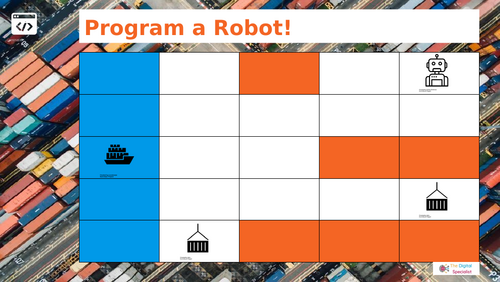
Unplugged Year 5 Computing carousel with 4 offline activities: robot mail delivery, digital tool detectives, game design ideas, and online safety for games.

This Year 5 Computing carousel builds on KS2 computing skills through four unplugged, hands-on activities that promote group discussion, problem-solving, and creative design. Perfect for the first computing lesson of the year, this resource reinforces coding, digital literacy, and online safety without relying on devices.

What’s included:

Station 1: Robot Mail Delivery – pupils code a “robot” across a grid to deliver parcels using arrow and loop cards, applying sequencing, repetition, and debugging.

Station 2: Digital Tool Detectives – pupils match tasks (presenting information, editing sound, creating a graph, designing an animation) to the most suitable digital tools, then explain their choices.

Station 3: Game Ideas (Paper Prototyping) – pupils generate and sketch creative game ideas, considering rules, events, player interaction, and objectives.

Station 4: Online Safety Features for Games – pupils discuss safety features such as age ratings, in-game purchases, chat filters, and reporting systems, then decide which they would include in their own designs.

Specification links:

Linked to the UK KS2 Computing curriculum (Year 5): programming with loops, selecting digital tools, designing digital content, and understanding online safety.

Suitable internationally for Grade 4–5 computer science, ICT, or digital citizenship lessons.

Why teachers love this resource:

Fully unplugged — no devices required.

Encourages partner talk, listening, and structured collaboration.

Designed with accessibility in mind — visuals and concise text reduce cognitive load, supporting EAL and SEND learners.

Low entry / high ceiling: simple starting points with clear extension opportunities.

Includes clear, student-friendly templates and activity sheets for independent group work.

Low-prep, print-and-go resource designed to save teacher time.

File type:

Editable PowerPoint (.pptx) and Google Slides version (station cards, arrow and loop coding cards, digital tools activity sheets, game prototyping templates, online safety feature checklists).

Keywords: Year 5 Computing, KS2 Computing, Unplugged Computing, Robot Mail Delivery Coding, Digital Tool Detectives, Game Design KS2, Online Safety for Games, Offline Computing Carousel, Debugging and Loops, Partner Talk Activities, Computing for EAL and SEND.

Get this resource as part of a bundle and save up to 67%

A bundle is a package of resources grouped together to teach a particular topic, or a series of lessons, in one place.

Bundle

Computing Unplugged CarouselsYears 1-6

Unplugged computing carousel bundle for Years 1-6. Teach algorithms, debugging, loops, data, digital literacy, creativity, and online safety without devices. This bundle contains unplugged computing carousel activities for Years 1 to 6. Each year group includes four device-free stations designed to introduce or revisit core computing concepts. The stations are intended for short rotations and guided discussion. Activities focus on clear instructions, error checking, choosing suitable digital tools, safe choices online, and creative design. The materials are suitable for the first lesson of the year, for classes with limited devices, or for reinforcement of foundational ideas. Layouts use straightforward visuals and concise text to support pupils who are learning English and pupils with special educational needs and disabilities. Print-and-go formats reduce setup time in class. What teachers need to know - Purpose: Provide structured, device-free activities that build understanding of algorithms, sequencing, loops, data representation, digital literacy, and online safety. - Structure: Four stations per year group. Pupils rotate in small groups. Each station targets a specific concept. - Pedagogy: Emphasises talk, turn-taking, and collaborative problem solving. Prompts support the use of correct vocabulary. - When to use: First computing lesson, cover lessons, enrichment days, or to consolidate key ideas alongside PSHE, maths, and art. Contents by year group - Year 1: Be the Robot. Technology Detectives. Classroom Robot Design. Staying Safe Online. - Year 2: Robot Treasure Hunt. Digital Tool Detectives. Robot Designer. Online Safety Advice. - Year 3: Robot Coding with loops. Data Handling with pictograms. Internet Safety scenarios. Flipbook Animation. - Year 4: Coding with Loops. Design a Game. Internet Safety Features. Digital Literacy tools. - Year 5: Robot Mail Delivery with loops. Digital Tool Detectives. Paper Game Prototyping. Online Safety for Games. - Year 6: Advanced Loop Coding. Digital Literacy tools. Creative Computing Planning. Internet Safety dilemmas. Formats - PDF station cards, activity sheets, and templates. - Editable PowerPoint and Google Slides versions available separately. Curriculum links - Aligned to UK KS1 and KS2 Computing: algorithms, sequencing, repetition, data, digital content, and online safety. - Suitable for international primary computing, ICT, and digital citizenship. Classroom use - No devices required. - Clear routines support expectations for discussion and movement between stations. - Low preparation. Flexible differentiation by prompt, extension question, or success criteria. - Cross-curricular links: PSHE (safe and responsible choices), maths (logic and data), art and design (planning and visual communication). Suggested routine - Prepare four station packs per year group. Print double-sided. Laminate for reuse if needed. - Model one example at the start. Clarify vocabulary: algorithm, sequence, debug, loop, data, tool choice, online safety. - Run 10 to 12 minute rotations with a visible timer. - Use a 5 minute plenary to collect examples, address misconceptions, and reinforce key terms. Keywords and search terms KS1 Computing, KS2 Computing, Primary Computing, Unplugged Computing, Offline Computing Carousel, Robot Coding, Sequencing, Debugging, Loops, Repetition, Data Handling, Pictograms, Digital Literacy, Internet Safety, Online Safety KS1, Online Safety KS2, Game Design, Creative Computing, Partner Talk, EAL, SEND, Low Prep, Print and Go.

£4.00

Reviews

Something went wrong, please try again later.

This resource hasn't been reviewed yet

To ensure quality for our reviews, only customers who have purchased this resource can review it

Report this resourceto let us know if it violates our terms and conditions.
Our customer service team will review your report and will be in touch.