


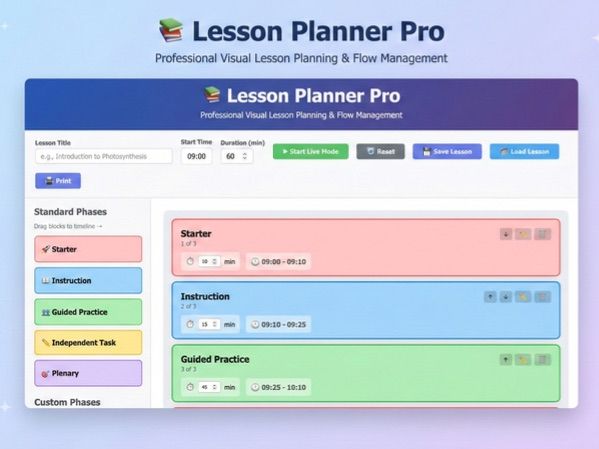

**Lesson Planner Pro is a high-fidelity, standalone planning tool that moves beyond static text-based lesson plans to treat the teaching hour as a dynamic “storyboard” or musical score. **
It is designed specifically to help educators manage the rhythm and pacing of a single lesson through a tactile, vertical interface.
Core Functionality: The Vertical Timeline Rail
-
Tactile Assembly: A central vertical rail serves as the lesson’s spine, allowing users to drag and drop color-coded “Phase Blocks” (Starter, Instruction, Guided Practice, Independent Task, and Plenary) from a sidebar library.
-
Scale-to-Duration Architecture: The timeline is visually proportional; for example, a 20-minute independent task physically occupies twice the vertical space of a 10-minute starter (using a 1 minute = 4 pixel scale).
-
Whimsical Physics: Blocks feature magnetic snapping and whimsical spring physics, causing lower blocks to “bounce” and slide down the rail when new elements are inserted or durations are extended.
-
Interactive “Live Mode” Navigation
-
The Real-Time Playhead: Once a lesson begins, a horizontal “Playhead” line slides down the timeline in real-time, providing an immediate visual indicator of current progress.
-
Dynamic Visual Cues: As the Playhead enters a block, that phase pulses with color; as it exits, the block turns “Achievement Green” to signify completion.
-
Wall-Clock Synchronization: The system automatically calculates and displays the exact transition times (e.g., 09:42 AM) for every phase based on the user-defined lesson start time.
-
Deep-Dive Planning Tools
-
Phase-Specific Detail Panels: Clicking any block opens a modal interface to manage teacher scripts, key questioning prompts, learning resources, and expected student output for that specific segment.
-
Curriculum Alignment: Users can cross-reference lesson segments against broader academic goals, ensuring the “How” of the lesson supports the “What” of the curriculum.
-
Enclosed, Portable Architecture: The entire application operates as a single, standalone HTML file that requires no installation, no internet connection, and no user accounts.
-
Local Secure Storage: All lesson data is stored locally within the user’s browser, ensuring privacy and instant accessibility during observations or live teaching.
-
Pro-Scale Printing: Generated storyboards are formatted to fit perfectly on A4 landscape sheets for department handovers or professional portfolios.
Something went wrong, please try again later.
This resource hasn't been reviewed yet
To ensure quality for our reviews, only customers who have purchased this resource can review it
Report this resourceto let us know if it violates our terms and conditions.
Our customer service team will review your report and will be in touch.
£2.29