Mental Health - Community + Support NetworksQuick View
EC_Resources

Mental Health - Community + Support Networks

(1)
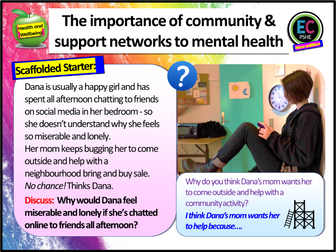
Community is the theme of Mental Health Week 2025 this year, so we’ve produced this secondary resource which shows how essential communities are to our mental wellbeing and how they can be used as support networks… The lesson heavily emphasises throughout how online communities do not have the same beneficial impact on our wellbeing as spending time with real life, off-line communities. There are two options of board templates to choose from. Students will complete a wide range of tasks, literacy-based, creative, analysis and clip tasks. Everything is editable and easy to just pick up and use. All information need is included. Includes sign-posting to further help provided from charities / hotlines. You can contact us at info@ecpublishing.co.uk Who are EC Resources? EC Resources are the top TES PSHE providers and are a group of teachers who work together to create easy to use, high quality and editable lessons and units of work. We have created lessons for The Children’s Commissioner, The Bank of England, The British Legion, MACS Charity, Tes, LikeToBe Careers, the Criminal Cases Review Commission (UK Gov) and have also completed PSHE and Citizenship commissions for schools across the UK. Please visit our Tes store https://www.tes.com/teaching-resources/shop/EC_Resources for everything PSHE, RSE, RE and Citizenship. We still offer a free lesson of your choice for each time you leave a review! Just email info@ecpublishing.co.uk Teaching PSHE, RE or Citizenship GCSE next year? Why not join our Citizenship and PSHE teachers Facebook group, with 12,000 other teachers, for guidance, advice and resource sharing.
Learning networks and communication skillsQuick View
AssocLearningTech

Learning networks and communication skills

(0)
The increase in student numbers in further and higher education over the last decade has been dramatic, placing greater pressures on academic staff in terms of contact hours. At the same time public funding of universities has decreased. Furthermore, the current pace of technological innovation and change and the fact that there are fewer jobs for life with clear pathways for progression mean that more of us need to be engaged in learning throughout our lives in order to remain competitive in the job-market. That is the reality of lifelong learning.
Networks WorksheetsQuick View
nwilkin

Networks Worksheets

(0)
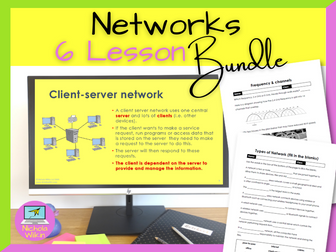
Here are 6 ready to use network worksheets you can immediately use with your class with absolutely no preparation necessary. They can be printed out or completed on-screen as they comprise of PDF files with editable areas for students to enter their answers. You can even assign these worksheets as learning tasks using a VLE for students working at home. You even have a separate copy of each handout that contains the answers, making these a brilliant easy to use addition to your teacher toolkit. HOW CAN I USE THEM? These worksheets are ideal for An easy grab-and-go classroom activity, homework tasks and cover worksheets. . These engaging worksheets are perfect for computer science teachers, non-specialists and new teachers. WHAT IS INCLUDED? The 6 PDF worksheets included: Advantages and Disadvantages of Networks – An easy worksheet where students are given a number of statements and need to decide if it is an advantage of disadvantage of using a computer network. A great starter worksheet when first introducing networks. LAN and WAN Fill in The Gaps – Students use a list of given words to complete the short text about Local Areas Networks and Wide Area Networks. A nice plenary activity to recap what they have learnt. Client Server and Peer-to-Peer Networks – A mid-level worksheet where pupils need to decide if the statement is about a client server network or a peer-to-peer network, or both.# Wire and Wireless Networks – Pupils need to do a bit of research and write about the benefits and risks of using ethernet copper cables, fiber optic cables, Bluetooth networks and wi-fi networks. Great as a homework task. Star and Mesh Topologies – Students identify a star and a mesh diagram from a drawing. They are also given several scenarios and have to decide if a star or a mesh topology would better fit the needs described. Finally students must write about the difference between a switch and a hub. Great as a homework task. Network Protocols – match the protocol layer to the description and then identify the protocols which are in a 4-layer TCP/IP protocol layer. A higher level worksheet that is great for assessing pupils understanding of a 4-lay TCP/IP protocol. Don’t forget the answers to each worksheet are included meaning you can use the answers yourself or give them to students for self-marking. These 6 worksheets will quickly become an essential tool in your teacher toolkit. They are a great way to break up the lesson, reinforce the learning and check your pupils’ understanding of networks. What are you waiting for? Buy them now and use them straight away to enhance your lessons whilst saving yourself hours of preparation.
Network Topologies LessonQuick View
nwilkin

Network Topologies Lesson

(2)
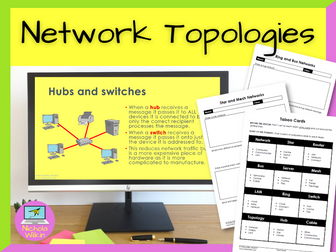
How can you teach your students about network topologies, in an engaging way? The key is to break up the theory into small manageable chunks and reinforce each section with a variety of activities. And that is exactly what this lesson does. Why spend hours making your own resources when it is all done for you? Download this lesson today and save yourself all that preparation. WHAT IS INCLUDED? Suitable for GCSE Computer Science pupils following either OCR GCSE Computer Science (J277) or AQA GCSE Computer Science (8520) syllabuses. This lesson includes: an attractive dyslexia friendly PowerPoint presentation, differentiated lesson objectives, 4 videos to change focus and break up the lesson, loads of individual and group tasks and questions, 2 printable ready to use worksheets for classwork, A set of taboo cards for the plenary 3 differentiated exam style questions which can be used either in the plenary or set for a homework task, a comprehensive 3-page teacher’s lesson plan including ALL THE ANSWERS. . WHAT DOES IT COVER? With virtually no preparation (apart from photocopying the worksheets and taboo cards) you will be ready to teach about your classes about: Ring network topology Bus network topology Star network topology Full mesh network topology Partial mesh network topology . **DURATION: **1 lesson Check out these other great resources by Nichola Wilkin (nwilkin): Network types Network hardware What is the internet?
Networks and learning: communities, practices 2Quick View
AssocLearningTech

Networks and learning: communities, practices 2

(0)
It is rare to have a dialogue with someone who has taken the time and trouble to consider what you have written for a journal. All too often reviewing is a one-way process with the reviewer remaining anonymous. It is all the more pleasant to have a response to what you have written that gets to grips with some of the issues that the author also finds troubling. It is in that spirit that I write this reaction to Ingraham; it is an opportunity for me to develop some of the points he has identified as problematic in the original article.
Networks and learning: communities, practices 3Quick View
AssocLearningTech

Networks and learning: communities, practices 3

(0)
This article argues that the use of the network metaphor can link together various different aspects of research into the use of advanced learning technologies based on computer networks. The idea of networked learning has become commonplace as an alternative to e-learning that stresses the interaction of learners, tutors and resources through networks. The arguments put in this article are firstly that learning technology needs to take account of the wider debate about networks and secondly that research in this field needs to address the theoretical and practical issues raised.
Networks and learning: communities, practices 1Quick View
AssocLearningTech

Networks and learning: communities, practices 1

(0)
In issue 12(1), Jones (2004) in his article ‘Networks and learning: communities, practices and the metaphor of networks’ sets out to address three inter-related sets of issues: … firstly that learning technology needs to take account of the wider debate about networks and secondly that research in this field needs to address the theoretical and practical issues raised by advances in the field of networks. A third point is that the idea of the network acts as a powerful metaphor even if we are able to discount any particular theory generated in its support.
Computing - NetworksQuick View
HistoryRocksCPH

Computing - Networks

(2)
An entire UNIT OF WORK for the new Computing curriculum, looking at: - what networks are, - how they are made, - how the Internet works, - data protection and encryption - and touching on E-Safety. Includes Medium and Short Term Planning, professional PowerPoint presentation for the whole unit, ALL worksheets and EXEMPLAR photographs for ease of understanding. Simple reference system - L1 means Lesson 1, L2 - Lesson 2 etc. ALL necessary worksheets for each lesson are highlighted on the Short Term Planning in Yellow in both the Resources column and when describing the activities. Most worksheets are editable to suit. This has been successfully delivered to Y3, but could it be used for most of KS2 if they have not yet looked at it. Please review and rate.
Fundamentals of Communication and Networking - AQA Computer Science A level 4.9 notesQuick View
Joedoon

Fundamentals of Communication and Networking - AQA Computer Science A level 4.9 notes

(0)
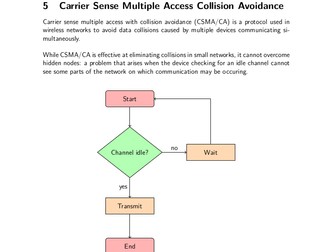
Comprehensive notes on all of communication and networking, for the AQA syllabus. Includes notes on: 4.9.1 Communication Communication Basics Serial and Parallel Data Transmission The Advantages of Serial over Parallel Synchronous and Asynchronous data transmission 4.9.2 Networking Network Topology Physical Network Topology Physical Star Network Topology Physical Bus Topology Logical Network Topology Mixing Topologies Types of Networking Between Hosts Client-Server Networking Peer-to-Peer Networking Wireless networking Wifi Carrier Sense Multiple Access Collision Avoidance 4.9.3 The Internet The Structure of the Internet Internet Service Providers Packet Switching and Routers The Primary Components of a Packet Routers and Gateways Uniform Resource Locators Domain Names Fully Qualified Domain Names IP Addresses The Domain Name Server (DNS) System Internet Security Firewalls Packet Filtering Stateful Inspection Proxy Server Symmetric & Asymmetric Encryption Digital Certificates & Digital Signatures Worms, Trojans & Viruses Preventing Malware 4.9.4 The Transmission Control Protocol & Internet Protocol (TCP/IP) TCP / IP Application Layer Transport Layer Network Layer Link Layer Socket Addresses Well-Known Ports The Structure of IP Addresses IP Address Standards IPv4 IPv6 Public and Private IP Addresses Dynamic Host Configuration Protocol (DHCP) Network Address Translation (NAT)
Digital Functional Skills - Module 3 - Communicating - Unit 3.2 - EmailingQuick View
Smartbooks

Digital Functional Skills - Module 3 - Communicating - Unit 3.2 - Emailing

(0)
These resources have been created for those delivering the Digital Functional Skills Qualification at Entry Level which replaces the current Functional Skills ICT Qualification from 31st of July 2023. The DFS qualification’s main purpose is to provide reliable evidence of a learner’s achievements against content that is relevant to the workplace and real life. These resources provide a structured assessment in workbook form to evidence learner’s knowledge and skills as well as their ability to apply these in different contexts and demonstrate that all learning outcomes have been met. The qualification itself is made up of many 5 main skill areas (Modules) each with its own series of units. The unit workbooks include various challenges, activities and tasks to prove learners understanding. Each page has a header that includes the individual outcomes covered and can be assessed easily and signed off. This resource covers: Module 3 - Communicating 3.2 - Compose and reply to online communications comprising text and other digital content to individual and multiple recipients. This resource includes: Tutorial 1 – Learners will follow the steps that show you how to compose and send an email to an individual and to multiple recipients. Tutorial 2 – They will Continue the tutorial on how to attach digital content such as images & videos. Tutorial 3 - Finally, they will; learn how to ‘reply to’ and 'forward on’ an email from an individual and group recipients. Scenario: Lunch Time Gaming Club Task 1- Email an Individual and a Group. Learners will be provided with a scenario where they will need to compose and send an email to their Tutor. They will then compose and send a ‘follow up’ email to a selection of their peers. Task 2 - Attaching Digital Content Learners will send another email to both their tutor and their peers; however, this time it will include an image and link related to the set scenario. Task 3 - Replying to an Email Finally, each student will receive an email from their tutor of which they will need to reply to with a suitable message. Independent Practice Task - Movie Recommendation Learners will demonstrate their ability to independently compose and reply to online communications by recommending a Movie or TV Show. Recap Quiz (Answers included) Also included in this resource is a Glossary for learners to fill out and Skills and Knowledge checklist to be completed before and after delivery of this unit. This resource is currently in a PDF file format. Word versions are available for free upon purchase of the PDF, please message me directly for these at SmartbooksEd@outlook.com. Feedback is Key and we value your positive comments and constructive criticism. Post a review and we will send you another singular resource of your choice for FREE! Just contact us at SmartbooksEd@outlook.com. Other Workbooks in this DFSQ series are available on TES. Many are still being created and will all be available soon.
Importance of Networking and LinkedInQuick View
Cre8tive_PSHE

Importance of Networking and LinkedIn

(0)
Importance of Networking and LinkedIn. Careers and Financial education Lesson designed by a L6 Qualified Careers Guidance Leader. Editable 18+ slide PowerPoint Lesson. Lesson includes: Lesson Assessment, Student Resources, Signposting to extra support services. Bonus Homework Activity and links to our videos and much more. Careers Learning Outcomes: To understand what networking is, both online and offline To consider why it is good to have a large network To think about how we can use our networks in our future careers Some Careers and finance linked Key Terms Covered Network, LinkedIn, Communication, Teamwork, Opportunities ✯✯✯✯✯✯✯✯✯✯✯✯✯✯✯ Each Careers Lesson Pack Contains: 1 Fully Editable PowerPoint (Learning Outcomes, Confidence Checkers, Assessment of Learning, Variety of Tasks, Video Embedded URL Clips, Engaging Premium Quality Slides, Extra Support careers Websites, Challenging & Thoughtful Questioning) Student Worksheet(s) are included with some lessons Homework Activity Assessment Opportunity (Confidence Checker) Teacher Notes (On some slides) Focus on literacy 1 Hours worth of activities - including timings for every activity ✯✯✯✯✯✯✯✯✯✯✯✯✯✯✯ Why not try out some of our other highly rated secondary careers units: ☞ Year 9 Gatsby Benchmark Careers in Context Unit ☞ Year 10 Gatsby Benchmark Careers in Context Unit ☞ Year 11 Gatsby Benchmark Careers in Context Unit ☞ Year 12 Gatsby Benchmark Finance & Careers in Context Unit ☞ Year 13 Gatsby Benchmark Finance & Careers in Context Unit
Network Topologies LessonQuick View
CrimsonWizard

Network Topologies Lesson

(0)
Discover the power of star and mesh network topologies! Teach how the arrangement of network devices allows for reliability and flexibility. This lesson discusses the structure of star and mesh network topologies, as well as their key features. Furthermore, some attention is given to the partial mesh topology. You can use this resource with minimal preparation - it is good to go! You can easily reuse and build upon our top-quality teaching material to fit your unique teaching style. The activities inside this resource have been specially created to allow students to develop their problem-solving and critical thinking skills.   █▀▀ █▀▀ ▄▀█ ▀█▀ █░█ █▀█ █▀▀ █▀ █▀░ ██▄ █▀█ ░█░ █▄█ █▀▄ ██▄ ▄█ Specially designed for the OCR GCSE curriculum (J277). No excessive content from other exam boards here! ➟ This resource contains: 21x Slide Presentation which consists of appealing visuals, discussion tasks, student activities, and more! and (un)funny jokes! Worksheet with answers to allow students to consolidate their knowledge or explore a different aspect of the topic. Exam-Styled Questions with a mark scheme to reinforce key concepts learned in the lesson, either for homework or during the lesson.   ➟ Other useful resources: Standards and Protocols - OCR GCSE Lesson Encryption - OCR GCSE Lesson Secondary Storage - OCR GCSE Lesson   █▀▀ █▀█ █ █▀▄▀█ █▀ █▀█ █▄░█ █▄▄ █▀▄ █ █░▀░█ ▄█ █▄█ █░▀█   █░█░█ █ ▀█ ▄▀█ █▀█ █▀▄ ▀▄▀▄▀ █ █▄ █▀█ █▀▄ █▄▀ We hope you enjoy using our resources just as much as we enjoyed creating them! :) ─────█─▄▀█──█▀▄─█───── ────▐▌──────────▐▌──── ────█▌▀▄──▄▄──▄▀▐█──── ───▐██──▀▀──▀▀──██▌─── ──▄████▄──▐▌──▄████▄──
networksQuick View
hoof_hearted

networks

(0)
This is half terms work on networks. It covers features, topologies, WANs, hardware, and security. There is also an assessment which can be used. All PowerPoints have learning objectives, and engaging tasks which can be tailored to suit your classes.
Computer Communications and Networks PPT and Worksheet - GCSE Computer ScienceQuick View
charlainerichards85

Computer Communications and Networks PPT and Worksheet - GCSE Computer Science

(0)
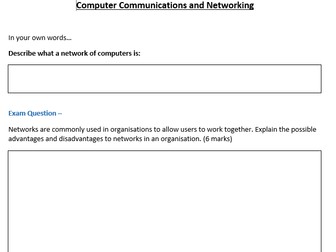
This resource covers the advantages and disadvantages of networks, the importance of networks, peer-to-peer, client servers, different types of servers and topologies (Ring, Star and Mesh). There is also a worksheet which allow students to use the PowerPoint as well as their own knowledge/research to complete. The worksheet also includes Exam Style Questions which are from GCSE Past Papers.
Computer Networks SOWQuick View
m_barker96

Computer Networks SOW

(1)
Lesson 1 - Networks Lesson 2 - Hardware Lesson 3 - Topologies Lesson 4 - The internet Lesson 5 - Peer to Peer and Client Server
Network Performance LessonQuick View
CrimsonWizard

Network Performance Lesson

(0)
Enhance your students’ understanding of network performance! Explore how bandwidth, latency, and the number of connected devices affect the speed and reliability of networks. This lesson discusses the different factors that affect the performance of networks. You can use this resource with minimal preparation - it is good to go! You can easily reuse and build upon our top-quality teaching material to fit your unique teaching style. The activities inside this resource have been specially created to allow students to develop their problem-solving and critical thinking skills.   █▀▀ █▀▀ ▄▀█ ▀█▀ █░█ █▀█ █▀▀ █▀ █▀░ ██▄ █▀█ ░█░ █▄█ █▀▄ ██▄ ▄█ Specially designed for the OCR GCSE curriculum (J277). No excessive content from other exam boards here! ➟ This resource contains: 24x Slide Presentation which consists of appealing visuals, discussion tasks, student activities, and more! and (un)funny jokes! Worksheet with answers to allow students to consolidate their knowledge or explore a different aspect of the topic. Exam-Styled Questions with a mark scheme to reinforce key concepts learned in the lesson, either for homework or during the lesson.   ➟ Other useful resources: Concept of Layers Computational Thinking - OCR GCSE Lesson Secondary Storage - OCR GCSE Lesson   █▀▀ █▀█ █ █▀▄▀█ █▀ █▀█ █▄░█ █▄▄ █▀▄ █ █░▀░█ ▄█ █▄█ █░▀█   █░█░█ █ ▀█ ▄▀█ █▀█ █▀▄ ▀▄▀▄▀ █ █▄ █▀█ █▀▄ █▄▀ We hope you enjoy using our resources just as much as we enjoyed creating them! :) ─────█─▄▀█──█▀▄─█───── ────▐▌──────────▐▌──── ────█▌▀▄──▄▄──▄▀▐█──── ───▐██──▀▀──▀▀──██▌─── ──▄████▄──▐▌──▄████▄──