


Students often struggle with selecting the correct file format in which to save the product they are creating for their coursework units. We do not want students missing these marks! You cannot tell students which file format to use as this is over-guiding.
After running the Creative iMedia course for the first year and some students selecting the wrong file formats, I realised I needed to create more scaffolded support when delivering the coursework units. Prior to starting the coursework in the second year, I decided to create this resource to improve outcomes.
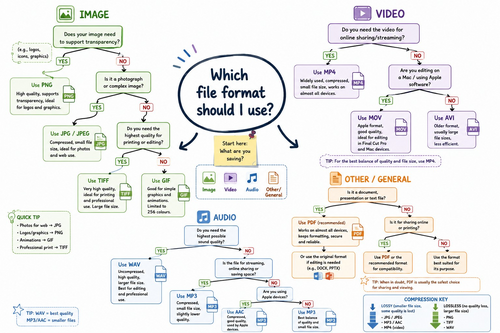
This time-saving resource will act as a coursework support to enable students to consider which is the most appropriate file format for the product they are creating for themselves. You could use this resource as a group during practice coursework tasks to get students used to using it. Promote oracy by asking students which would be the most appropriate file type for different scenarios (practice only tasks).
This resource includes:
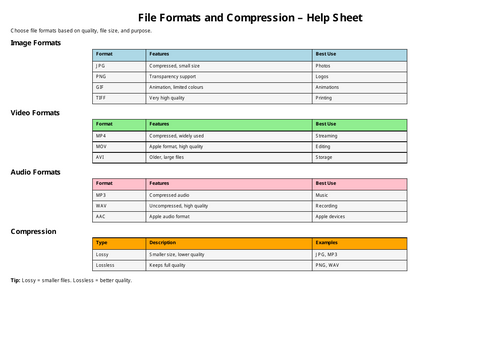
- A reference table including the types of file format that students may choose
- Yes/No questions that make students think about which file is the most appropriate depending on what the coursework task is asking them to do.
E.g. Tiff - most appropriate for a high-quality print products
PNG - most appropriate for a logo that requires a transparent background to be used on multiple applications.
This resource can also be used as a visual aid to support the teaching of R093 (examined unit).
Something went wrong, please try again later.
This resource hasn't been reviewed yet
To ensure quality for our reviews, only customers who have purchased this resource can review it
Report this resourceto let us know if it violates our terms and conditions.
Our customer service team will review your report and will be in touch.
£2.00