





















Part 1: HTML
Part 2: Assignment: Add a Contact Form Database to Your Website
Part 3: Create a Simple Login System for My Digital Portfolio
Part 4: Introduction to CSS: Improve the Design of Your HTML Website
Part 5: External CSS include Navigation Buttons
Part 6: CSS Animation with Real F1 Image and Video
Phase 7: Using Excel Spreadsheet (Beginner Level)
Phase 8: Transition to SQLite Database (Intermediate Level)
Phase 9: Application and Understanding (Progression)
Part 10: HTML login/register pages/ Flask/ Password rules /SQLite database
Part 11:Connecting a Flask Login System to a Racing Game Website
Part 12: JavaScript Interactivity: Make My Website Interactive
Part 13:STEM Data Dashboard: Build a Racing Data Dashboard
Part 14: Upload Website Online: Publish My Website to the Internet
*Include: *
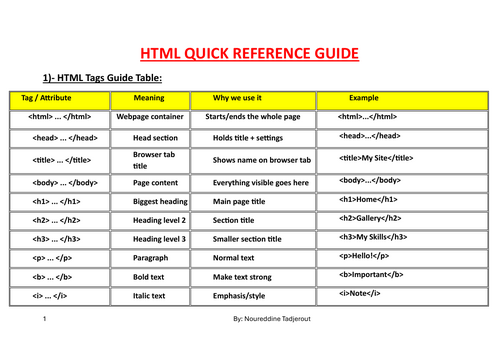
- HTML QUICK REFERENCE GUIDE
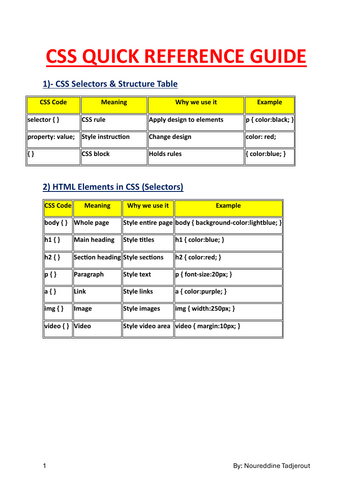
- CSS QUICK REFERENCE GUIDE
- JAVASCRIPT QUICK REFERENCE GUIDE
The project can be used as a teaching example, classroom exercise, or starting point for more advanced systems such as database-driven login applications. Please check all learning objectives of each part and practical steps activities on attached full lessons pdf
Something went wrong, please try again later.
This resource hasn't been reviewed yet
To ensure quality for our reviews, only customers who have downloaded this resource can review it
Report this resourceto let us know if it violates our terms and conditions.
Our customer service team will review your report and will be in touch.
£0.00