



Interactive Genially Lesson | Computer Science / Computing
Make learning about computer hardware engaging and interactive!
Inside Your Computer is an interactive digital learning resource designed for students aged 11–13. Created with Genially, this lesson introduces students to the essential components of a computer, how they work together and how different hardware devices are used.
Through interactive explanations, engaging activities and embedded videos, students explore what happens inside a computer and discover the technology behind the devices they use every day.
WHAT WILL STUDENTS LEARN?By the end of this unit, students should be able to:
- Identify the main components of a computer and explain their functions.
- Understand the difference between hardware and software.
- Recognise and distinguish between input and output devices.
- Describe the functions of basic computer components.
- Identify the characteristics and functions of different types of memory and storage devices.
- Understand how the different parts of a computer work together.
The resource is organised into seven sections:
1. How does a computer work?
An introduction to the basic operation of a computer system.
2. What is hardware?
Discover what hardware is and how it differs from software.
3. Inside the computer
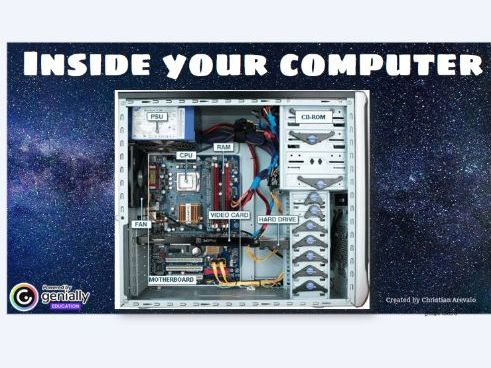
Explore the main internal components, including:
- Motherboard
- CPU (Central Processing Unit)
- RAM memory
- Hard drives and storage devices
- Graphics card
- Power supply and other components
4. Input and output peripherals
Learn to identify and distinguish between input and output devices, with practical examples.
5. How do we store information?
Discover different types of memory and storage devices and understand their main features and uses.
6. Activities: Practice and assessment
Interactive activities designed to reinforce understanding and check students’ learning throughout the unit.
7. What should you know by the end of the topic?
A review of the key knowledge and learning objectives.
- Interactive Genially presentation.
- Online access through a web browser.
- Embedded videos and interactive elements.
- Explanations and activities covering the main concepts of computer hardware.
- Computer Science and Computing teachers.
- Digital Technology teachers.
- Students aged 11–13.
- Lower Secondary / Key Stage 3.
- Teachers introducing computer hardware and basic computer architecture.
Please note: An internet connection and a web browser are required to access the Genially resource. This is an independent educational resource and is not affiliated with Genially.
Something went wrong, please try again later.
This resource hasn't been reviewed yet
To ensure quality for our reviews, only customers who have purchased this resource can review it
Report this resourceto let us know if it violates our terms and conditions.
Our customer service team will review your report and will be in touch.
£6.00